
 业务集成二开
# 业务集成二开
# 目录结构
业务功能目录结构如下:
# src/views/checkRule

├─index.ts                      // 打包入口文件
├─index.vue                     // 根组件
├─detail.vue                    // 详情组件(如果有)
├─package.json                  // 项目依赖包版本信息
├─pageConfig.js                 // 页面组件配置
├─_build                        // 构建配置目录
|   ├─tsconfig.json
|   ├─tsconfig.node.json
|   ├─typings.d.ts
|   └vite.config.ts
├─api                           // 接口目录
|  └index.js
2
3
4
5
6
7
8
9
10
11
12
13
14
业务功能目录在/src/views目录下,不建议在/src/views目录下创建目录嵌入业务功能。
_build为构建配置目录,下载_build.zip,解压到业务功能目录中。
# 说明
说明框架提供的模块作用,以及如何使用。 提供代码示例,展示如何在开发业务功能时,使用框架提供的方法为二开人员提供二开入口。
# hooks钩子
以npm包的方式提供业务功能包,本质上业务功能也是一个vue组件,因此使用props参数的方式接收外部属性,达到参数标准化的目的。
<script setup lang="ts">
import { modelProps } from "@imom/vue-2nd-kit";

const props = defineProps({
  ...modelProps,
  // ...其他属性
});

// ...其他代码
</script>
2
3
4
5
6
7
8
9
10
| 名称 | 类型 | 默认值 | 说明 |
|---|---|---|---|
| customSetup | ({ state, config }: CustomParamsType): CustomParamsType => ({ state, config }) | ({state, config}) => ({state, config}) | setup时期数据初始化 |
| customBeforeMount | async (_: CustomLifecycleParamsType): void => void 0 | (_) => void 0 | vue的beforeMount生命周期 |
| customMounted | async (_: CustomLifecycleParamsType): Promise<void> => void 0 | (_) => void 0 | vue的mounted生命周期 |
| customBeforeUnmount | async (_: CustomLifecycleParamsType): Promise<void> => void 0 | (_) => void 0 | vue的beforeUnmount生命周期 |
| customUnmounted | async (_: CustomLifecycleParamsType): Promise<void> => void 0 | (_) => void 0 | vue的unmounted生命周期 |
| beforeSearch | async (_: ObjType): Promise<ObjType> => _ | (_) => _ | 调用搜索前 |
| tableCellClick | async (_e: RowDataType): HookReturnDataType => void 0 | (_) => void 0 | 表格单元格点击事件 |
| tableClickAction | async (_rowData: RowDataType, _type: string): HookReturnDataType => void 0 | (_) => void 0 | 表格操作列点击事件 |
| beforeFetchList | async (_params: ObjType): HookReturnDataType => _params | (_) => _ | 调用查询列表数据前 |
| afterFetchList | async (_responseBody: ResponseBodyType): HookReturnDataType => _responseBody | (_) => _ | 调用查询列表后 |
| catchFechListError | async (_error: any): HookReturnDataType => void 0 | (_) => void 0 | 调用查询列表数据出现错误时 |
| setButtonGroupAttrs | ({ config, state: _state }: CustomParamsType): Reactive<ObjType> => config | ({ config, _state }) => config | 设置按钮组属性 |
| buttonGroupClick | async (_btnItem: ObjType, _: CustomParamsType): HookReturnDataType => void 0 | (_, __) => void 0 | 按钮组点击事件 |
| beforeFormSubmit | async (_: CustomParamsType) => void 0 | (_) => void 0 | 表单提交事件前 |
| customApi | (_type: string): HookReturnDataType | undefined => void 0 | (_) => void 0 | 自定义api接口 |
# customSetup
customSetup- setup时期数据初始化,用于预留给二开交付人员在页面setup时自定义变量、配置。- 入参
_state全局变量状态,vue3的reactive对象。config组件配置项,vue3的reactive对象。
- 返回
__.state修改后的全局变量状态_.config修改后的组件配置项
- 入参
<script setup>
import { modelProps, modelState, modelConfig } from "@imom/vue-2nd-kit";
import pageConfig from "./pageConfig";

const props = defineProps({
  ...modelProps
});

const defaultSetupValue = props.customSetup({
  state: {
    ...modelState()
  },
  config: {
    ...modelConfig,
    ...pageConfig
  }
});
</script>
2
3
4
5
6
7
8
9
10
11
12
13
14
15
16
17
18
# customBeforeMount
customBeforeMount-vue的beforeMount生命周期,用于预留给二开交付人员在beforeMount生命周期- 入参
__.state全局变量状态,vue3的reactive对象。_.config组件配置项,vue3的reactive对象。
- 返回(支持Promise)
- 入参
<script setup>
import { onBeforeMount, ref } from "vue";
import { modelProps, modelState, modelConfig, modelEmits } from "@imom/vue-2nd-kit";
import pageConfig from "./pageConfig";

const props = defineProps({
  ...modelProps
});
const emits = defineEmits([...modelEmits]);

const defaultSetupValue = props.customSetup({
  state: {
    ...modelState()
  },
  config: {
    ...modelConfig,
    ...pageConfig
  }
});
const tableRef = ref(null);
const formRef = ref(null);

const { $state, $config, $methods } = createPageContext({
  props,
  emits,
  ref: {
    tableRef,
    formRef
  },
  state: {
    ...defaultSetupValue.state
  },
  config: {
    ...defaultSetupValue.config
  },
  api
});

// ...

onBeforeMount(async () => {
  await props.customBeforeMount({ state: $state, config: $config, methods: $methods });
});
</script>
2
3
4
5
6
7
8
9
10
11
12
13
14
15
16
17
18
19
20
21
22
23
24
25
26
27
28
29
30
31
32
33
34
35
36
37
38
39
40
41
42
43
44
# customMounted
customMounted-vue的mounted生命周期- 入参
__.state全局变量状态,vue3的reactive对象。_.config组件配置项,vue3的reactive对象。
- 返回(支持Promise)
- 入参
<script setup>
import { onMounted, ref } from "vue";
import { modelProps, modelState, modelConfig, modelEmits } from "@imom/vue-2nd-kit";
import pageConfig from "./pageConfig";

const props = defineProps({
  ...modelProps
});
const emits = defineEmits([...modelEmits]);

const defaultSetupValue = props.customSetup({
  state: {
    ...modelState()
  },
  config: {
    ...modelConfig,
    ...pageConfig
  }
});
const tableRef = ref(null);
const formRef = ref(null);

const { $state, $config, $methods } = createPageContext({
  props,
  emits,
  ref: {
    tableRef,
    formRef
  },
  state: {
    ...defaultSetupValue.state
  },
  config: {
    ...defaultSetupValue.config
  },
  api
});

// ...

onMounted(async () => {
  await props.customMounted({ state: $state, config: $config, methods: $methods });
});
</script>
2
3
4
5
6
7
8
9
10
11
12
13
14
15
16
17
18
19
20
21
22
23
24
25
26
27
28
29
30
31
32
33
34
35
36
37
38
39
40
41
42
43
44
# customBeforeUnmount
customBeforeUnmount-vue的beforeUnmount生命周期- 入参
__.state全局变量状态,vue3的reactive对象。_.config组件配置项,vue3的reactive对象。
- 返回(支持Promise)
- 入参
<script setup>
import { onBeforeUnmount, ref } from "vue";
import { modelProps, modelState, modelConfig, modelEmits } from "@imom/vue-2nd-kit";
import pageConfig from "./pageConfig";

const props = defineProps({
  ...modelProps
});
const emits = defineEmits([...modelEmits]);

const defaultSetupValue = props.customSetup({
  state: {
    ...modelState()
  },
  config: {
    ...modelConfig,
    ...pageConfig
  }
});
const tableRef = ref(null);
const formRef = ref(null);

const { $state, $config, $methods } = createPageContext({
  props,
  emits,
  ref: {
    tableRef,
    formRef
  },
  state: {
    ...defaultSetupValue.state
  },
  config: {
    ...defaultSetupValue.config
  },
  api
});

// ...

onBeforeUnmount(async () => {
  await props.customBeforeUnmount({ state: $state, config: $config, methods: $methods });
});
</script>
2
3
4
5
6
7
8
9
10
11
12
13
14
15
16
17
18
19
20
21
22
23
24
25
26
27
28
29
30
31
32
33
34
35
36
37
38
39
40
41
42
43
44
# customUnmounted
customUnmounted-vue的unmounted生命周期- 入参
__.state全局变量状态,vue3的reactive对象。_.config组件配置项,vue3的reactive对象。
- 返回(支持Promise)
- 入参
<script setup>
import { onUnmounted, ref } from "vue";
import { modelProps, modelState, modelConfig, modelEmits } from "@imom/vue-2nd-kit";
import pageConfig from "./pageConfig";

const props = defineProps({
  ...modelProps
});
const emits = defineEmits([...modelEmits]);

const defaultSetupValue = props.customSetup({
  state: {
    ...modelState()
  },
  config: {
    ...modelConfig,
    ...pageConfig
  }
});
const tableRef = ref(null);
const formRef = ref(null);

const { $state, $config, $methods } = createPageContext({
  props,
  emits,
  ref: {
    tableRef,
    formRef
  },
  state: {
    ...defaultSetupValue.state
  },
  config: {
    ...defaultSetupValue.config
  },
  api
});

// ...

onUnmounted(async () => {
  await props.customUnmounted({ state: $state, config: $config, methods: $methods });
});
</script>
2
3
4
5
6
7
8
9
10
11
12
13
14
15
16
17
18
19
20
21
22
23
24
25
26
27
28
29
30
31
32
33
34
35
36
37
38
39
40
41
42
43
44
# beforeSearch
$methods.searchForm.handleSearch已内置封装beforeSearch,不使用默认$methods.searchForm.handleSearch搜索逻辑需自行调用。
beforeSearch-调用搜索前。- 入参
params查询参数。
- 返回(支持Promise)
params修改后的查询参数。
- 入参
已集成到$methods.searchForm.handleSearch。
<template>
  <div>
    <SieSearchForm
      v-model="$state.searchFormData"
      :form-item-list="$config.searchForm.formItemList"
      :loading="$state.loading"
      :attrs="$config.searchForm.attrs"
      @search="handleSearch"></SieSearchForm>
    <!-- ...其余代码 -->
  </div>
</template>

<script setup>
import { ref } from "vue";
import { modelProps, modelState, modelConfig, modelEmits } from "@imom/vue-2nd-kit";
import pageConfig from "./pageConfig";
import { SieSearchForm } from "@dme/snack-ui";

const props = defineProps({
  ...modelProps
});
const emits = defineEmits([...modelEmits]);

const defaultSetupValue = props.customSetup({
  state: {
    ...modelState()
  },
  config: {
    ...modelConfig,
    ...pageConfig
  }
});
const tableRef = ref(null);
const formRef = ref(null);

const { $state, $config, $methods } = createPageContext({
  props,
  emits,
  ref: {
    tableRef,
    formRef
  },
  state: {
    ...defaultSetupValue.state
  },
  config: {
    ...defaultSetupValue.config
  },
  api
});

// --------------------------------
/**
 * 点击查询表单的查询按钮事件
 */
const handleSearch = () => {
  // 使用默认逻辑加载数据
  $methods.searchForm.handleSearch($state.searchFormData);
};

/**
 * 点击查询表单的查询按钮事件
 */
const handleSearch = () => {
  // 不使用默认逻辑加载数据,预留钩子
  const isReturn = props.beforeSearch($state.searchFormData);
  if (isReturn === false) return;

  // ...搜索逻辑
};
// --------------------------------

// ...逻辑代码
</script>
2
3
4
5
6
7
8
9
10
11
12
13
14
15
16
17
18
19
20
21
22
23
24
25
26
27
28
29
30
31
32
33
34
35
36
37
38
39
40
41
42
43
44
45
46
47
48
49
50
51
52
53
54
55
56
57
58
59
60
61
62
63
64
65
66
67
68
69
70
71
72
73
74
# tableCellClick
$methods.table.cellClick已内置封装tableCellClick钩子,$methods.table.cellClick讲当前选中行e.row赋给$state.currentRow。
tableCellClick-表格单元格点击事件。- 入参
e点击单元格对象。
- 返回(支持Promise)
false可选,返回false不执行原点击事件逻辑。
- 入参
<template>
  <div>
    <SieTable
      ref="tableRef"
      v-model="$state.selectedData"
      :table-data="$state.tableData"
      :is-loading="$state.loading"
      :table-data-total="$state.tableDataTotal"
      :list-params="$state.tableParams"
      v-bind="$config.table"
      @cell-click="cellClick"
      @fetch-list="$methods.table.fetchList">
    </SieTable>
  </div>
</template>

<script setup>
import { ref } from "vue";
import { modelProps, modelState, modelConfig, modelEmits } from "@imom/vue-2nd-kit";
import pageConfig from "./pageConfig";
import { SieTable } from "@dme/snack-ui";

const props = defineProps({
  ...modelProps
});
const emits = defineEmits([...modelEmits]);

const defaultSetupValue = props.customSetup({
  state: {
    ...modelState()
  },
  config: {
    ...modelConfig,
    ...pageConfig
  }
});
const tableRef = ref(null);
const formRef = ref(null);

const { $state, $config, $methods } = createPageContext({
  props,
  emits,
  ref: {
    tableRef,
    formRef
  },
  state: {
    ...defaultSetupValue.state
  },
  config: {
    ...defaultSetupValue.config
  },
  api
});

// --------------------------------
/**
 * 单元格点击事件
 * @param {Object} row 当前点击行
 */
const cellClick = ({ row }) => {
  // 使用默认cellClick方法
  $methods.table.cellClick({ row });

  // ...逻辑处理
};

/**
 * 单元格点击事件
 * @param {Object} row 当前点击行
 */
const cellClick = ({ row }) => {
  // 不使用默认cellClick方法
  $state.currentRow = row;

  // ...逻辑处理
};
// --------------------------------

// ...其他逻辑处理
</script>
2
3
4
5
6
7
8
9
10
11
12
13
14
15
16
17
18
19
20
21
22
23
24
25
26
27
28
29
30
31
32
33
34
35
36
37
38
39
40
41
42
43
44
45
46
47
48
49
50
51
52
53
54
55
56
57
58
59
60
61
62
63
64
65
66
67
68
69
70
71
72
73
74
75
76
77
78
79
80
81
# tableClickAction
支持外部修改表格操作列点击事件逻辑,必要时可阻止原逻辑继续执行。
tableClickAction-表格操作列点击事件。- 入参
rowData行数据。type操作按钮类型。
- 返回(支持Promise)
false可选,返回false不执行原点击事件逻辑。
- 入参
<template>
  <div>
    <SieTable
      ref="tableRef"
      :table-data="$state.tableData"
      :is-loading="$state.loading"
      :table-data-total="$state.tableDataTotal"
      :list-params="$state.tableParams"
      v-bind="$config.table"
      @click-action="clickAction"
      @fetch-list="$methods.table.fetchList">
    </SieTable>
  </div>
</template>

<script setup>
import { ref } from "vue";
import { modelProps, modelState, modelConfig, modelEmits } from "@imom/vue-2nd-kit";
import pageConfig from "./pageConfig";
import { SieTable } from "@dme/snack-ui";

const props = defineProps({
  ...modelProps
});
const emits = defineEmits([...modelEmits]);

const defaultSetupValue = props.customSetup({
  state: {
    ...modelState()
  },
  config: {
    ...modelConfig,
    ...pageConfig
  }
});
const tableRef = ref(null);
const formRef = ref(null);

const { $state, $config, $methods } = createPageContext({
  props,
  emits,
  ref: {
    tableRef,
    formRef
  },
  state: {
    ...defaultSetupValue.state
  },
  config: {
    ...defaultSetupValue.config
  },
  api
});

// --------------------------------
/**
 * 操作栏按钮点击事件
 * @param {Object} rowData 当前点击行数据源
 * @param {string} type 操作类型
 */
const clickAction = async (rowData, type) => {
  // 预留操作列点击事件钩子
  const isContinue = await props.tableClickAction(rowData, type);
  if (isContinue === false) return;

  switch (type) {
    case "edit":
      $state.formData = { ...rowData };
      $state.isFormVisible = true;
      break;

    case "delete":
      // ...删除逻辑
      break;

    default:
      break;
  }
};
// --------------------------------
</script>
2
3
4
5
6
7
8
9
10
11
12
13
14
15
16
17
18
19
20
21
22
23
24
25
26
27
28
29
30
31
32
33
34
35
36
37
38
39
40
41
42
43
44
45
46
47
48
49
50
51
52
53
54
55
56
57
58
59
60
61
62
63
64
65
66
67
68
69
70
71
72
73
74
75
76
77
78
79
80
81
# beforeFetchList
$methods.table.fetchList已内置封装beforeFetchList。执行顺序如下:
[处理parentParams] -> beforeCallback -> beforeFetchList -> $methods.table.fetchList
beforeFetchList-调用查询列表数据前。- 入参
extraParams查询参数。
- 返回(支持Promise)
extraParams修改后的查询参数。
- 入参
<template>
  <div>
    <SieTable
      ref="tableRef"
      :table-data="$state.tableData"
      :is-loading="$state.loading"
      :table-data-total="$state.tableDataTotal"
      :list-params="$state.tableParams"
      v-bind="$config.table"
      @fetch-list="loadTable">
    </SieTable>
  </div>
</template>

<script setup>
import { ref } from "vue";
import { modelProps, modelState, modelConfig, modelEmits } from "@imom/vue-2nd-kit";
import pageConfig from "./pageConfig";
import { SieTable, catchError } from "@dme/snack-ui";

const props = defineProps({
  ...modelProps
});
const emits = defineEmits([...modelEmits]);

const defaultSetupValue = props.customSetup({
  state: {
    ...modelState()
  },
  config: {
    ...modelConfig,
    ...pageConfig
  }
});
const tableRef = ref(null);
const formRef = ref(null);

const { $state, $config, $methods } = createPageContext({
  props,
  emits,
  ref: {
    tableRef,
    formRef
  },
  state: {
    ...defaultSetupValue.state
  },
  config: {
    ...defaultSetupValue.config
  },
  api
});

// --------------------------------
/**
 * 使用默认数据查询
 * @param {Object} extraParams 拓展查询参数
 */
const loadTable = async (extraParams = {}) => {
  try {
    // 使用默认表格查询方法,返回接口传回body内容(try正常执行完毕)和错误的Error值(catch执行)
    const { result, error } = await $methods.table.fetchList(extraParams, {
      // 【可选】父组件传过来的查询参数
      parentParams: [
        // {
        //   field: "", // 查询字段
        //   value: "", // 查询值
        //   required: true // 是否必填
        // }
      ],
      // 【可选】请求前的回调,一般是标品有特殊处理用,返回方法处理后、二开处理前参数
      beforeCallback: (_) => _,
      // 【可选】请求后的回调,一般标品有特殊处理用,返回方法处理后、二开处理前的响应数据
      afterCallback: (res) => {
        if (res.code === 0) {
          // ...业务成功逻辑
        } else {
          // ...业务错误逻辑
        }
        return res;
      },
      // 【可选】请求错误的回调,一般标品有特殊处理用,返回是否继续执行catch错误逻辑,返回false不执行默认错误逻辑(提示错误)
      catchErrorCallback: () => {
        // ...接口或逻辑错误处理
      }
    });
  } catch (err) {
    catchError(err);
    // 隐藏加载动画
    $state.loading = false;
  }
};

/**
 * 不使用默认数据查询方法
 */
const loadTable = async (extraParams = {}) => {
  if ($state.loading) return;

  try {
    let params = {
      ...$state.tableParams,
      ...$state.searchFormData,
      ...extraParams
    }
    // 二开扩展处理请求前参数
    params = await e.props.beforeFetchList(params);
    // 处理获取api
    const $api = e.props.customApi("table.page") || e.api.page;
    // 请求
    let res = await $api(params);
    // 二开扩展处理请求后数据
    res = await e.props.afterFetchList(res);
    if (res?.code === 0) {
      $state.tableData = res?.data?.records || [];
      $state.tableDataTotal = res?.data?.total || 0;
      $state.tableParams.current = res?.data?.current || 1;
      $state.tableParams.size = res?.data?.size || 10;

      // 清空选中数据
      $state.currentRow = null;
      $state.selectedData = [];
    }
  } catch (err) {
    let isErr;
    // 二开扩展处理错误
    isErr = await e.props.catchFechListError(err);
    if (isErr !== false) {
      catchError(err);
    }
  }
}
// --------------------------------

// ...业务逻辑
</script>
2
3
4
5
6
7
8
9
10
11
12
13
14
15
16
17
18
19
20
21
22
23
24
25
26
27
28
29
30
31
32
33
34
35
36
37
38
39
40
41
42
43
44
45
46
47
48
49
50
51
52
53
54
55
56
57
58
59
60
61
62
63
64
65
66
67
68
69
70
71
72
73
74
75
76
77
78
79
80
81
82
83
84
85
86
87
88
89
90
91
92
93
94
95
96
97
98
99
100
101
102
103
104
105
106
107
108
109
110
111
112
113
114
115
116
117
118
119
120
121
122
123
124
125
126
127
128
129
130
131
132
133
134
135
136
# afterFetchList
$methods.table.fetchList已内置封装afterFetchList。执行顺序如下:
$methods.table.fetchList -> afterCallback -> afterFetchList
不使用默认$methods.table.fetchList方法,自行绑定afterFetchList钩子参考beforeFetchList部分。
afterFetchList-调用查询列表后。- 入参
res接口返回结果。
- 返回(支持Promise)
res修改后的接口返回结果。
- 入参
<template>
  <div>
    <SieTable
      ref="tableRef"
      :table-data="$state.tableData"
      :is-loading="$state.loading"
      :table-data-total="$state.tableDataTotal"
      :list-params="$state.tableParams"
      v-bind="$config.table"
      @fetch-list="loadTable">
    </SieTable>
  </div>
</template>

<script setup>
import { ref } from "vue";
import { modelProps, modelState, modelConfig, modelEmits } from "@imom/vue-2nd-kit";
import pageConfig from "./pageConfig";
import { SieTable, catchError } from "@dme/snack-ui";

const props = defineProps({
  ...modelProps
});
const emits = defineEmits([...modelEmits]);

const defaultSetupValue = props.customSetup({
  state: {
    ...modelState()
  },
  config: {
    ...modelConfig,
    ...pageConfig
  }
});
const tableRef = ref(null);
const formRef = ref(null);

const { $state, $config, $methods } = createPageContext({
  props,
  emits,
  ref: {
    tableRef,
    formRef
  },
  state: {
    ...defaultSetupValue.state
  },
  config: {
    ...defaultSetupValue.config
  },
  api
});

/**
 * 数据查询
 * @param {Object} extraParams 拓展查询参数
 */
const loadTable = async (extraParams = {}) => {
  try {
    await $methods.table.fetchList(extraParams, {
      // 【可选】父组件传过来的查询参数
      parentParams: [
        // {
        //   field: "", // 查询字段
        //   value: "", // 查询值
        //   required: true // 是否必填
        // }
      ],
      // 【可选】请求前的回调,一般是标品有特殊处理用,返回方法处理后、二开处理前参数
      beforeCallback: (_) => _,
      // 【可选】请求后的回调,一般标品有特殊处理用,返回方法处理后、二开处理前的响应数据
      afterCallback: (res) => {
        // ...业务逻辑
        return res;
      },
      // 【可选】请求错误的回调,一般标品有特殊处理用,返回是否继续执行catch错误逻辑,返回false不执行默认错误逻辑(提示错误)
      catchErrorCallback: () => {}
    });
  } catch (err) {
    catchError(err);
    // 隐藏加载动画
    $state.loading = false;
  }
};

// ...业务逻辑
</script>
2
3
4
5
6
7
8
9
10
11
12
13
14
15
16
17
18
19
20
21
22
23
24
25
26
27
28
29
30
31
32
33
34
35
36
37
38
39
40
41
42
43
44
45
46
47
48
49
50
51
52
53
54
55
56
57
58
59
60
61
62
63
64
65
66
67
68
69
70
71
72
73
74
75
76
77
78
79
80
81
82
83
84
85
86
87
# catchFechListError
$methods.table.fetchList已内置封装``catchFechListError。执行顺序如下:
catchErrorCallback -> catchFechListError
不使用默认$methods.table.fetchList方法,自行绑定afterFetchList钩子参考beforeFetchList部分。
catchFechListError-调用查询列表数据出现错误时。- 入参
error接口返回结果。
- 返回(支持Promise)
false可选,返回false不执行错误逻辑提示及相关错误逻辑。
- 入参
<template>
  <div>
    <SieTable
      ref="tableRef"
      :table-data="$state.tableData"
      :is-loading="$state.loading"
      :table-data-total="$state.tableDataTotal"
      :list-params="$state.tableParams"
      v-bind="$config.table"
      @fetch-list="loadTable">
    </SieTable>
  </div>
</template>

<script setup>
import { ref } from "vue";
import { modelProps, modelState, modelConfig, modelEmits } from "@imom/vue-2nd-kit";
import pageConfig from "./pageConfig";
import { SieTable, catchError } from "@dme/snack-ui";

const props = defineProps({
  ...modelProps
});
const emits = defineEmits([...modelEmits]);

const defaultSetupValue = props.customSetup({
  state: {
    ...modelState()
  },
  config: {
    ...modelConfig,
    ...pageConfig
  }
});
const tableRef = ref(null);
const formRef = ref(null);

const { $state, $config, $methods } = createPageContext({
  props,
  emits,
  ref: {
    tableRef,
    formRef
  },
  state: {
    ...defaultSetupValue.state
  },
  config: {
    ...defaultSetupValue.config
  },
  api
});

/**
 * 数据查询
 * @param {Object} extraParams 拓展查询参数
 */
const loadTable = async (extraParams = {}) => {
  try {
    await $methods.table.fetchList(extraParams, {
      // 【可选】父组件传过来的查询参数
      parentParams: [
        // {
        //   field: "", // 查询字段
        //   value: "", // 查询值
        //   required: true // 是否必填
        // }
      ],
      // 【可选】请求前的回调,一般是标品有特殊处理用,返回方法处理后、二开处理前参数
      beforeCallback: (_) => _,
      // 【可选】请求后的回调,一般标品有特殊处理用,返回方法处理后、二开处理前的响应数据
      afterCallback: (res) => {
        // ...业务逻辑
        return res;
      },
      // 【可选】请求错误的回调,一般标品有特殊处理用,返回是否继续执行catch错误逻辑,返回false不执行默认错误逻辑(提示错误)
      catchErrorCallback: () => {}
    });
  } catch (err) {
    catchError(err);
    // 隐藏加载动画
    $state.loading = false;
  }
};

// ...业务逻辑
</script>
2
3
4
5
6
7
8
9
10
11
12
13
14
15
16
17
18
19
20
21
22
23
24
25
26
27
28
29
30
31
32
33
34
35
36
37
38
39
40
41
42
43
44
45
46
47
48
49
50
51
52
53
54
55
56
57
58
59
60
61
62
63
64
65
66
67
68
69
70
71
72
73
74
75
76
77
78
79
80
81
82
83
84
85
86
87
# setButtonGroupAttrs
按钮组配置会根据表格数据勾选项而动态改变按钮的disabled属性,因此按钮组配置一般为computed计算属性。因此setButtonGroupAttrs需在钩子中运行。
setButtonGroupAttrs-设置按钮组属性。- 入参
ee.state全局变量状态,vue3的reactive对象。e.config组件的配置对象。
- 返回
config组件的配置对象。
- 入参
<template>
  <div>
    <SieButtonGroup v-bind="buttonGroupAttrs"></SieButtonGroup>
  </div>
</template>

<script setup>
import { computed, ref } from "vue";
import { modelProps, modelState, modelConfig, modelEmits } from "@imom/vue-2nd-kit";
import pageConfig from "./pageConfig";
import { SieButtonGroup, catchError } from "@dme/snack-ui";

const props = defineProps({
  ...modelProps
});
const emits = defineEmits([...modelEmits]);

const defaultSetupValue = props.customSetup({
  state: {
    ...modelState()
  },
  config: {
    ...modelConfig,
    ...pageConfig
  }
});
const tableRef = ref(null);
const formRef = ref(null);

const { $state, $config, $methods } = createPageContext({
  props,
  emits,
  ref: {
    tableRef,
    formRef
  },
  state: {
    ...defaultSetupValue.state
  },
  config: {
    ...defaultSetupValue.config
  },
  api
});

const buttonGroupAttrs = computed(() => {
  // 按钮组配置钩子,外部可处理并返回config配置
  return props.setButtonGroupAttrs({
    config: {
      limitNum: 8,
      buttonList: [
        {
          text: "新增",
          type: "primary",
          key: "add"
        },
        {
          text: "启用",
          type: "default",
          key: "useBatch",
          disabled: $state.selectedData.length === 0
        },
        {
          text: "禁用",
          type: "default",
          key: "disableBatch",
          disabled: $state.selectedData.length === 0
        },
        {
          text: "批量删除",
          type: "default",
          key: "deleteBatch",
          disabled: $state.selectedData.length === 0
        }
      ]
    },
    state: $state
  });
});

// ...其他代码
</script>
2
3
4
5
6
7
8
9
10
11
12
13
14
15
16
17
18
19
20
21
22
23
24
25
26
27
28
29
30
31
32
33
34
35
36
37
38
39
40
41
42
43
44
45
46
47
48
49
50
51
52
53
54
55
56
57
58
59
60
61
62
63
64
65
66
67
68
69
70
71
72
73
74
75
76
77
78
79
80
81
82
# buttonGroupClick
自定义按钮事件时可使用,可选择阻止原逻辑执行
buttonGroupClick-按钮组点击事件。- 入参
btnItem按钮对象。__.state全局变量状态,vue3的reactive对象。_.config组件的配置对象。
- 返回(支持Promise)
false可选,返回false不执行。
- 入参
<template>
  <div>
    <SieButtonGroup v-bind="buttonGroupAttrs" @click="buttonGroupClick"></SieButtonGroup>
  </div>
</template>

<script setup>
import { computed, ref } from "vue";
import { modelProps, modelState, modelConfig, modelEmits } from "@imom/vue-2nd-kit";
import pageConfig from "./pageConfig";
import { SieButtonGroup, catchError } from "@dme/snack-ui";

const props = defineProps({
  ...modelProps
});
const emits = defineEmits([...modelEmits]);

const defaultSetupValue = props.customSetup({
  state: {
    ...modelState()
  },
  config: {
    ...modelConfig,
    ...pageConfig
  }
});
const tableRef = ref(null);
const formRef = ref(null);

const { $state, $config, $methods } = createPageContext({
  props,
  emits,
  ref: {
    tableRef,
    formRef
  },
  state: {
    ...defaultSetupValue.state
  },
  config: {
    ...defaultSetupValue.config
  },
  api
});

const buttonGroupAttrs = computed(() => {
  return props.setButtonGroupAttrs({
    config: {
      limitNum: 8,
      buttonList: [
        {
          text: "新增",
          type: "primary",
          key: "add"
        },
        {
          text: "启用",
          type: "default",
          key: "useBatch",
          disabled: $state.selectedData.length === 0
        },
        {
          text: "禁用",
          type: "default",
          key: "disableBatch",
          disabled: $state.selectedData.length === 0
        },
        {
          text: "批量删除",
          type: "default",
          key: "deleteBatch",
          disabled: $state.selectedData.length === 0
        }
      ]
    },
    state: $state
  });
});

/**
 * 按钮组点击事件
 */
const buttonGroupClick = async (btnItem) => {
  // 外部阻止按钮组点击事件钩子
  const isContinue = await props.buttonGroupClick(btnItem, { state: $state, config: $config });
  if (isContinue === false) return;

  // ...默认按钮逻辑
}

// ...其他代码
</script>
2
3
4
5
6
7
8
9
10
11
12
13
14
15
16
17
18
19
20
21
22
23
24
25
26
27
28
29
30
31
32
33
34
35
36
37
38
39
40
41
42
43
44
45
46
47
48
49
50
51
52
53
54
55
56
57
58
59
60
61
62
63
64
65
66
67
68
69
70
71
72
73
74
75
76
77
78
79
80
81
82
83
84
85
86
87
88
89
90
91
92
# beforeFormSubmit
beforeFormSubmit-表单提交事件前。- 入参
__.state全局变量状态,vue3的reactive对象。_.config全局配置项,vue3的reactive对象。
- 返回(支持Promise)
false可选,返回false不执行提交逻辑。
- 入参
<template>
  <div>
    <SieDrawer v-model="$state.isFormVisible" :title="formTitle" @confirm="handleConfirm" @cancel="handleCancel">
      <SieForm ref="formRef" v-model="$state.formData" v-bind="$config.form"></SieForm>
    </SieDrawer>
  </div>
</template>

<script setup>
import { computed, ref } from "vue";
import { modelProps, modelState, modelConfig, modelEmits } from "@imom/vue-2nd-kit";
import pageConfig from "./pageConfig";
import { SieDrawer, SieForm, catchError } from "@dme/snack-ui";

const props = defineProps({
  ...modelProps
});
const emits = defineEmits([...modelEmits]);

const defaultSetupValue = props.customSetup({
  state: {
    ...modelState()
  },
  config: {
    ...modelConfig,
    ...pageConfig
  }
});
const tableRef = ref(null);
const formRef = ref(null);

const { $state, $config, $methods } = createPageContext({
  props,
  emits,
  ref: {
    tableRef,
    formRef
  },
  state: {
    ...defaultSetupValue.state
  },
  config: {
    ...defaultSetupValue.config
  },
  api
});

const formTitle = computed(() => {
  return $state.formData?.id ? "编辑" : "新增";
});

/**
 * 表单,点击【确认】按钮
 */
const handleConfirm = async () => {
  // 表单提交前的钩子,可阻止表单默认提交事件
  const isContinue = await props.beforeFormSubmit({ state: $state, config: $config });
  if (isContinue === false) return;

  submit();
};

async function submit() {
  // ...业务代码
}

async function handleCancel() {
  // ...业务代码
}

// ...其他代码
</script>
2
3
4
5
6
7
8
9
10
11
12
13
14
15
16
17
18
19
20
21
22
23
24
25
26
27
28
29
30
31
32
33
34
35
36
37
38
39
40
41
42
43
44
45
46
47
48
49
50
51
52
53
54
55
56
57
58
59
60
61
62
63
64
65
66
67
68
69
70
71
72
# customApi
替换默认的api接口。
customApi-自定义api接口。- 入参
typeapi类型,用于业务开发人员告知二开交付人员当前使用的api类型。(暂定)参数值:表格数据查询接口page、table.page,表格新增接口form.create,表格编辑接口form.update。其余api类型可由业务开发人员自行定义。
- 返回
- Promise请求,并非固定有返回值。对于业务开发人员来说,可能会无返回值,需要用默认api接口做兜底处理。
- 入参
<script setup>
import { ref } from "vue";
import { modelProps, modelState, modelConfig, modelEmits } from "@imom/vue-2nd-kit";
import pageConfig from "./pageConfig";
import { $notify, catchError } from "@dme/snack-ui";
import { api } from "./api/index";

const props = defineProps({
  ...modelProps
});
const emits = defineEmits([...modelEmits]);

const defaultSetupValue = props.customSetup({
  state: {
    ...modelState()
  },
  config: {
    ...modelConfig,
    ...pageConfig
  }
});
const tableRef = ref(null);
const formRef = ref(null);

const { $state, $config, $methods } = createPageContext({
  props,
  emits,
  ref: {
    tableRef,
    formRef
  },
  state: {
    ...defaultSetupValue.state
  },
  config: {
    ...defaultSetupValue.config
  },
  api
});

/**
 * 二、(50)表单,提交
 */
const submit = async () => {
  // 显示加载动画
  $state.loading = true;

  let isSuccess = false;
  const data = $state.formData;
  let valid;
  try {
    valid = await formRef.value.validate();
  } catch (err) {
    valid = err;
  }

  if (valid) {
    try {
      // 接口配置
      const cusApiConfig = [
        // 使用props.customApi作为外部修改接口的钩子
        { api: props.customApi("form.create") || api.create, msg: "添加成功" },
        { api: props.customApi("form.update") || api.update, msg: "更新成功" }
      ][data.id ? 1 : 0];

      const res = await cusApiConfig.api(data);
      if (res?.code === 0) {
        $notify.success(cusApiConfig.msg);
        $state.isFormVisible = false; // 操作成功后,关闭表单
        isSuccess = true;
      }
    } catch (err) {
      catchError(err);
    }

  }
  // 隐藏加载动画
  $state.loading = false;

  if (isSuccess) {
    // ...逻辑处理
  }
};

// ...其他代码
</script>
2
3
4
5
6
7
8
9
10
11
12
13
14
15
16
17
18
19
20
21
22
23
24
25
26
27
28
29
30
31
32
33
34
35
36
37
38
39
40
41
42
43
44
45
46
47
48
49
50
51
52
53
54
55
56
57
58
59
60
61
62
63
64
65
66
67
68
69
70
71
72
73
74
75
76
77
78
79
80
81
82
83
84
85
86
# variable变量
modelState是页面状态的默认模板,是一个函数,返回一个对象。返回的对象提供了:预定义数据结构、状态初始化、状态扩展点,实现标准化和可维护性。
<template>
  <div>
    <div>父级ID:{{ $state.parentId }}</div>
  </div>
</template>

<script setup lang="ts">
import { createPageContext, modelProps, modelState } from "@imom/vue-2nd-kit";

const props = defineProps({
  ...modelProps
});

// customSetup生命周期处理state、config
const defaultSetupValue = props.customSetup({
  state: {
    ...modelState(),
    searchFormData: { // 覆盖默认searchFormData
      siteId: "123456" // 站点ID
    },
    parentId: "abc123" // 扩展自定义创建父级ID
  },
  config: {
    // ...
  }
});

const { $state } = createPageContext({
  state: {
    ...defaultSetupValue.state // customSetup处理后的初始化状态值,覆盖默认state
  }
  // ...其余配置
});

console.log("$state.parentId >>> ", $state.parentId); // 读取父级ID

// ...其他代码

defineExpose({
  // ...其他导出
  $state // 导出页面状态变量
});
</script>
2
3
4
5
6
7
8
9
10
11
12
13
14
15
16
17
18
19
20
21
22
23
24
25
26
27
28
29
30
31
32
33
34
35
36
37
38
39
40
41
42
43
由modelState创建的默认$state属性:
loading状态加载中,默认false。searchFormData搜索表单数据,默认{}。tableParams表格参数。current当前页码,默认1。size每页条数,默认10。
selectedData表格选中数据,默认[]。currentRow表格当前行数据,默认null。tableData表格数据,默认[]。tableDataTotal表格数据总数,默认0。formData表单数据,默认{}。isFormVisible表单是否可见,默认false。
# API方法
由业务页面抛出,给外部调用。
<script setup>
import { ref } from "vue";
import { modelProps, modelState, modelConfig, modelEmits } from "@imom/vue-2nd-kit";
import pageConfig from "./pageConfig";
import { catchError } from "@dme/snack-ui";

const props = defineProps({
  ...modelProps
});
const emits = defineEmits([...modelEmits]);

const defaultSetupValue = props.customSetup({
  state: {
    ...modelState()
  },
  config: {
    ...modelConfig,
    ...pageConfig
  }
});
const tableRef = ref(null);
const formRef = ref(null);

const { $state, $config, $methods, $ref } = createPageContext({
  props,
  emits,
  ref: {
    tableRef,
    formRef
  },
  state: {
    ...defaultSetupValue.state
  },
  config: {
    ...defaultSetupValue.config
  },
  api
});

// ...其他逻辑

const customFunc = () => {
  console.log('customFunc');
}

// --------------------------------
// 导出方法、变量等给外部二开使用
defineExpose({
  // ...其他导出
  $methods, // 导出统一的API方法
  customFunc // 自定义导出
});
// --------------------------------
</script>
2
3
4
5
6
7
8
9
10
11
12
13
14
15
16
17
18
19
20
21
22
23
24
25
26
27
28
29
30
31
32
33
34
35
36
37
38
39
40
41
42
43
44
45
46
47
48
49
50
51
52
53
54
# $methods.searchForm
搜索表单内置方法。
| 名称 | 类型 | 说明 |
|---|---|---|
| handleSearch | (params: object) => Promise<void> | 查询方法,会讲搜索页码$state.tableParams.current重置为1 |
| setFormItemList | () => { insert(datas: FormItemListType, idx: number \| undefined): this; update(datas: FormItemListType): this; delete(datas: string:[]): this; replace(data: Record<string, FormItemType>): this;} | insert:插入表单项,idx为插入位置(默认为最后);update:更新表单项,delete:删除表单项;replace:替换表单项 |
# $methods.buttonGroup
按钮组内置方法。
| 名称 | 类型 | 说明 |
|---|---|---|
# $methods.table
表格内置方法。
| 名称 | 类型 | 说明 |
|---|---|---|
| fetchList | (params: object) => Promise<any> | 表格数据获取方法 |
| selectChange | (data: TinyGridColumnCellResultType) => void | 表格勾选事件 |
| cellClick | (e: TinyGridColumnCellResultType) => void | 表格单元格点击事件 |
| clickAction | (rowData: ObjType, type: string) => void | 表格操作列点击事件 |
| clearSelectTrace | () => void | 抹除主表选择痕迹 |
| setColumnConfig | () => { insert: (datas: ColumnConfigType, idx: number \| undefined) => this; update: (datas: ColumnConfigType) => this; delete: (datas: string[]) => this; replace: (data: Record<string, ColumnType>) => this; } | insert:插入列,idx为插入位置(默认为最后),update:更新列,delete:删除列,replace:替换列 |
# $methods.form
表单内置方法。
| 名称 | 类型 | 说明 |
|---|---|---|
| setFormItemList | () => { insert(datas: FormItemListType, idx: number \| undefined): this; update(datas: FormItemListType): this; delete(datas: string:[]): this; replace(data: Record<string, FormItemType>): this;} | insert: 插入表单项,idx为插入位置(默认为最后),update:更新表单项,delete:删除表单项,replace:替换表单项 |
# $methods.tabs
标签页内置方法。
| 名称 | 类型 | 说明 |
|---|---|---|
| click | (tabItem: TabItemType) => void | tabs点击事件 |
| setTabItems | () => { insert: (datas: TabItemsType, idx: number \| undefined) => this; update: (datas: TabItemsType) => this; delete: (datas: string[]) => this; replace: (data: Record<string, TabItemType>) => this; } | insert:插入tabItems,idx为插入位置(默认为最后),update:更新tabItems,delete:删除tabItems,replace:替换tabItems |
# $methods.leftTree
(预留,未实现)左侧树形菜单内置方法。
# slot插槽
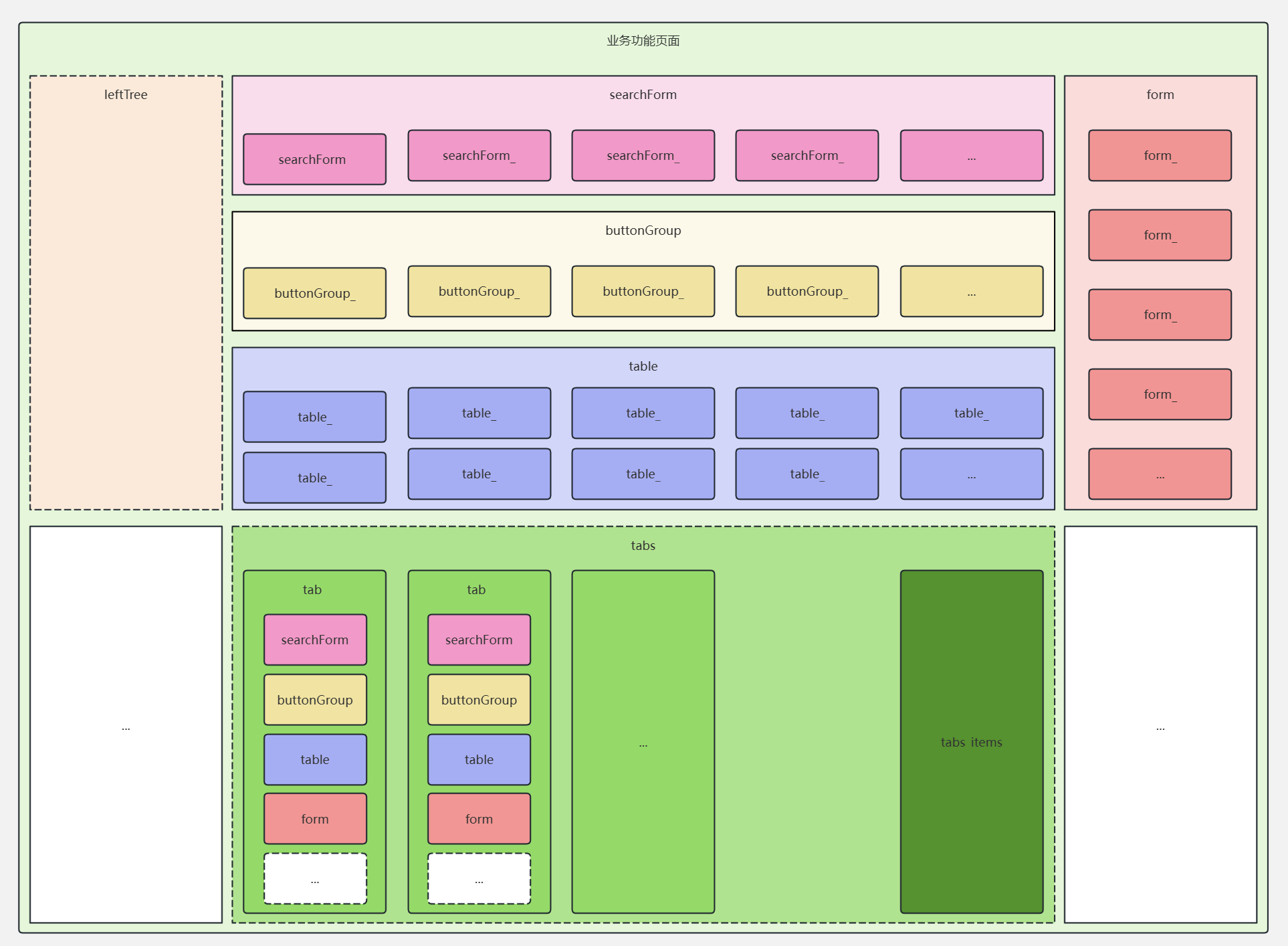
预留插槽给外部调用。插槽规则如下:
- 单个单词、小驼峰的为整个独立组件的插槽,如
searchForm、table。 - 带下划线的为独立组件内部的插槽,如
table_xxx、form_xxx。
<template>
  <div class="page-wrapper auto-scroll">
    <TinyCollapse v-model="collapseActiveName">
      <!-- 查询条件 -->
      <TinyCollapseItem :title="pageConfig.pageInfo.searchTitle" name="1">
        <!-- searchForm 查询表单插槽 -->
        <slot name="searchForm">
          <SieSearchForm
            v-model="$state.searchFormData"
            :form-item-list="$config.searchForm.formItemList"
            :loading="$state.loading"
            :attrs="$config.searchForm.attrs"
            @search="handleSearch">
            <template v-for="(sf, _idx) in $config.searchForm.formItemList" :key="sf.prop" v-slot:[sf.prop]="searchFormScope">
              <!-- searchForm_ 查询表单项插槽 -->
              <slot :name="`searchForm_${sf.prop}`" v-bind="{ ...searchFormScope }" :biz-state="$state" :biz-config="$config"></slot>
            </template>
          </SieSearchForm>
        </slot>
      </TinyCollapseItem>

      <!-- 列表 -->
      <TinyCollapseItem :title="pageConfig.pageInfo.title" name="2">
        <div class="btn-panel">
          <!-- buttonGroup 按钮组插槽 -->
          <slot name="buttonGroup">
            <SieButtonGroup v-bind="buttonGroupAttrs" @click="buttonGroupClick"></SieButtonGroup>
          </slot>
        </div>
        <!-- table 表格插槽 -->
        <slot name="table">
          <SieTable
            ref="tableRef"
            :table-data="$state.tableData"
            :is-loading="$state.loading"
            :table-data-total="$state.tableDataTotal"
            :list-params="$state.tableParams"
            v-bind="$config.table"
            @click-action="clickAction"
            @select-change="$methods.table.selectChange"
            @select-all="$methods.table.selectChange"
            @fetch-list="loadTable">
            <template v-for="(t, _idx) in $config.table.columnConfig" :key="t.field" v-slot:[t.field]="tableScope">
              <!-- table_ 表格列插槽 -->
              <slot :name="`table_${t.field}`" v-bind="{ ...tableScope }"></slot>
            </template>
          </SieTable>
        </slot>
      </TinyCollapseItem>
    </TinyCollapse>

    <!-- 新增/编辑弹窗 -->
     <!-- form 表单插槽 -->
    <slot name="form">
      <SieDrawer v-model="$state.isFormVisible" :title="formTitle" @confirm="handleConfirm" @cancel="handleCancel">
        <template #content>
          <SieForm ref="formRef" v-model="$state.formData" v-bind="$config.form">
            <template v-for="(f, _idx) in $config.form.formItemList" :key="f.prop" v-slot:[f.prop]="formScope">
              <!-- form_ 表单项插槽 -->
              <slot :name="`form_${f.prop}`" v-bind="{ ...formScope }" :biz-state="$state" :biz-config="$config"></slot>
            </template>
          </SieForm>
        </template>
      </SieDrawer>
    </slot>
  </div>
</template>
2
3
4
5
6
7
8
9
10
11
12
13
14
15
16
17
18
19
20
21
22
23
24
25
26
27
28
29
30
31
32
33
34
35
36
37
38
39
40
41
42
43
44
45
46
47
48
49
50
51
52
53
54
55
56
57
58
59
60
61
62
63
64
65
66
67
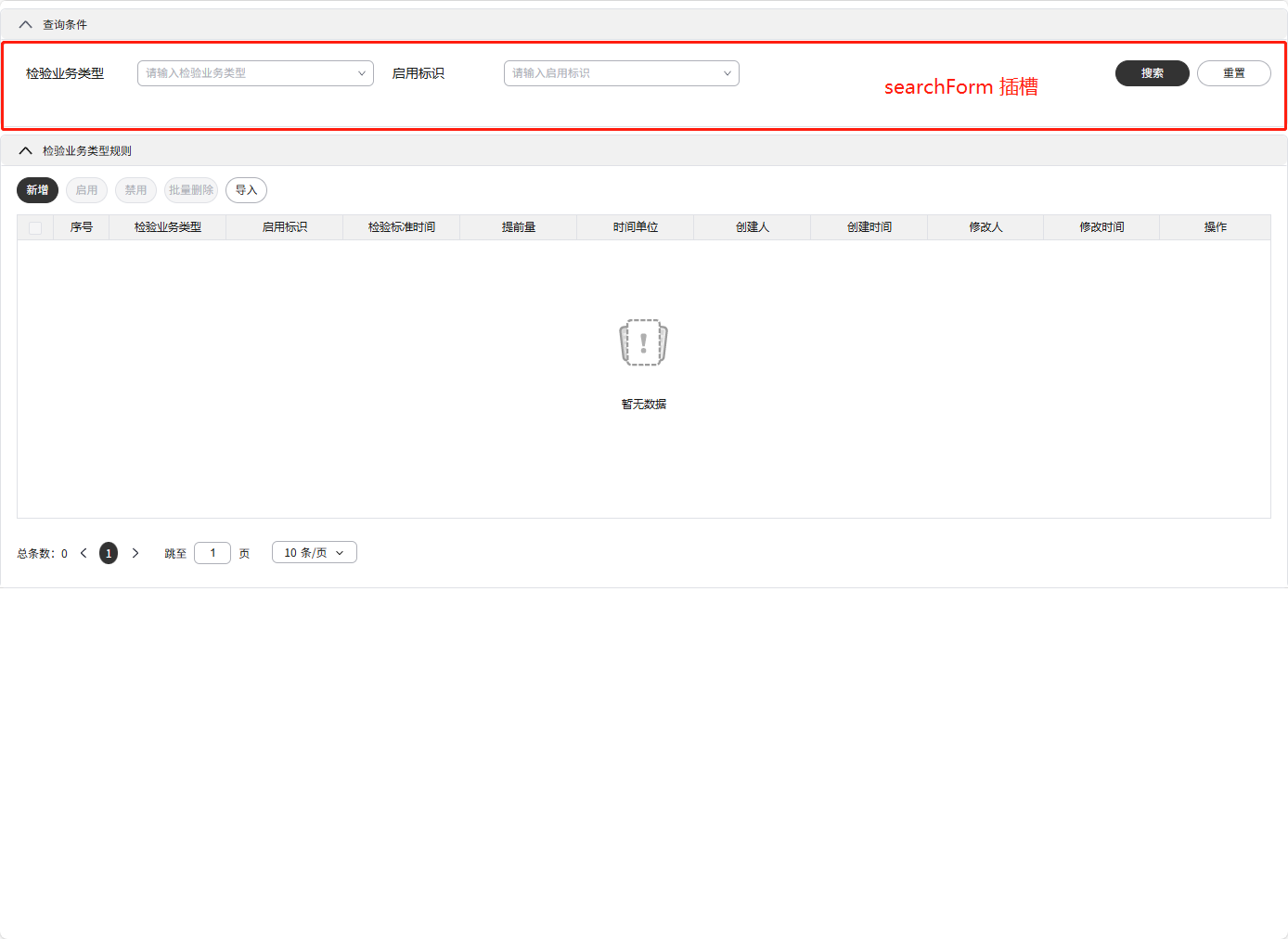
# searchForm
查询表单组件插槽,可替换整个查询表单。
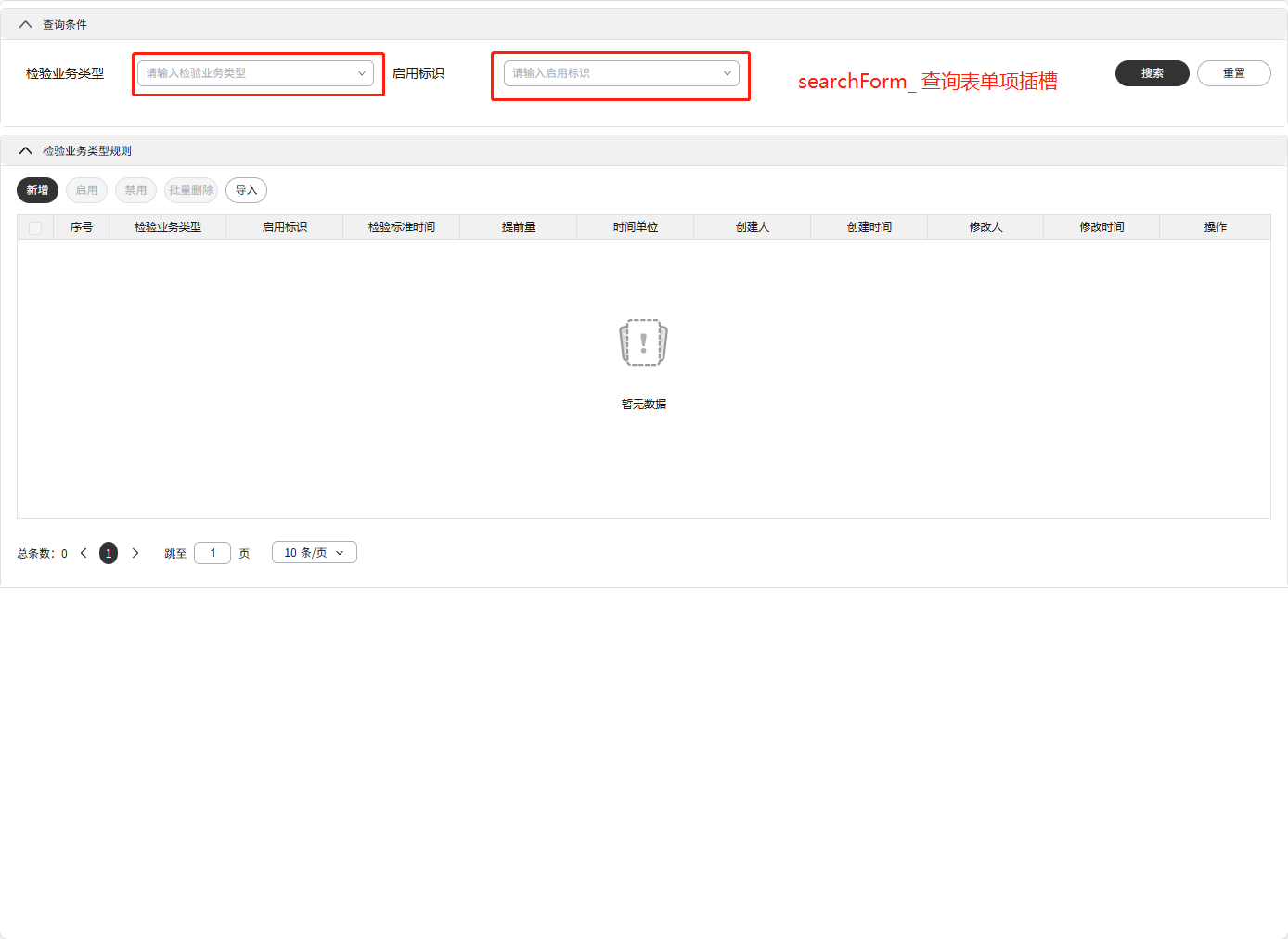
# searchForm_
查询表单组件的表单项插槽,可以根据prop名称替换指定表单项。
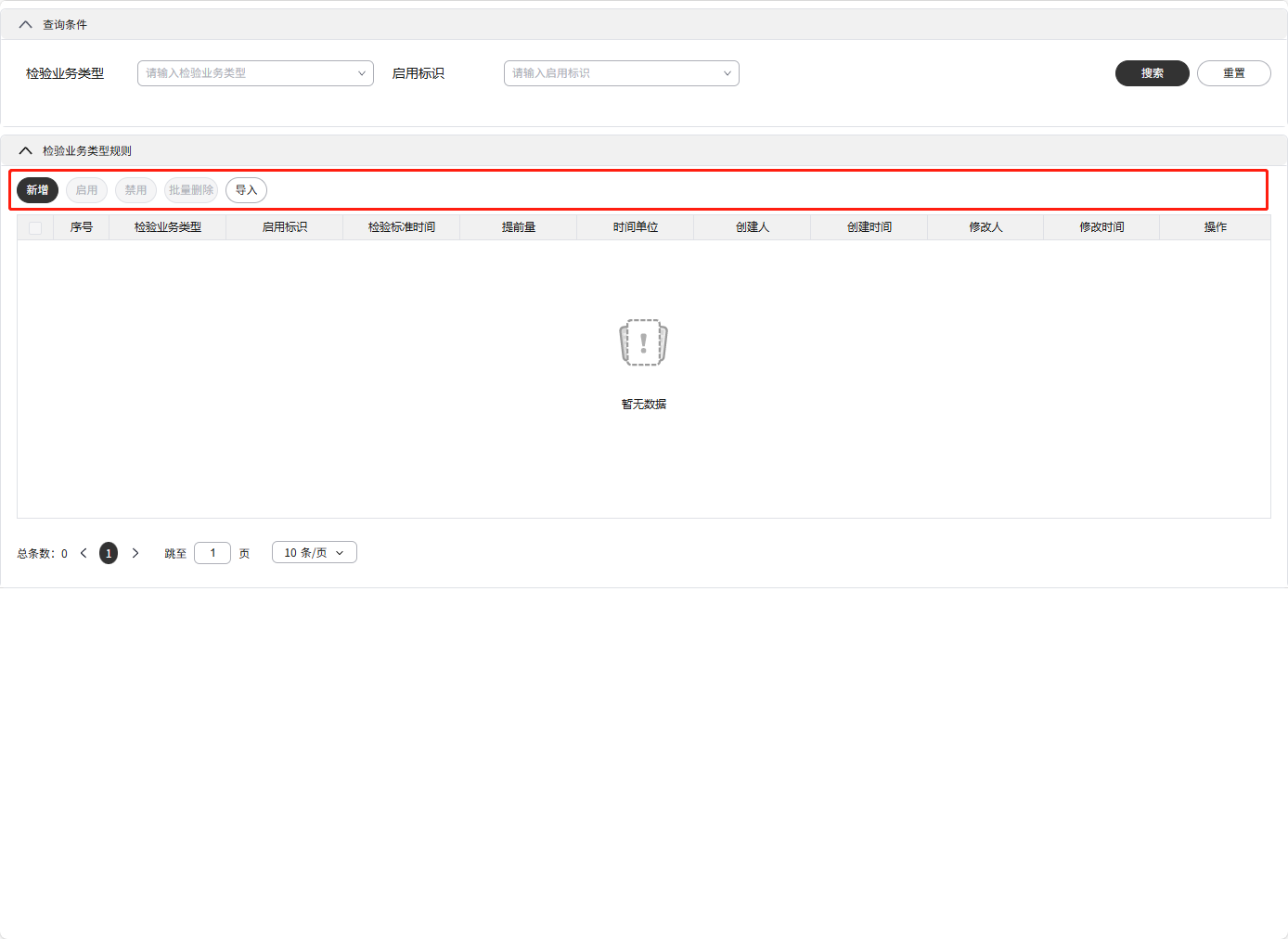
# buttonGroup
表格组件插槽,可替换整个表格。
# buttonGroup_
表格组件按钮插槽,可以根据key名称替换指定按钮。
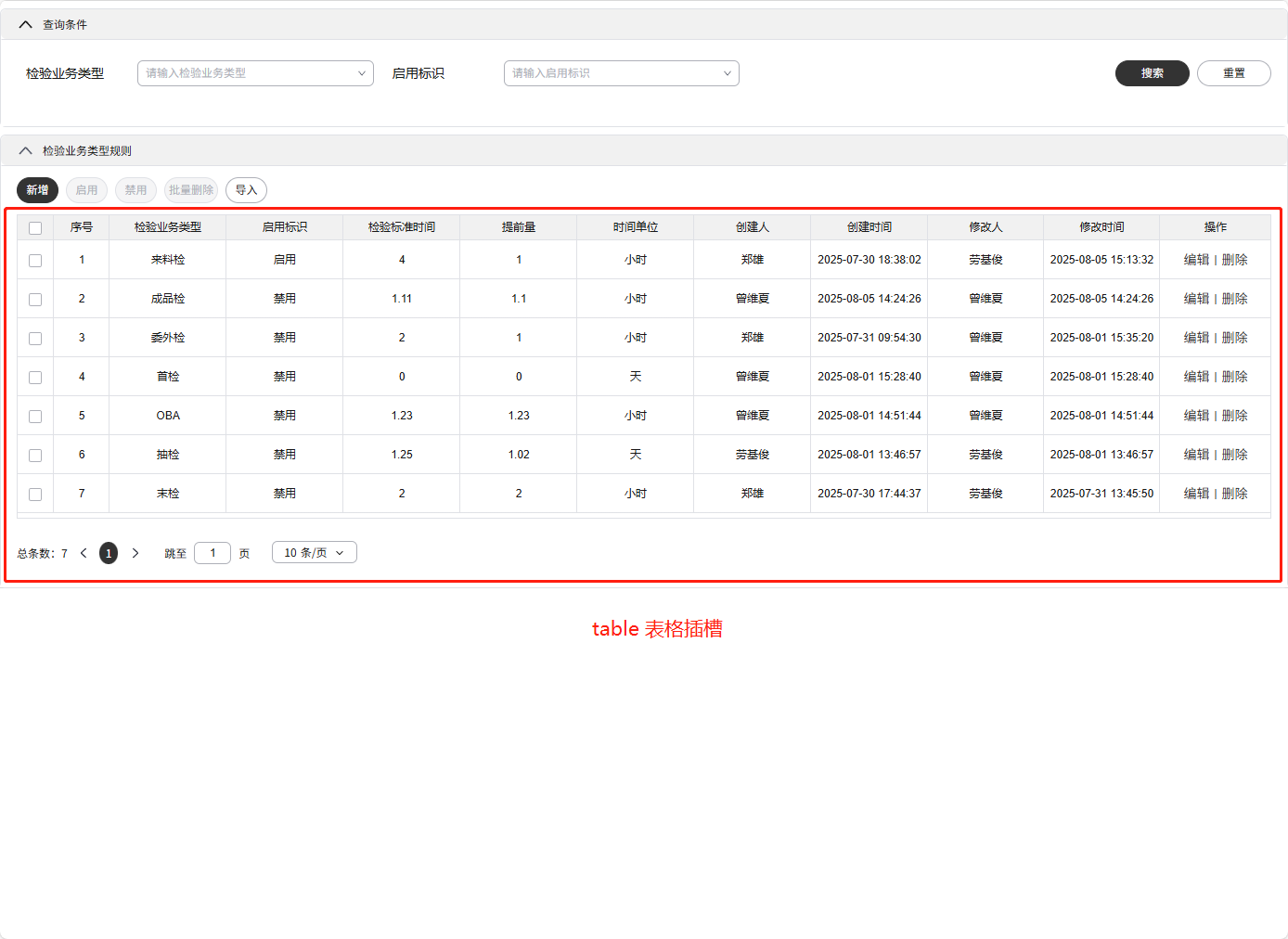
# table
表格组件插槽,可替换整个表格。
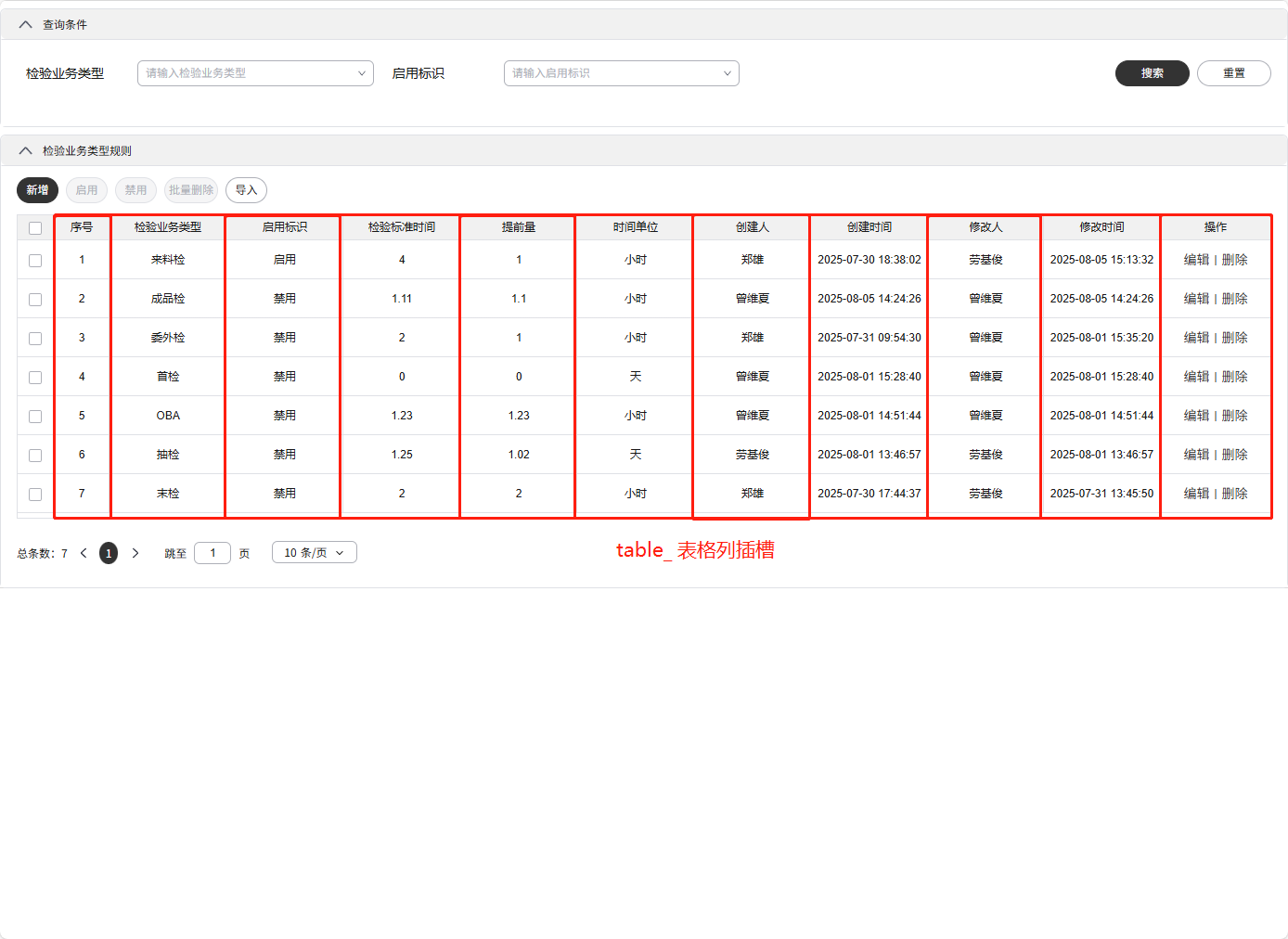
# table_
表格组件的列插槽,可以根据field名称替换指定列。
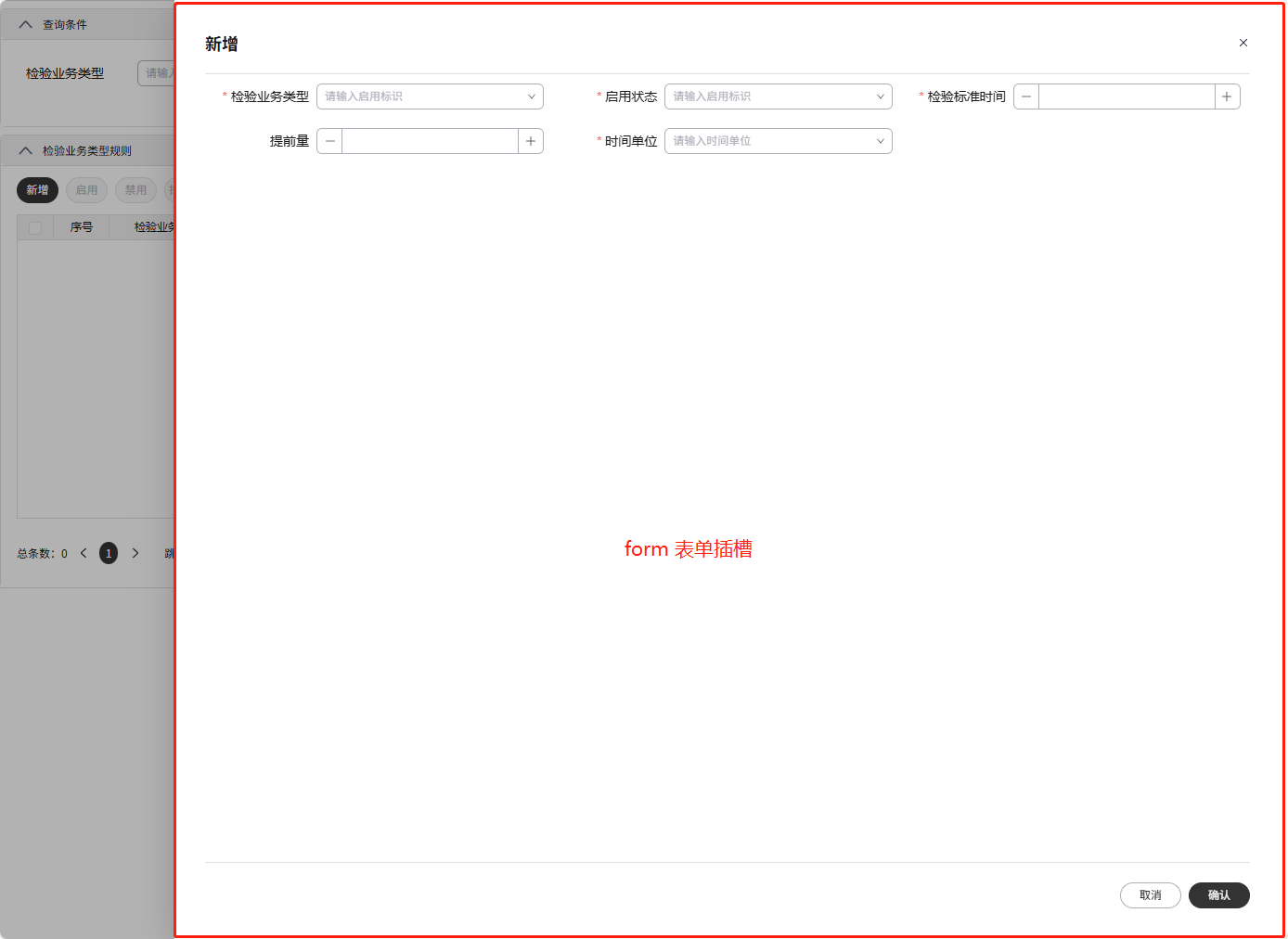
# form
表单组件插槽,可替换整个表单。
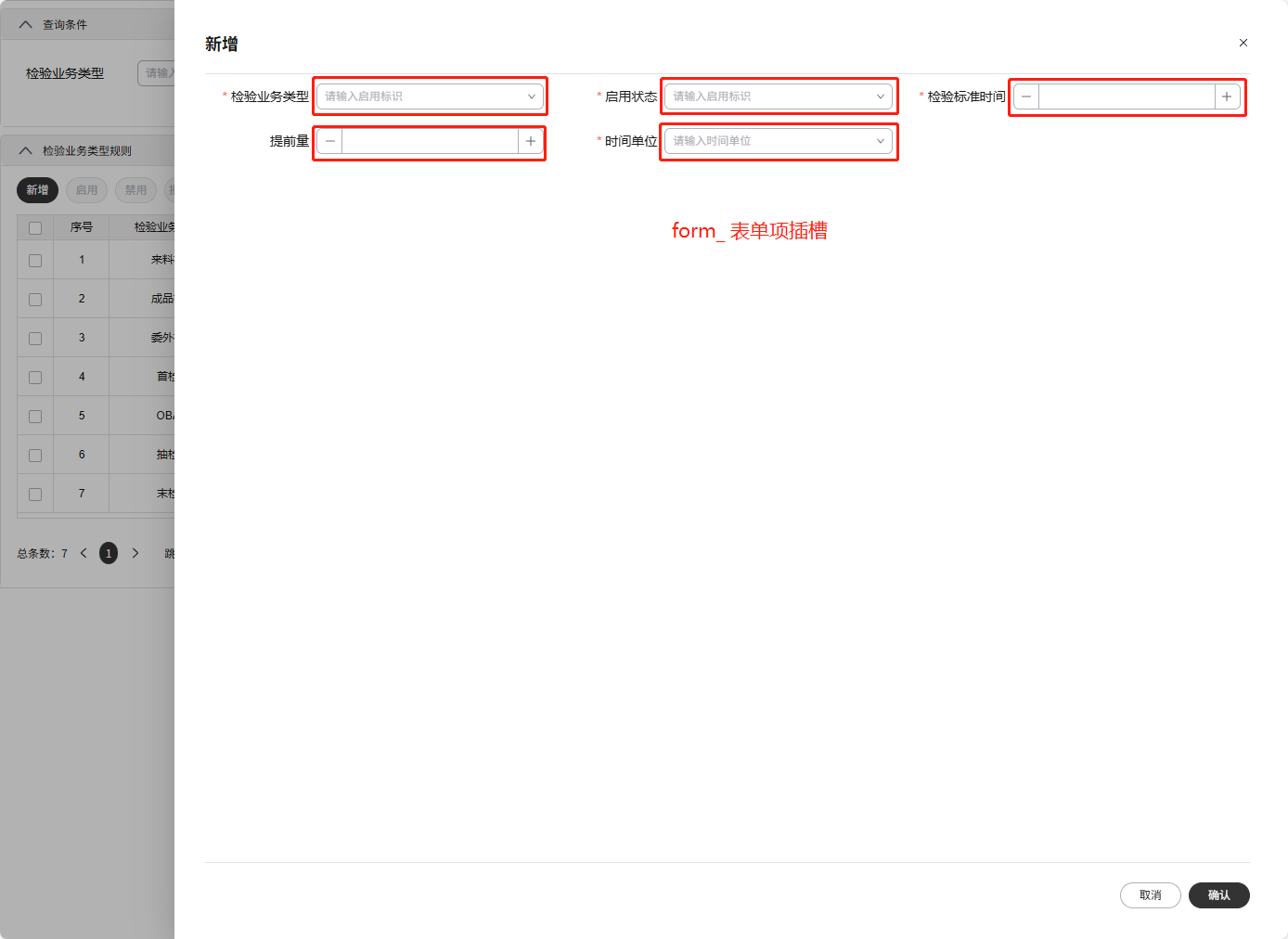
# form_
表单组件的表单项插槽,可以根据prop名称替换指定表单项。
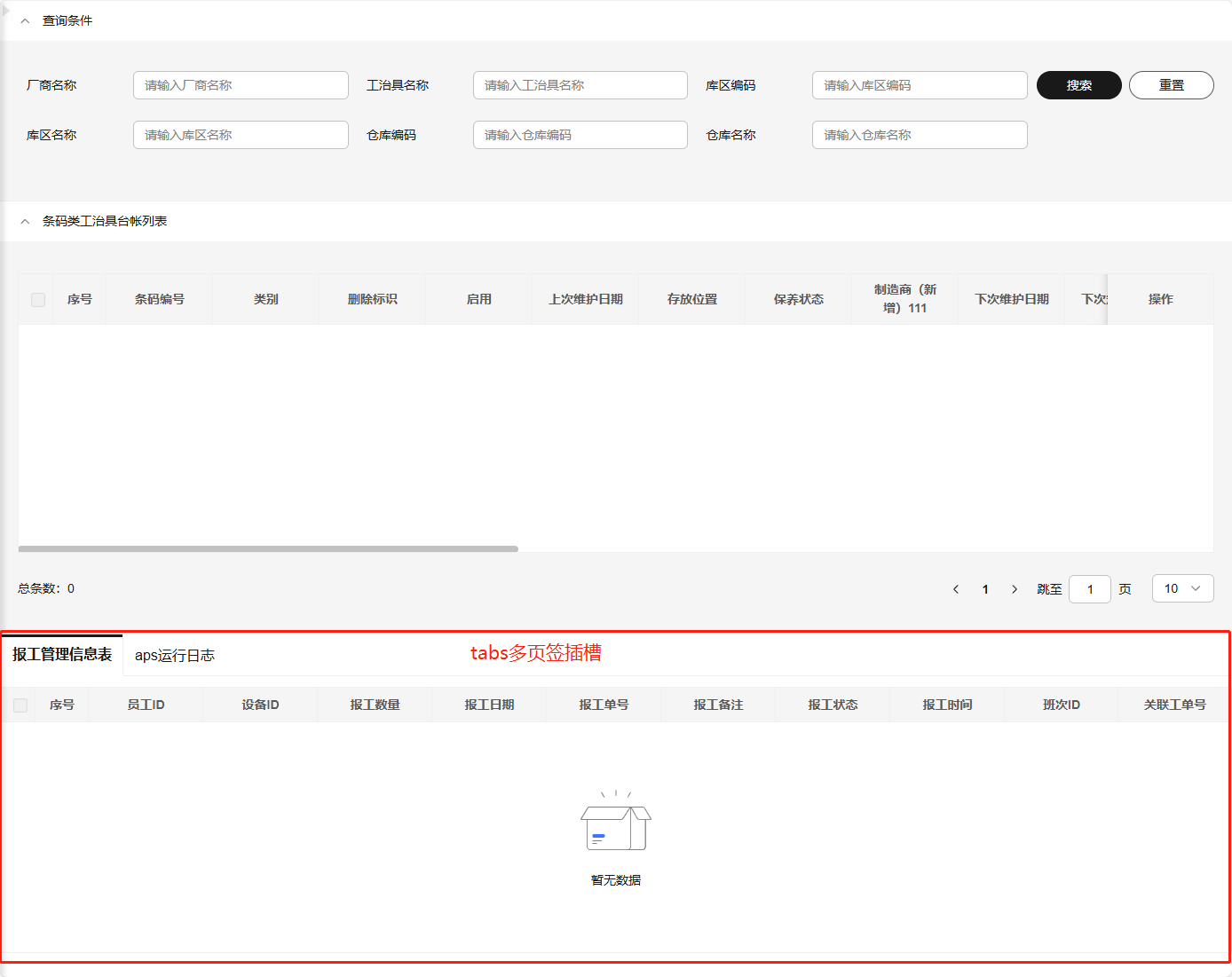
# tabs
标签页组件插槽,可替换整个标签页。
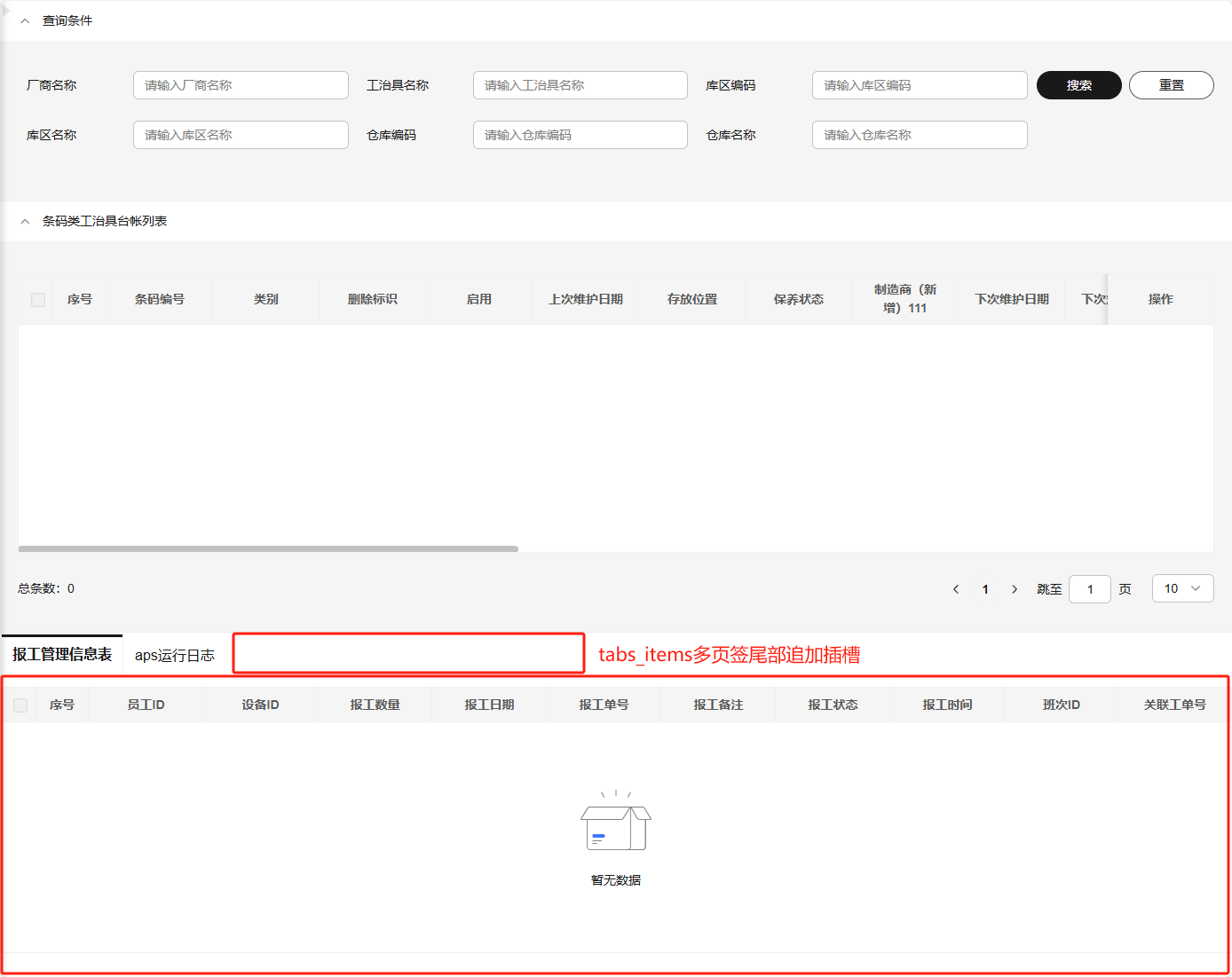
# tabs_items
标签页组件的标签项尾部追加插槽,可在标签项最后追加页签内容。
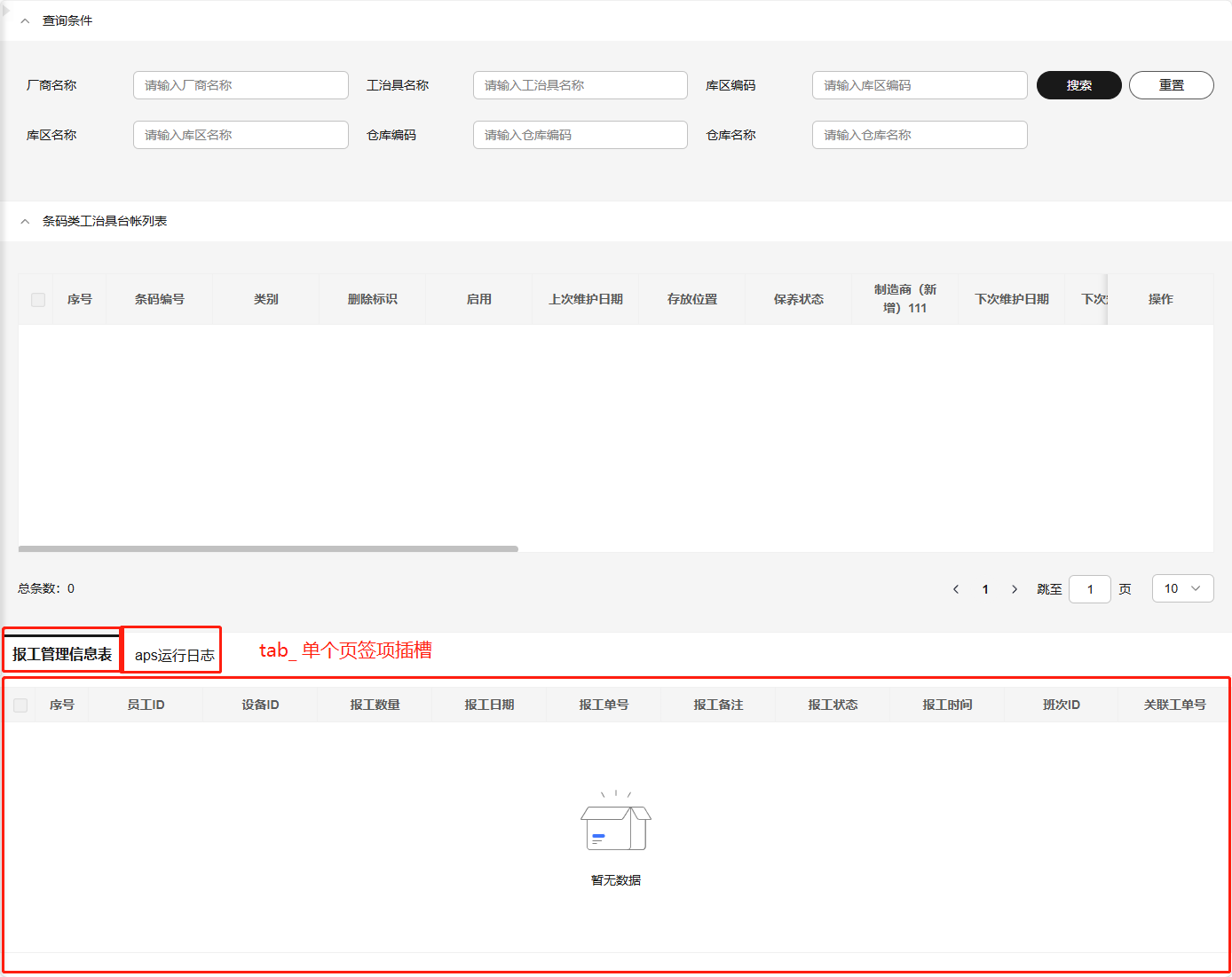
# tab_
标签页组件的标签项插槽,可以根据name名称替换指定标签项。
# leftTree
左侧树组件插槽,可以替换整个左侧树。
# 代码使用
标准页面结构主要部分为四大代码块:searchFrom、buttonGroup、table、form,如主从表会增加tabs,左侧树结构会增加leftTree。
# searchForm
查询表单。
<template>
  <div>
    <!-- ...其他代码 -->

      <slot name="searchForm">
        <SieSearchForm
          v-model="$state.searchFormData"
          :form-item-list="$config.searchForm.formItemList"
          :loading="$state.loading"
          :attrs="$config.searchForm.attrs"
          @search="handleSearch">
          <template
            v-for="(sf, _idx) in $config.searchForm.formItemList"
            :key="sf.prop"
            v-slot:[sf.prop]="searchFormScope">
            <slot
              :name="`searchForm_${sf.prop}`"
              v-bind="{ ...searchFormScope }"
              :biz-state="$state"
              :biz-config="$config"></slot>
          </template>
        </SieSearchForm>
      </slot>

    <!-- ...其他代码 -->
  </div>
</template>

<script setup>
// 一、Vue 和 Composition API
import { ref } from "vue";
// 二、第三方库(包含自己封装的其他库)
import { createPageContext, modelProps, modelState, modelConfig, modelEmits } from "@imom/vue-2nd-kit";
// 三、API
import { api } from "./api/index";
// 四、基础配置
import pageConfig from "./pageConfig";

const props = defineProps({
  ...modelProps
});
const emits = defineEmits([...modelEmits]);

const defaultSetupValue = props.customSetup({
  state: {
    ...modelState()
  },
  config: {
    ...modelConfig,
    ...pageConfig
  }
});

const { $state, $config, $methods, $ref } = createPageContext({
  props,
  emits,
  ref: {
    // ...其他代码
  },
  state: {
    ...defaultSetupValue.state
  },
  config: {
    ...defaultSetupValue.config
  },
  api
});

/**
 * 一、(10)点击【查询】按钮
 */
const handleSearch = (params) => {
  // 查询数据
  $methods.searchForm.handleSearch({
    ...$state.searchFormData,
    ...params
  });
};

// ...其他代码
</script>
2
3
4
5
6
7
8
9
10
11
12
13
14
15
16
17
18
19
20
21
22
23
24
25
26
27
28
29
30
31
32
33
34
35
36
37
38
39
40
41
42
43
44
45
46
47
48
49
50
51
52
53
54
55
56
57
58
59
60
61
62
63
64
65
66
67
68
69
70
71
72
73
74
75
76
77
78
79
80
81
# buttonGroup
按钮组。
<template>
  <div>
    <!-- ...其他代码 -->

      <div class="btn-panel">
        <slot name="buttonGroup">
          <SieButtonGroup v-bind="buttonGroupAttrs" @click="buttonGroupClick">
            <template
              v-for="(btnItem, _btnIndex) in buttonGroupAttrs.buttonList"
              :key="btnItem.key"
              v-slot:[btnItem.key]="buttonGroupScope">
              <slot
                :name="`buttonGroup_${btnItem.key}`"
                v-bind="{ ...buttonGroupScope }"
                :biz-state="$state"
                :biz-config="$config"></slot>
            </template>
          </SieButtonGroup>
        </slot>
      </div>

    <!-- ...其他代码 -->
  </div>
</template>

<script setup>
// 一、Vue 和 Composition API
import { ref } from "vue";
// 二、第三方库(包含自己封装的其他库)
import { createPageContext, modelProps, modelState, modelConfig, modelEmits } from "@imom/vue-2nd-kit";
// 三、API
import { api } from "./api/index";
// 四、基础配置
import pageConfig from "./pageConfig";

const props = defineProps({
  ...modelProps
});
const emits = defineEmits([...modelEmits]);

const defaultSetupValue = props.customSetup({
  state: {
    ...modelState(),
    formDataInit: () => {}
  },
  config: {
    ...modelConfig,
    ...pageConfig
  }
});

const { $state, $config, $methods, $ref } = createPageContext({
  props,
  emits,
  ref: {
    // ...其他代码
  },
  state: {
    ...defaultSetupValue.state
  },
  config: {
    ...defaultSetupValue.config
  },
  api
});

const buttonGroupAttrs = computed(() => {
  // ...其他代码
  return props.setButtonGroupAttrs({
    config: {
      limitNum: 8,
      buttonList: [
        {
          text: "新增",
          type: "primary",
          key: "add"
        },
        {
          text: "导入",
          type: "default",
          key: "import"
        }
      ]
    },
    state: $state
  });
});

/**
 * 按钮组点击事件
 * @param btnItem 按钮对象
 */
const buttonGroupClick = async (btnItem) => {
  const isContinue = await props.buttonGroupClick(btnItem, { state: $state, config: $config });
  if (isContinue === false) return;

  // 获取当前选中的所有 ID
  const selectIds = $state.selectedData.map((item) => item.id);

  switch (btnItem.key) {
    case "add":
      $state.formData = { ...$state.formDataInit() };
      $state.isFormVisible = true;
      break;

    case "import":
      // ...其他代码
      break;

    default:
      break;
  }
};

// ...其他代码
</script>
2
3
4
5
6
7
8
9
10
11
12
13
14
15
16
17
18
19
20
21
22
23
24
25
26
27
28
29
30
31
32
33
34
35
36
37
38
39
40
41
42
43
44
45
46
47
48
49
50
51
52
53
54
55
56
57
58
59
60
61
62
63
64
65
66
67
68
69
70
71
72
73
74
75
76
77
78
79
80
81
82
83
84
85
86
87
88
89
90
91
92
93
94
95
96
97
98
99
100
101
102
103
104
105
106
107
108
109
110
111
112
113
114
115
116
# table
表格。
<template>
  <div>
    <!-- ...其他代码 -->

      <slot name="table">
        <SieTable
          ref="tableRef"
          v-model="$state.selectedData"
          :table-data="$state.tableData"
          :is-loading="$state.loading"
          :table-data-total="$state.tableDataTotal"
          :list-params="$state.tableParams"
          v-bind="$config.table"
          @click-action="clickAction"
          @select-change="$methods.table.selectChange"
          @select-all="$methods.table.selectChange"
          @fetch-list="loadTable">
          <template v-for="(t, _idx) in $config.table.columnConfig" :key="t.field" v-slot:[t.field]="tableScope">
            <slot :name="`table_${t.field}`" v-bind="{ ...tableScope }"></slot>
          </template>
        </SieTable>
      </slot>

    <!-- ...其他代码 -->
  </div>
</template>

<script setup>
// 一、Vue 和 Composition API
import { ref } from "vue";
// 二、第三方库(包含自己封装的其他库)
import { catchError } from "@dme/snack-ui";
import { createPageContext, modelProps, modelState, modelConfig, modelEmits } from "@imom/vue-2nd-kit";
// 三、API
import { api } from "./api/index";
// 四、基础配置
import pageConfig from "./pageConfig";

const props = defineProps({
  ...modelProps
});
const emits = defineEmits([...modelEmits]);

const defaultSetupValue = props.customSetup({
  state: {
    ...modelState()
  },
  config: {
    ...modelConfig,
    ...pageConfig
  }
});

//#region 页面所有 DOM 实例引用
const tableRef = ref(null);

const { $state, $config, $methods, $ref } = createPageContext({
  props,
  emits,
  ref: {
    tableRef,
    // ...其他代码
  },
  state: {
    ...defaultSetupValue.state
  },
  config: {
    ...defaultSetupValue.config
  },
  api
});

/**
 * 二、(10)数据查询
 * @param {Object} extraParams 拓展查询参数
 */
const loadTable = async (extraParams = {}) => {
  try {
    await $methods.table.fetchList(extraParams, {
      // 父组件传过来的查询参数
      parentParams: [
        // {
        //   field: "", // 查询字段
        //   value: "", // 查询值
        //   required: true // 是否必填
        // }
      ],
      // 请求前的回调,一般是标品有特殊处理用,返回方法处理后、二开处理前参数
      beforeCallback: (_) => _,
      // 请求后的回调,一般标品有特殊处理用,返回方法处理后、二开处理前的响应数据
      afterCallback: (res) => res,
      // 请求错误的回调,一般标品有特殊处理用,返回是否继续执行catch错误逻辑,返回false不执行默认错误逻辑(提示错误)
      catchErrorCallback: () => {}
    });
  } catch (err) {
    catchError(err);
    // 隐藏加载动画
    $state.loading = false;
  }
};

/**
 * 二、(60)操作栏按钮点击事件
 * @param {Object} rowData 当前点击行数据源
 * @param {string} type 操作类型
 */
const clickAction = async (rowData, type) => {
  const isContinue = await props.tableClickAction(rowData, type);
  if (isContinue === false) return;

  switch (type) {
    case "edit":
      $state.formData = { ...rowData };
      $state.isFormVisible = true;
      break;

    case "delete":
      // ...删除逻辑
      break;

    default:
      break;
  }
};

// ...其他代码
</script>
2
3
4
5
6
7
8
9
10
11
12
13
14
15
16
17
18
19
20
21
22
23
24
25
26
27
28
29
30
31
32
33
34
35
36
37
38
39
40
41
42
43
44
45
46
47
48
49
50
51
52
53
54
55
56
57
58
59
60
61
62
63
64
65
66
67
68
69
70
71
72
73
74
75
76
77
78
79
80
81
82
83
84
85
86
87
88
89
90
91
92
93
94
95
96
97
98
99
100
101
102
103
104
105
106
107
108
109
110
111
112
113
114
115
116
117
118
119
120
121
122
123
124
125
126
127
# form
表单。
<template>
  <div>
    <!-- ...其他代码 -->

    <!-- 新增/编辑弹窗 -->
    <slot name="form">
      <SieDrawer
        v-model="$state.isFormVisible"
        :title="formTitle"
        @confirm="handleConfirm"
        @cancel="handleCancel"
        width="1200">
        <template #content>
          <SieForm ref="formRef" v-model="$state.formData" v-bind="$config.form" label-width="110px">
            <template v-for="(f, _idx) in $config.form.formItemList" :key="f.prop" v-slot:[f.prop]="formScope">
              <slot :name="`form_${f.prop}`" v-bind="{ ...formScope }" :biz-state="$state" :biz-config="$config"></slot>
            </template>
          </SieForm>
        </template>
      </SieDrawer>
    </slot>

    <!-- ...其他代码 -->
  </div>
</template>

<script setup>
// 一、Vue 和 Composition API
import { ref } from "vue";
// 二、第三方库(包含自己封装的其他库)
import { createPageContext, modelProps, modelState, modelConfig, modelEmits } from "@imom/vue-2nd-kit";
// 三、API
import { api } from "./api/index";
// 四、基础配置
import pageConfig from "./pageConfig";

const props = defineProps({
  ...modelProps
});
const emits = defineEmits([...modelEmits]);

const defaultSetupValue = props.customSetup({
  state: {
    ...modelState()
  },
  config: {
    ...modelConfig,
    ...pageConfig
  }
});

const formRef = ref(null); // 表单,实例

const { $state, $config, $methods, $ref } = createPageContext({
  props,
  emits,
  ref: {
    formRef,
    // ...其他代码
  },
  state: {
    ...defaultSetupValue.state
  },
  config: {
    ...defaultSetupValue.config
  },
  api
});

/**
 * 二、(30)表单,点击【确认】按钮
 */
const handleConfirm = async () => {
  const isContinue = await props.beforeFormSubmit({ state: $state, config: $config });
  if (isContinue === false) return;

  submit();
};

/**
 * 二、(40)表单,点击【取消】按钮
 */
const handleCancel = () => {};

/**
 * 二、(50)表单,提交
 */
const submit = async () => {
  // ...表单提交逻辑
}

// ...其他代码
</script>
2
3
4
5
6
7
8
9
10
11
12
13
14
15
16
17
18
19
20
21
22
23
24
25
26
27
28
29
30
31
32
33
34
35
36
37
38
39
40
41
42
43
44
45
46
47
48
49
50
51
52
53
54
55
56
57
58
59
60
61
62
63
64
65
66
67
68
69
70
71
72
73
74
75
76
77
78
79
80
81
82
83
84
85
86
87
88
89
90
91
92
93
# tabs
多页签(一般用于子表)。
<template>
  <div>
    <!-- ...其他代码 -->

    <!-- 【从表】TAB -->
    <div class="tab-box">
      <slot name="tabs">
        <TinyTabs v-bind="$config.tabs.attrs" @click="$methods.tabs.click">
          <TinyTabItem v-for="(tab, tabIdx) in $config.tabs.tabItems" :key="tabIdx" v-bind="tab.attrs">
            <slot :name="`tab_${tab.attrs.name}`">
              <component
                ref="compRef"
                :is="tab.childNode.component"
                :parent-id="$state.currentRow?.id"
                v-bind="tab.childNode.attrs"></component>
            </slot>
          </TinyTabItem>
          <slot name="tabs_items"></slot>
        </TinyTabs>
      </slot>
    </div>

    <!-- ...其他代码 -->
  </div>
</template>

<script setup lang="ts">
// 一、Vue 和 Composition API
import { ref, markRaw } from "vue";
// 二、第三方库(包含自己封装的其他库)
import { TinyTabs, TinyTabItem } from "@opentiny/vue";
import { createPageContext, modelProps, modelState, modelConfig, modelEmits } from "@imom/vue-2nd-kit";
// 三、API
import { api } from "./api/index";
// 四、基础配置
import pageConfig from "./pageConfig";
// 五、业务组件
import ReportingManagementSlave from "./slaveComponents/ReportingManagementSlave/index.vue";
import ApsOperationLogSlave from "./slaveComponents/ApsOperationLogSlave/index.vue";

const props = defineProps({
  ...modelProps
});
const emits = defineEmits([...modelEmits]);

const compRef = ref(null);

const defaultSetupValue = props.customSetup({
  state: {
    ...modelState()
  },
  config: {
    ...modelConfig,
    ...pageConfig,
    tabs: {
      attrs: {
        activeName: "reportingManagement",
        tabStyle: "card"
      },
      tabItems: [
        {
          attrs: {
            title: "报工管理信息表",
            name: "reportingManagement"
          },
          childNode: {
            attrs: {},
            component: markRaw(ReportingManagementSlave) // 标记组件对象,使其保持原样,不被转换为响应式对象。
          }
        },
        {
          attrs: {
            title: "aps运行日志",
            name: "apsOperationLog"
          },
          childNode: {
            attrs: {},
            component: markRaw(ApsOperationLogSlave)
          }
        }
      ]
    }
  }
});

const { $state, $config, $methods, $ref } = createPageContext({
  props,
  emits,
  ref: {
    compRef
    // ...其他代码
  },
  state: {
    ...defaultSetupValue.state
  },
  config: {
    ...defaultSetupValue.config
  },
  api
});

// ...其他代码
</script>
2
3
4
5
6
7
8
9
10
11
12
13
14
15
16
17
18
19
20
21
22
23
24
25
26
27
28
29
30
31
32
33
34
35
36
37
38
39
40
41
42
43
44
45
46
47
48
49
50
51
52
53
54
55
56
57
58
59
60
61
62
63
64
65
66
67
68
69
70
71
72
73
74
75
76
77
78
79
80
81
82
83
84
85
86
87
88
89
90
91
92
93
94
95
96
97
98
99
100
101
102
103
# leftTree
待完善。
<template>
  <div>
    <!-- ...其他代码 -->
    <!-- ...其他代码 -->
  </div>
</template>

<script setup>
// ...其他代码
</script>
2
3
4
5
6
7
8
9
10
# 其他业务模块
由于标准模块不能覆盖所有业务场景,若有非标准模块,需要业务人员自行扩展。
# 生成业务功能包
使用npm包的方式提供前端业务功能包,通常一个菜单对应一个业务功能包。
# 包名规范
包名需要带有项目、产品线、模块、业务功能等要素,做到语义化、规范化。
- 包名规则
- 小写 包名必须全部使用小写字母,不允许使用大写字母
- 无空格和特殊字符 包名不能包含空格
、~)('!*等特殊字符 - 不能以
.或_开头 包名不能以.或_开头
模板
@imom-${产品线}/${模块}-${业务功能}
- 示例
- imom产品中,qms产品线,process-control模块,检验业务类型规则(checkRule)功能
@imom-qms/processcontrol-checkrule
- imom产品中,mes产品线,smt模块,工单操作台(workOrderConsole)功能
@imom-mes/smt-workorderconsole
- imom产品中,qms产品线,process-control模块,检验业务类型规则(checkRule)功能
// package.json

{
  "name": "@imom-qms/processcontrol-checkrule",
  // ...其他属性
}
2
3
4
5
6
# 版本规范
npm包版本管理遵循语义化版本控制(Semantic Versioning,简称 SemVer)规范,这一规范为软件版本赋予了明确的意义,使得版本升级和依赖管理变得更加简单和清晰。
- 版本号格式
- 版本号格式为
MAJOR.MINOR.PATCH,如1.0.0。 - 遵循语义化版本规范,重大更新使用
major,新功能使用minor,bug 修复使用patch。 - 项目中也出现
x.y.z格式的版本号,其中x等同于MAJOR,y等同于MINOR,z等同于PATCH。从中延伸,打包脚本中build:x即更新MAJOR版本号;同理,build:y更新MINOR版本号,build:z更新PATCH版本号。
- 版本号格式为
更多说明请查看版本号说明
// package.json

{
  // ...其他属性
  "version": "1.0.0"
  // ...其他属性
}
2
3
4
5
6
7
# 打包发版
进行这一步前,请先确保已阅读6. npm包开发。
- 下载_build.zip,并解压到业务功能目录下。
- 创建导出组件的入口文件
index.ts。
修改打包入口文件index.ts,引入页面组件,并导出组件。
示例中导出CheckRule业务功能组件。
- 单个vue组件导出
// index.ts

import CheckRuleIndex from "./index.vue";
export default CheckRuleIndex;
2
3
4
- 多个vue组件模块导出(推荐)
// index.ts

import CheckRuleIndex from "./index.vue";
import CheckRuleDetail from "./detail.vue";
export { CheckRuleIndex, CheckRuleDetail };
2
3
4
5
- 创建
package.json文件,并添加依赖。
{
  "name": "【根据包名规则填写包名】",
  "version": "【根据版本号格式填写版本号】",
  "description": "【根据业务功能填写描述】",
  "main": "./dist/cjs/index.cjs.js",
  "module": "./dist/es/index.es.js",
  "types": "./dist/types/index.d.ts",
  "type": "module",
  "scripts": {
    "dev": "vite -c ./_build/vite.config.ts",
    "build": "vue-tsc --project ./_build/tsconfig.json && vite build -c ./_build/vite.config.ts",
    "build:z": "npm run build && npm version patch && npm run publish:hosted",
    "build:y": "npm run build && npm version minor && npm run publish:hosted",
    "build:x": "npm run build && npm version major && npm run publish:hosted",
    "publish:hosted": "npm publish --registry=http://192.168.181.114:8081/repository/npm-hosted/",
    "test": "echo \"Error: no test specified\" && exit 1"
  },
  "keywords": [
    "vue3",
    "page",
    "imom"
  ],
  "author": "sie",
  "repository": {
    "type": "gitlab",
    "url": "http://192.168.175.208/imom"
  },
  "publishConfig": {
    "access": "public"
  },
  "files": [
    "dist"
  ],
  "dependencies": {
    // ...根据项目情况添加依赖包
  },
  "devDependencies": {
    "@types/node": "^16.9.0",
    "@vitejs/plugin-vue": "^5.0.4",
    "typescript": "^5.2.2",
    "vite": "^5.2.0",
    "vite-plugin-css-injected-by-js": "^3.5.1",
    "vite-plugin-dts": "^3.9.1",
    "vite-plugin-vue-setup-extend": "^0.4.0",
    "vue": "^3.2.27",
    "vue-tsc": "^2.0.6"
  },
  "peerDependencies": {
    "@dme/snack-ui": "0.0.76",
    "vue": "^3.2.27"
    // ...根据需求添加其他依赖项
  }
}
2
3
4
5
6
7
8
9
10
11
12
13
14
15
16
17
18
19
20
21
22
23
24
25
26
27
28
29
30
31
32
33
34
35
36
37
38
39
40
41
42
43
44
45
46
47
48
49
50
51
52
53
- 检查依赖
若有打包时需要忽略打包的依赖,修改_build/vite.config.ts文件,将需要忽略的依赖添加到build.rollupOptions.external中。
// _build/vite.config.ts

// ...引入依赖
export default defineConfig({
  // ...其他配置
  build: {
    // ...其他配置
    rollupOptions: {
      external: [
        "vue"
        // ...根据需求添加其他依赖项
      ]
      // ...其他配置
    }
  }
});
2
3
4
5
6
7
8
9
10
11
12
13
14
15
16
- 安装依赖 在业务功能目录下执行安装依赖命令
yarn install
- 打包、发版
在业务功能所在目录下执行对应命令进行打包、发版:
警告
!按照自己需要执行相关命令,不是全部都要执行!
# 只打包,不升版本,不发版
yarn build

# 不打包,不升版本,只发版
yarn publish:hosted

# 打包,升级 修订版本号(1.0.0 => 1.0.1),发版
yarn build:z

# 打包,升级 次版本号(1.0.0 => 1.1.0),发版
yarn build:y

# 打包,升级 主版本号(1.0.0 => 2.0.0),发版
yarn build:x
2
3
4
5
6
7
8
9
10
11
12
13
14
15
更多打包规则请查看本地部署运行-打包与发布
- 检查
执行打包操作执行成功后,生成的dist目录结构大致如下:
├─dist                          // 构建输出目录
|  ├─es                         // esm格式
|  | ├─index.es.js
|  | ├─index.vue.es.js
|  | ├─pageConfig.es.js
|  | ├─_virtual
|  | |    └_plugin-vue_export-helper.es.js
|  | ├─api
|  | |  └index.es.js
|  ├─cjs                        // cjs格式
|  |  ├─index.cjs.js
|  |  ├─index.vue.cjs.js
|  |  ├─pageConfig.cjs.js
|  |  ├─_virtual
|  |  |    └_plugin-vue_export-helper.cjs.js
|  |  ├─api
|  |  |  └index.cjs.js
2
3
4
5
6
7
8
9
10
11
12
13
14
15
16
17
若出现node_modules目录,请检查打包配置vite.config.ts是否正确。