
 PC端前端二开流程
# PC端前端二开流程
# 一、引言
# 背景介绍
- 在PC端行业包的的标品功能开发时,会沉淀很多通用的行业包标准功能。在实际的项目交付时,会经常需要一定程度的根据项目进行二次开发,如果复制源码进行修改交付,导致【标准版本】和【交付版本】很难实现代码同步,代码维护困难。
- PC端二次开发的关键在于实现单一源码的复用,以满足不同业务功能的二次开发需求。这种模式不仅支持项目交付时的标准版本,还能够灵活增补定制化功能,为开发注入更多可能性。
# 适用人员
- 业务开发人员。
- 二开交付人员。
- ...
# 二、环境准备
# 技术栈
推荐使用:
- Vue@3.2.27以上版本。
- Node.js 18.20.3以上版本。
- yarn包管理工具,版本1.22.22。
# 环境配置
- node.js
具体配置请参照文档:本地部署运行-node
- yarn
具体配置请参照文档:本地部署运行-yarn
- npm包开发准备
具体配置请参照文档:本地部署运行-6. npm包开发。
# 开发工具
- 推荐使用的代码编辑器(如 VS Code)。
# 二开实现
- 二开依赖
@imom/vue-2nd-kit依赖包实现。 - 每个业务功能都是一个npm包的方式。
- 共享同一份的变量、方法,实现数据的统一。
# 三、二次开发框架概览
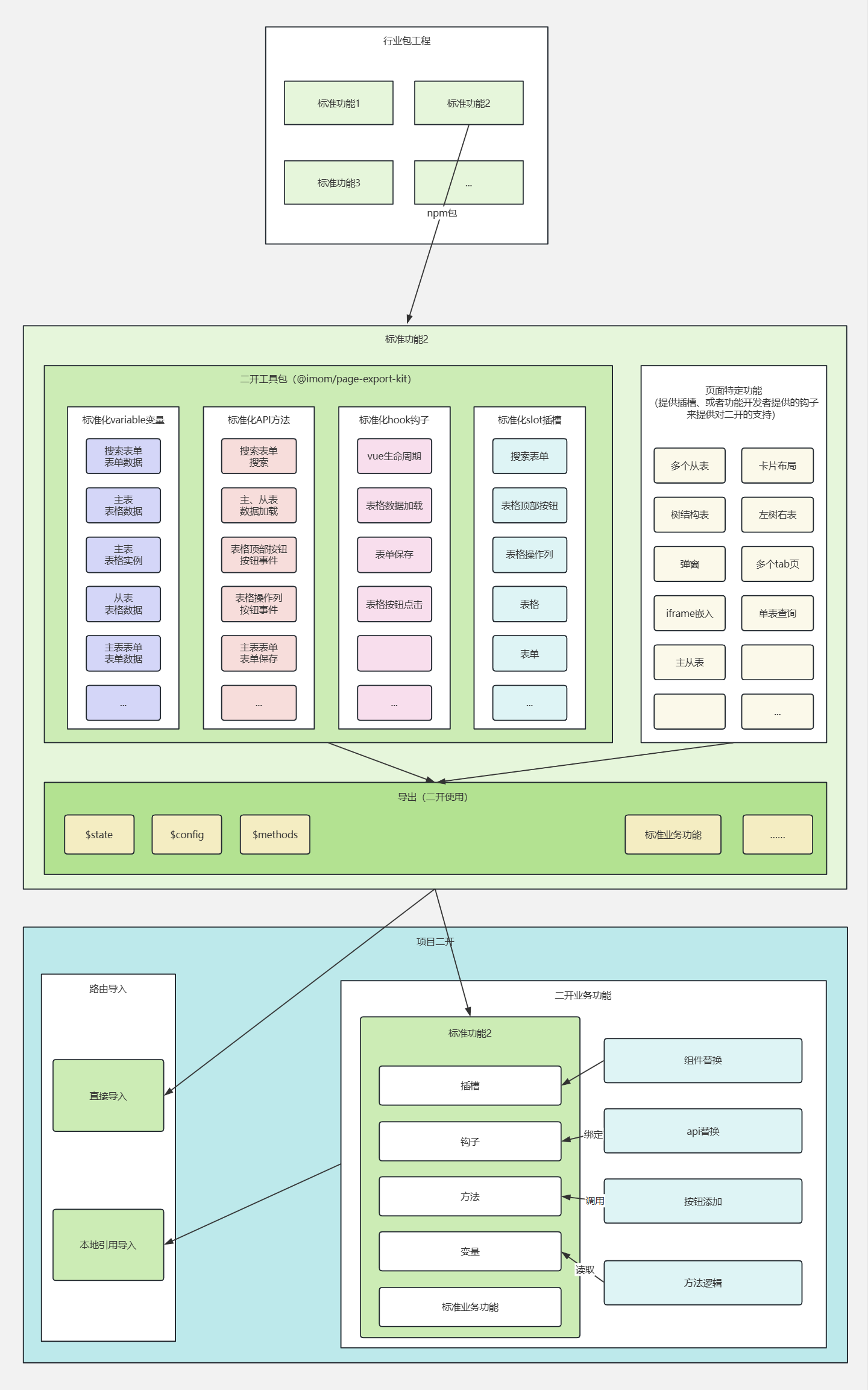
# 框架架构
展示框架的整体架构图。 说明各模块的功能和相互关系。
# 核心组件
列举框架提供的主要组件。 简述每个组件的作用和使用场景。
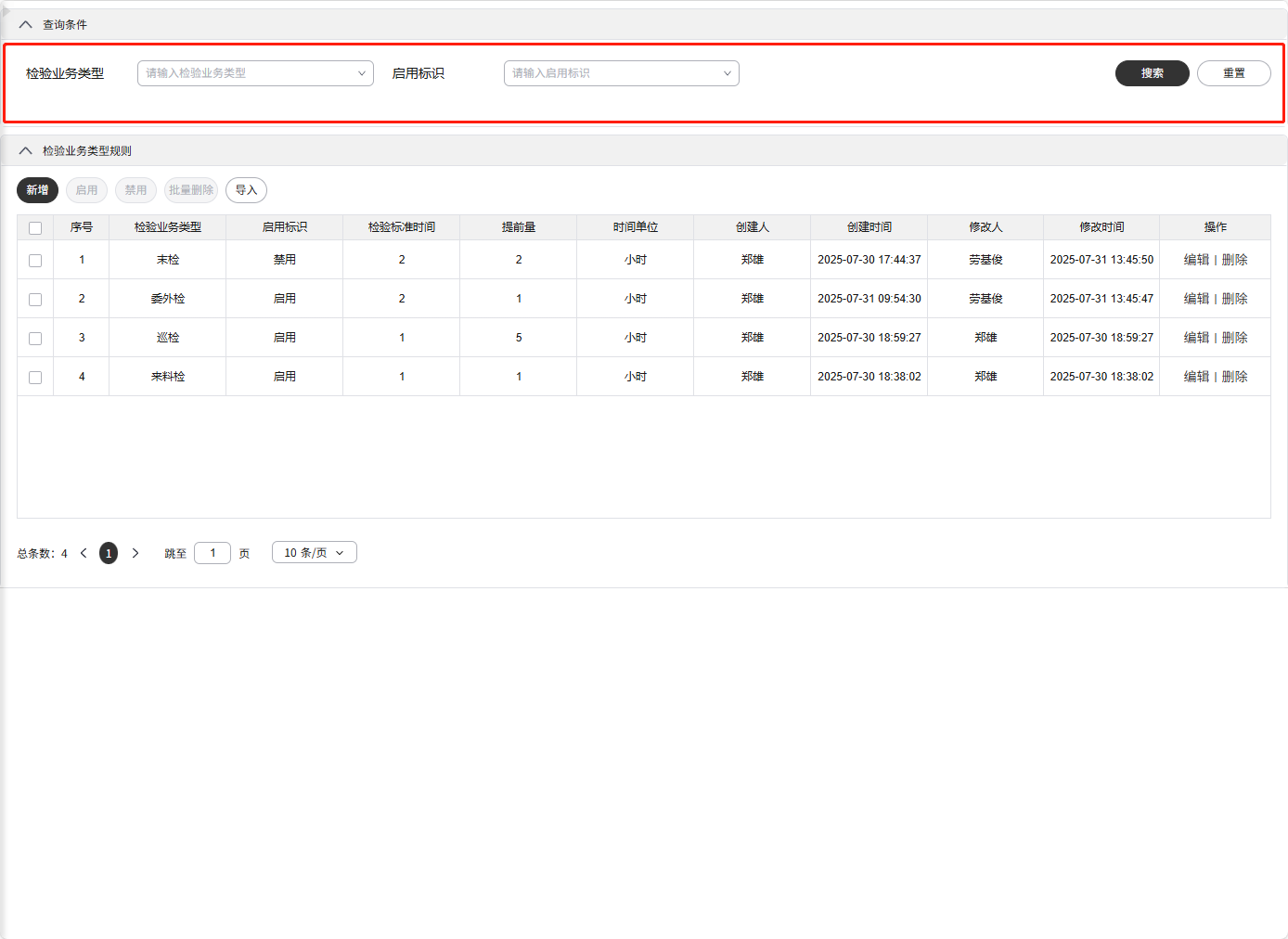
# SearchForm-查询表单
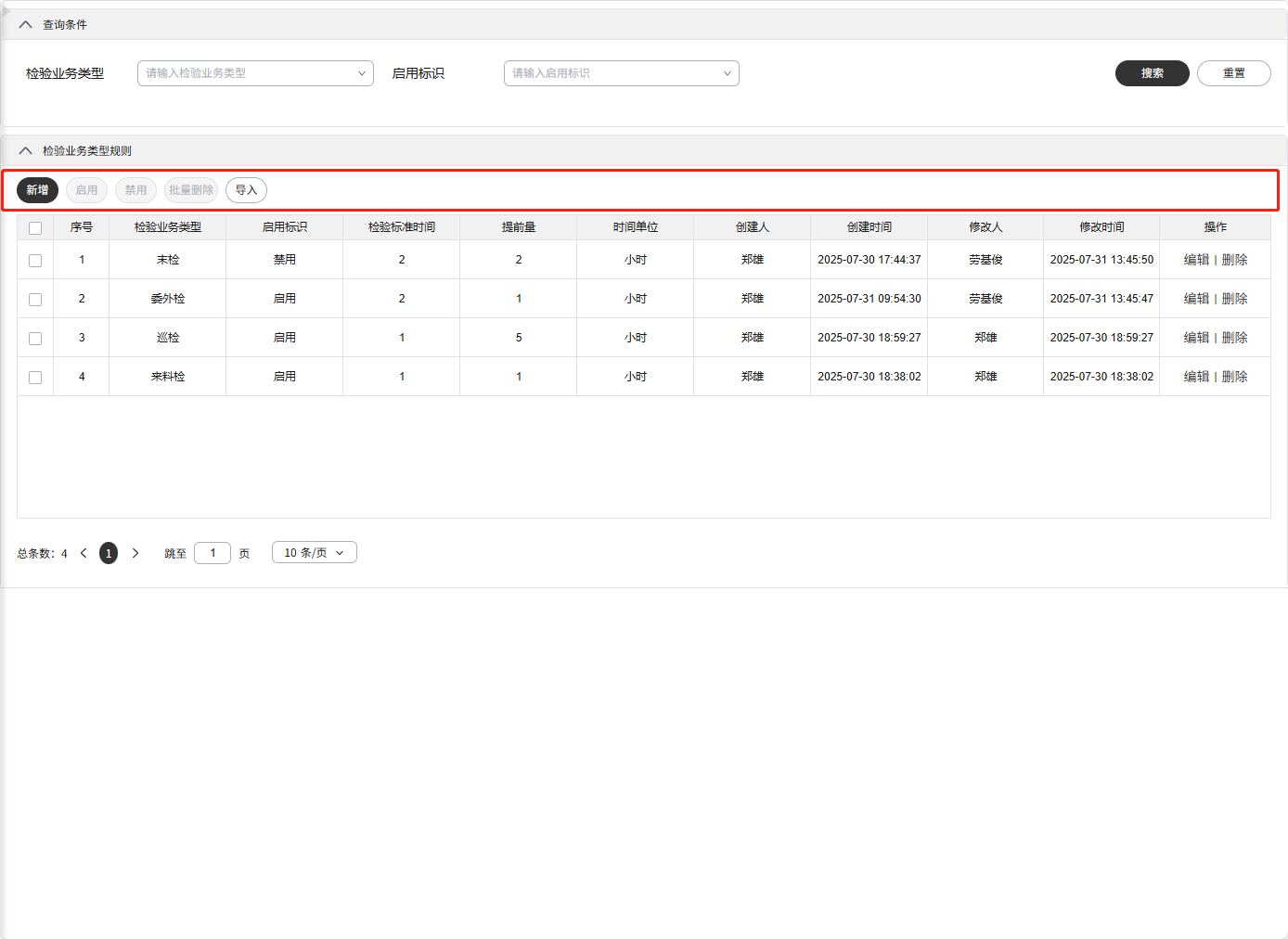
# ButtonGroup-按钮组
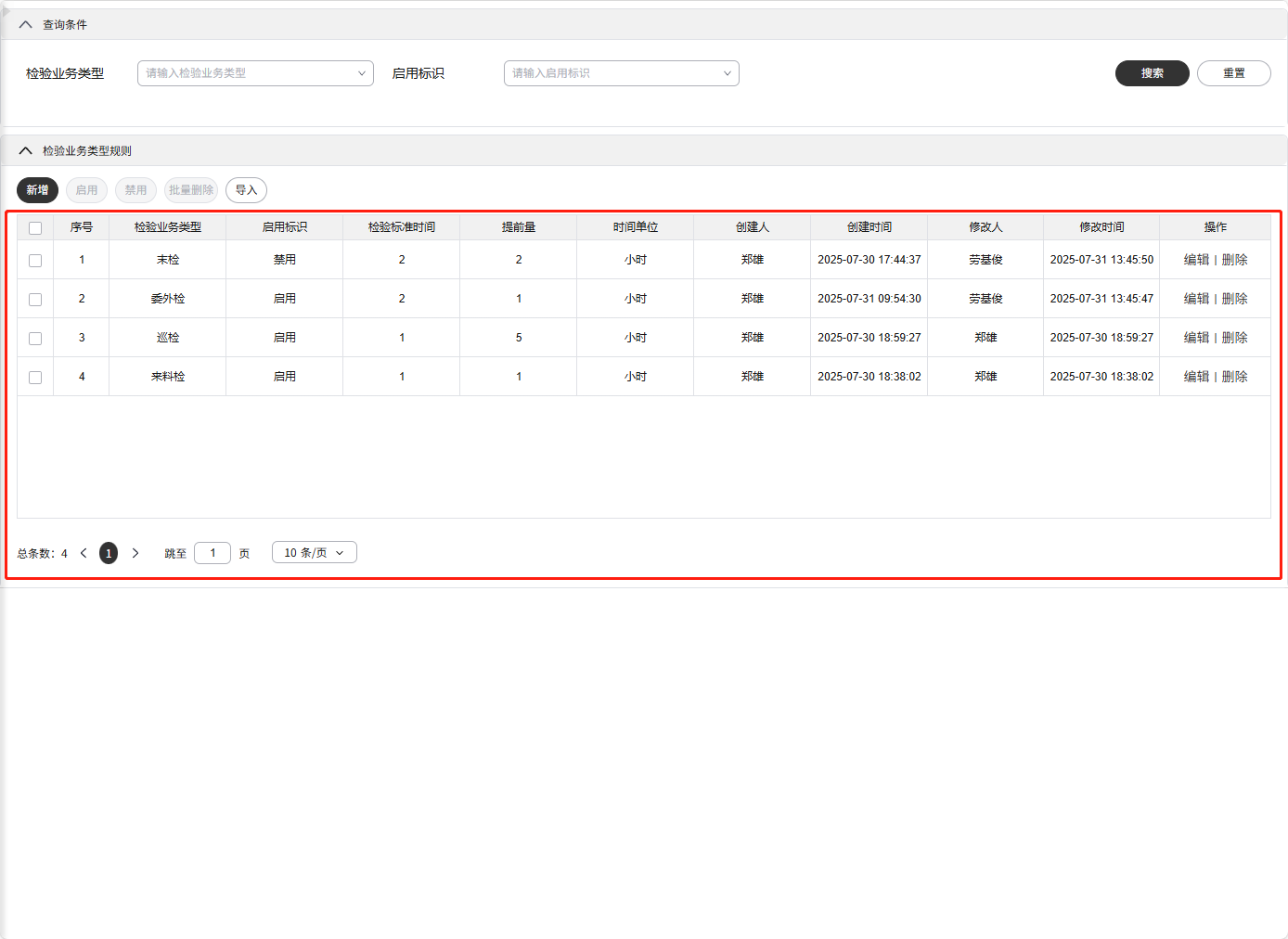
# Table-表格
# Form-表单
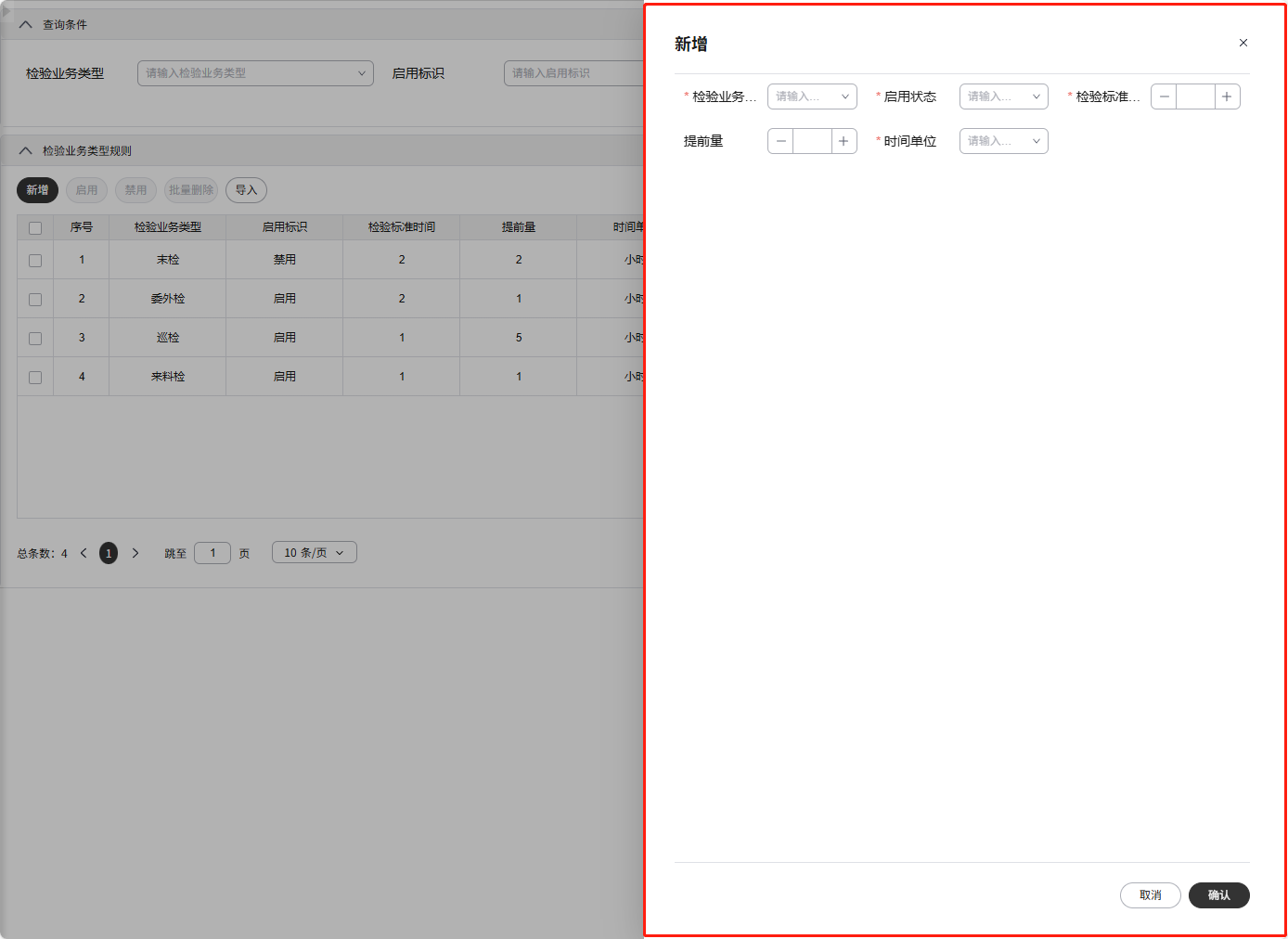
# Tabs-多页签
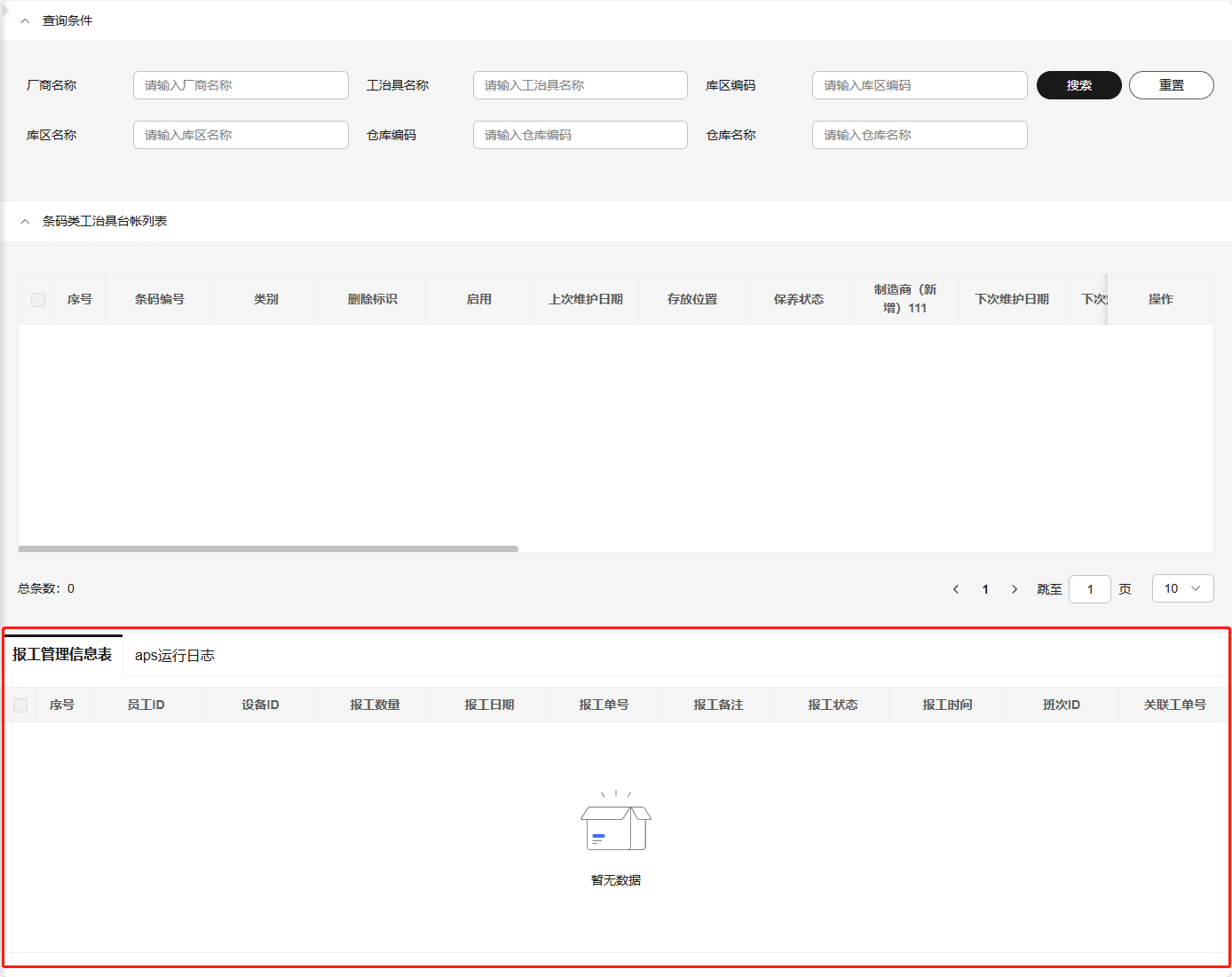
# LeftTree-左侧树
待完善。
# 四、工具包API概览
提供@imom/vue-2nd-kit中常用方法、属性、插槽和变量的清单。
# 模型
# modelProps
公共props配置,提供二开标准的props配置。
- 使用
<script setup lang="ts">
import { modelProps } from "@imom/vue-2nd-kit";

const props = defineProps({
  ...modelProps
  // 可继续添加自定义组件属性
})
</script>
1
2
3
4
5
6
7
8
2
3
4
5
6
7
8
- 定义
| 属性名 | 类型 | 默认值 | 说明 |
|---|---|---|---|
| customSetup | Function | ({ state, config }: CustomParamsType) => ({ state, config }) | setup时期数据初始化(此时未初始化完成,入参无methods)。 |
| customBeforeMount | Function | (_: CustomLifecycleParamsType) => _ | vue的beforeMount生命周期 |
| customMounted | Function | async (_: CustomLifecycleParamsType) => void 0 | vue的mounted生命周期 |
| customBeforeUnmount | Function | async (_: CustomLifecycleParamsType) => void 0 | vue的beforeUnmount生命周期 |
| customUnmounted | Function | async (_: CustomLifecycleParamsType) => void 0 | vue的unmounted生命周期 |
| beforeSearch | Function | async (_: CustomLifecycleParamsType) => _ | 调用搜索前 |
| tableCellClick | Function | async (_rowData: RowDataType): HookReturnDataType => void 0 | 表格单元格点击事件 |
| tableClickAction | Function | async (_rowData: RowDataType, _type: string): HookReturnDataType => void 0 | 表格操作列点击事件 |
| beforeFetchList | Function | async (_params: ObjType): HookReturnDataType => _params | 调用查询列表数据前 |
| afterFetchList | Function | async (_responseBody: ResponseBodyType): HookReturnDataType => _responseBody | 调用查询列表后 |
| catchFechListError | Function | async (_error: any): HookReturnDataType => void 0 | 调用查询列表数据出现错误时 |
| tabsChange | Function | (_: TabItemType) => void 0 | 子表tabs切换时 |
| setButtonGroupAttrs | Function | ({ config, state: _state }: CustomParamsType): Reactive<ObjType> => config | 设置按钮组属性 |
| beforeFormSubmit | Function | async (_: CustomParamsType) => void 0 | 表单提交事件前 |
| customApi | Function | (_type: string): HookReturnDataType \| undefined => void 0 | 自定义api接口 |
# modelEmits
公共emits配置,提供二开标准的emits配置。
- 使用
<script setup lang="ts">
import { modelEmits } from "@imom/vue-2nd-kit";

const emits = defineEmits([
  ...modelEmits
  // 可继续添加页面自定义事件
]);
</script>
1
2
3
4
5
6
7
8
2
3
4
5
6
7
8
- 定义
| 事件名 | 类型 | 说明 |
|---|---|---|
| current-change | (currentRow: RowDataType) => void | 表格当前选中改变 |
| select-change | (selectedData: RowDataType[]) => void | 表格选中改变 |
| select-all | (selectedData: RowDataType[]) => void | 表格全选 |
# modelState
公共状态配置,提供二开标准的变量状态配置。
- 使用
<script setup lang="ts">
import { modelProps, modelState, modelConfig } from "@imom/vue-2nd-kit";
import pageConfig from "./pageConfig";

const props = defineProps({
  ...modelProps
});

// customSetup生命周期处理state、config
const defaultSetupValue = props.customSetup({
  state: {
    ...modelState // 若不允许外部在setup时修改state,可不写
    // 可继续添加页面变量
  },
  config: {
    ...modelConfig,
    ...pageConfig
  }
});
</script>
1
2
3
4
5
6
7
8
9
10
11
12
13
14
15
16
17
18
19
20
2
3
4
5
6
7
8
9
10
11
12
13
14
15
16
17
18
19
20
- 定义
| 变量名 | 类型 | 默认值 | 说明 |
|---|---|---|---|
| loading | boolean | false | 页面数据加载中状态 |
| searchFormData | object | {} | searchForm表单数据 |
| tableParams | object | { current: 1, size: 10} | 表格参数,current当前页,size每页条数 |
| selectedData | array | [] | 勾选数据 |
| currentRow | object | null | null | 当前选中行 |
| tableData | array | [] | 表格数据 |
| tableDataTotal | number | 0 | 表格总条数 |
| formData | object | {} | form表单数据 |
| isFormVisible | boolean | false | form表单是否显示 |
# modelConfig
公共页面组件配置,提供二开标准的页面配置。
- 使用
<script setup lang="ts">
import { modelProps, modelState, modelConfig } from "@imom/vue-2nd-kit";
import pageConfig from "./pageConfig";

const props = defineProps({
  ...modelProps
});

// customSetup生命周期处理state、config
const defaultSetupValue = props.customSetup({
  state: {
    ...modelState
  },
  config: {
    ...modelConfig, // 若不允许外部在setup时修改config,可不写
    ...pageConfig
    // 可继续添加页面组件配置
  }
});
</script>
1
2
3
4
5
6
7
8
9
10
11
12
13
14
15
16
17
18
19
20
2
3
4
5
6
7
8
9
10
11
12
13
14
15
16
17
18
19
20
- 定义
| 属性名 | 默认值 | 说明 |
|---|---|---|
| pageInfo | { searchTitle: "", title: "" } | 页面折叠面板标题 |
| searchForm | { formItemList: [], attrs: {} } | 搜索表单配置 |
| buttonGroup | { buttonList: [], attrs: {} } | 按钮组配置 |
| table | { columnConfig: [], attrs: {} } | 表格配置 |
| form | { attrs: {} } | 表单配置 |
| tabs | { tabItems: [], attrs: {} } | 多页签配置 |
| leftTree | { attrs: {} } | 左侧树配置 |
# 方法
# createPageContext-创建页面变量
返回包含共享页面数据、配置和方法的上下文对象。
- 使用
<script setup lang="ts">
import { createPageContext, modelProps, modelState, modelConfig, modelEmits } from "@imom/vue-2nd-kit";
import pageConfig from "./pageConfig";
import { api } from "./api";

const props = defineProps({
  ...modelProps
});
const emits = defineEmits([...modelEmits]);

// customSetup生命周期处理state、config
const defaultSetupValue = props.customSetup({
  state: {
    ...modelState
  },
  config: {
    ...modelConfig,
    ...pageConfig
  }
});

const tableRef = ref(null);
const formRef = ref(null);

// 创建页面二开标准的变量状态$state、组件配置$config、方法$methods、组件实例$ref
const { $state, $config, $methods, $ref } = createPageContext({
  props,
  emits,
  ref: {
    tableRef,
    formRef
  },
  state: {
    ...defaultSetupValue.state // 外部修改后的state变量
  },
  config: {
    ...defaultSetupValue.config // 外部修改后的组件config配置
  },
  api
});
</script>
1
2
3
4
5
6
7
8
9
10
11
12
13
14
15
16
17
18
19
20
21
22
23
24
25
26
27
28
29
30
31
32
33
34
35
36
37
38
39
40
41
2
3
4
5
6
7
8
9
10
11
12
13
14
15
16
17
18
19
20
21
22
23
24
25
26
27
28
29
30
31
32
33
34
35
36
37
38
39
40
41
- props
| 名称 | 类型说明 | 说明 |
|---|---|---|
| props | defineProps返回值 | 业务页面的props结合工具包的modelProps后生成的属性对象 |
| emits | defineEmits返回值 | 业务页面的emits结合工具包的modelEmits后生成的事件对象 |
| ref | ref对象集 | 定义:表格的ref-tableRef、表单的ref-formRef、多页签tabs中的组件集合-compRef |
| state | reactive返回值 | 业务页面的reactive结合工具包的modelState后生成的响应式对象 |
| api | 请求Promise对象集 | api请求对象 |
| config | reactive返回值 | 页面组件配置对象 |
# setFormItemListOp-处理formItemList数据
处理formItemList数据,包括对数据的新增、更新、删除、替换等方法,并返回处理后的数据。
- 使用
<script setup lang="ts">
import { setFormItemListOp } from "@imom/vue-2nd-kit";
import pageConfig from "./pageConfig";

// 新增
const insertFormItemList = setFormItemListOp.insert(pageConfig.searchForm.formItemList, [
  { label: "测试", prop: "test" },
  { label: "名称", prop: "name" },
]);

// 更新
const updateFormItemList = setFormItemListOp.update(pageConfig.searchForm.formItemList, [
{ label: "新名称", prop: "name"}
]);

// 删除
const deleteFormItemList = setFormItemListOp.delete(pageConfig.searchForm.formItemList, ["test"]);

// 替换
const replaceFormItemList = setFormItemListOp.replace(pageConfig.searchForm.formItemList, {
  name: { label: "编码", "prop": "code"}
});
</script>
1
2
3
4
5
6
7
8
9
10
11
12
13
14
15
16
17
18
19
20
21
22
23
2
3
4
5
6
7
8
9
10
11
12
13
14
15
16
17
18
19
20
21
22
23
- 参数说明
| 属性名 | 类型 | 说明 |
|---|---|---|
| insert | (formItemList: FormItemListType, formItems: FormItemListType, idx: number \| undefined) => FormItemListType | formItemList:表单项配置,formItems:要插入的表单项数据,idx:插入位置索引 |
| update | (formItemList: FormItemListType, datas: FormItemListType) => FormItemListType | formItemList:表单项配置,formItems:要更新的表单项数据 |
| delete | (formItemList: FormItemListType, datas: string[]) => FormItemListType | formItemList:表单项配置,datas:要删除的prop数组 |
| replace | (formItemList: FormItemListType, data: Record<string, FormItemType>) => FormItemListType | formItemList:表单项配置,data:要替换的表单项对象 |
# setButtonListOp-处理buttonList数据
处理buttonList数据,包括对数据的新增、更新、删除、替换等方法,并返回处理后的数据。
- 使用
<script setup lang="ts">
import { setButtonListOp } from "@imom/vue-2nd-kit";
import pageConfig from "./pageConfig";

// 新增
const insertButtonList = setButtonListOp.insert(pageConfig.buttonGroup.buttonList, [
  { key: "add", text:"添加" },
  { key: "remove", text: "移除" }
])

// 更新
const updateButtonList = setButtonListOp.update(pageConfig.buttonGroup.buttonList, [
  { key: "add", text:"添加" }
]);

// 删除
const removeButtonList = setButtonListOp.remove(pageConfig.buttonGroup.buttonList, ["remove"]);

// 替换
const replaceButtonList = setButtonListOp.replace(pageConfig.buttonGroup.buttonList, {
  add: { key: "create", text:"新增" }
});
</script>
1
2
3
4
5
6
7
8
9
10
11
12
13
14
15
16
17
18
19
20
21
22
23
2
3
4
5
6
7
8
9
10
11
12
13
14
15
16
17
18
19
20
21
22
23
- 参数说明
| 属性名 | 类型 | 说明 |
|---|---|---|
| insert | (buttonListConfig: ButtonListType, buttonList: ButtonListType, idx: number \| undefined) => ButtonListType | buttonListConfig:按钮组配置,buttonList:要插入的按钮组数据,idx:插入位置索引 |
| update | (buttonListConfig: ButtonListType, datas: ButtonListType) => ButtonListType | buttonListConfig:按钮组配置,datas:要更新的按钮组数据 |
| delete | (buttonListConfig: ButtonListType, datas: string[]) => ButtonListType | buttonListConfig:按钮组配置,datas:要删除的按钮组key数组 |
| replace | (buttonListConfig: ButtonListType, data: Record<string, ButtonType>) => ButtonListType | buttonListConfig:按钮组配置,data:要替换的按钮组数据 |
# setColumnConfigOp-处理columnConfig数据
处理columnConfig数据,包括对数据的新增、更新、删除、替换等方法,并返回处理后的数据。
- 使用
<script setup lang="ts">
import { setColumnConfigOp } from "@imom/vue-2nd-kit";
import pageConfig from "./pageConfig";

// 新增
const insertColumnConfig = setColumnConfigOp.insert(pageConfig.table.columnConfig, [
  { field: "newField", title: "新增字段" },
  { field: "insertField", title: "插入字段" }
]);

// 更新
const udpateColumnConfig = setColumnConfigOp.update(pageConfig.table.columnConfig, [
  { field: "insertField", title: "添加字段"  }
]);

// 删除
const deleteColumnConfig = setColumnConfigOp.delete(pageConfig.table.columnConfig, ["newField"]);

// 替换
const replaceColumnConfig = setColumnConfigOp.replace(pageConfig.table.columnConfig, {
  insertField: { field: "name", title: "名称" }
});
</script>
1
2
3
4
5
6
7
8
9
10
11
12
13
14
15
16
17
18
19
20
21
22
23
2
3
4
5
6
7
8
9
10
11
12
13
14
15
16
17
18
19
20
21
22
23
- 参数说明
| 属性名 | 类型 | 说明 |
|---|---|---|
| insert | (columnConfig: ColumnConfigType, columns: ColumnConfigType, idx: number \| undefined) => ColumnConfigType | columnConfig:表格列配置,columns:要插入的表格列数据,idx:要插入的索引 |
| update | (columnConfig: ColumnConfigType, datas: ColumnConfigType) => ColumnConfigType | columnConfig:表格列配置,datas:要更新的表格列数据 |
| delete | (columnConfig: ColumnConfigType, datas: string[]) => ColumnConfigType | columnConfig:表格列配置,datas:要删除的field数组 |
| replace | (columnConfig: ColumnConfigType, data: Record<string, ColumnType>) => ColumnConfigType | columnConfig:表格列配置,data:要替换的表格列数据 |
# setTabItemsOp-处理tabItems数据
- 使用
<script setup lang="ts">
import { markRaw } from "vue";
import { setTabItemsOp } from "@imom/vue-2nd-kit";
import pageConfig from "./pageConfig";
import SubTableComponent from "./SubTableComponent.vue";
import DetailTable from "./DetailTable.vue";

// 新增
const insertTabItems = setTabItemsOp.insert(pageConfig.tabs.tabItems, [
  {
    attrs: { label: "Tab1", name: "Tab1" },
    childNode: { attrs: { parentId: 123 }, component: markRaw(SubTableComponent) }
  }
]);

// 更新
const updateTabItems = setTabItemsOp.update(pageConfig.tabs.tabItems, [
  {
    attrs: { name: "Tab1", label: "页签1" },
  }
]);

// 删除
const deleteTabItems = setTabItemsOp.delete(pageConfig.tabs.tabItems, ["Tab1"])

// 替换
const replaceTabItems = setTabItemsOp.replace(pageConfig.tabs.tabItems, {
  Tab1: {
    attrs: { name: "detailTable", label: "明细表" },
    childNode: { attrs: { id: 123 }, component: markRaw(DetailTable) }
  }
})
</script>
1
2
3
4
5
6
7
8
9
10
11
12
13
14
15
16
17
18
19
20
21
22
23
24
25
26
27
28
29
30
31
32
33
2
3
4
5
6
7
8
9
10
11
12
13
14
15
16
17
18
19
20
21
22
23
24
25
26
27
28
29
30
31
32
33
- 参数说明
| 属性名 | 类型 | 说明 |
|---|---|---|
| insert | (tabsConfig: TabItemsType, tabItems: TabItemsType, idx: number \| undefined) => TabItemsType | tabsConfig:tabs配置项,tabItems:要插入的tabs数据,idx:插入的索引 |
| update | (tabsConfig: TabItemsType, datas: TabItemsType) => TabItemsType | tabsConfig:tabs配置项,datas:要更新的tabs数据 |
| delete | (tabsConfig: TabItemsType, datas: string[]) => TabItemsType | tabsConfig:tabs配置项,datas:要删除的name数组 |
| replace | (tabsConfig: TabItemsType, data: Record<string, TabItemType>) => TabItemsType | tabsConfig:tabs配置项,data:要替换的tabs数据 |
# 五、二次开发流程
# 业务开发人员
# 二开交付人员
# 六、常见问题与解决方案
# 兼容性问题
列举可能遇到的兼容性问题及解决方法。
@dme/snack-ui组件库组件属性有误- 查看组件库更新日志 (opens new window),确认工程所用版本是否支持该属性。
- 业务功能包发版失败
- 查阅本地部署运行-6 npm包开发是否配置正确。
# 性能优化
提供性能优化的建议和技巧。
- 减少使用无用的钩子
- 非必要依赖,仅在工程中安装依赖,减少将依赖打包到业务功能包中
# 错误排查
说明如何排查常见错误并提供解决方案。
# 1. 包入口文件不正确
可能原因:
package.json中的main或module字段配置错误。- 引入第三方依赖,但打包时未忽略,导致引入的依赖文件被打包进主文件,打包后目录结构错误。
解决方法:
- 检查打包产物
dist目录,检查package.json中的main和module字段配置是否正确。 - 检查第三方依赖,确认是否需要忽略,并在业务包中的
_build/vite.config.ts中的build.rollupOptions.external进行修改。
# 2. 本地开发时使用insert会插入多次表单项、按钮、表格列等
可能原因:
- 热重载应用时,生命周期重复执行,导致
insert方法重复执行。
解决方法:
- 添加
if判断插入节点或项是否已存在,存在则不重复插入。
# 3. 使用setColumnConfigOp.insert向表格插入列,插入位置不正确
可能原因:
- 表格有固定列,无法插入最左或左右
解决方法:
- 删除固定列
# 4. 在配置customSetup时,无法使用$methods
可能原因:
customSetup在每次组件实例被创建的时候执行,此时$methods还未定义。
解决方法:
- 避免在
customSetup中使用$methods。
# 5. 多处引用同一个业务组件并进行二开时,组件之间配置互相干扰、污染
可能原因:
- 业务组件引入的
pageConfig.js文件直接引用后被修改,且作用域在顶级,从而全局影响。
解决方法:
- 使用方法返回
pageConfig对象,避免直接引用。
// pageConfig.js

export default function () {
  return {
    pageInfo: {
      // ...
    },
    searchForm: {
      // ...
    },
    table: {
      // ...
    },
    form: {
      // ...
    }
  }
}
1
2
3
4
5
6
7
8
9
10
11
12
13
14
15
16
17
18
2
3
4
5
6
7
8
9
10
11
12
13
14
15
16
17
18
<!-- index.vue -->

<script setup>
// ...其他代码
import pageConfig from "./pageConfig";

import { createPageContext, modelProps, modelState, modelConfig } from "@imom/vue-2nd-kit";

const props = defineProps({
  ...modelProps
});
const emits = defineEmits([...modelEmits]);

const defaultSetupValue = props.customSetup({
  state: {
    formDataInit: {},
    ...modelState
  },
  config: {
    ...modelConfig,
    ...pageConfig() // 调用方法获取配置
  }
});

// ...其他代码
</script>

<!-- ... -->
1
2
3
4
5
6
7
8
9
10
11
12
13
14
15
16
17
18
19
20
21
22
23
24
25
26
27
28
2
3
4
5
6
7
8
9
10
11
12
13
14
15
16
17
18
19
20
21
22
23
24
25
26
27
28
在线编辑 (opens new window)