
 交付人员二开
# 交付人员二开
# 目录结构
├─.prettierrc
├─index.html
├─jsconfig.json
├─package.json                    # 配置项
├─README.md
├─vite.config.js
├─src
|  ├─App.vue
|  ├─main.js
|  ├─views                        # 页面视图
|  |   ├─error
|  |   |   ├─403.vue
|  |   |   └404.vue
|  |   ├─demo
|  |   |  └index.vue
|  ├─utils
|  ├─store
|  ├─router                      # 路由
|  |   ├─index.js
|  |   ├─routerMap.js
|  |   ├─modules
|  ├─const
|  ├─config
|  ├─components
|  ├─assets
|  ├─api
├─public
├─env
1
2
3
4
5
6
7
8
9
10
11
12
13
14
15
16
17
18
19
20
21
22
23
24
25
26
27
28
2
3
4
5
6
7
8
9
10
11
12
13
14
15
16
17
18
19
20
21
22
23
24
25
26
27
28
# 业务功能组件使用
详细说明如何在业务页面中使用框架提供的组件。 提供组件的使用示例和注意事项。
# 不需要二开
一般来说,标品交付且不需要二开的话,不需要引入对应业务功能包,此处用于描述如何业务功能npm包如何在路由中配置使用。
添加业务包@imom-qms/processcontrol-checkrule,并以check-rule为路由访问。
- 单组件业务功能npm包导入
// src/router/modules/checkRule/index.js

export default [
  {
    path: "/check-rule",
    name: "checkRule",
    component: () => import("@imom-qms/processcontrol-checkrule"),
    meta: { title: "检验业务类型规则" }
  }
];
1
2
3
4
5
6
7
8
9
10
2
3
4
5
6
7
8
9
10
- 多组件业务功能npm包导入
// src/router/modules/checkRule/index.js

export default [
  {
    path: "/check-rule",
    name: "checkRuleIndex",
    component: () => import("@imom-qms/processcontrol-checkrule").then(m => m.CheckRuleIndex),
    meta: { title: "检验业务类型规则" }
  },
  {
    path: "/check-rule-detail",
    name: "checkRuleDetail",
    component: () => import("@imom-qms/processcontrol-checkrule").then(m => m.CheckRuleDetail),
    meta: { title: "检验业务类型规则-详情" }
  },
];
1
2
3
4
5
6
7
8
9
10
11
12
13
14
15
16
2
3
4
5
6
7
8
9
10
11
12
13
14
15
16
# 需要二开
需要二开,需要根据业务需求进行修改。
- 添加业务包
@imom-qms/processcontrol-checkrule到vue文件中。
- 单组件业务功能npm包导入
<!-- src/views/customCheckRule/index.vue -->

<template>
  <div class="custom-check-rule">
    <CheckRuleIndex ref="checkRuleIndexRef" />
      <!-- ...插槽使用 -->
    </CheckRuleIndex>
  </div>
</template>

<script setup>
import { ref } from "vue";
import CheckRuleIndex from "@imom-qms/processcontrol-checkrule";

const checkRuleIndexRef = ref(null);

// ...二次开发逻辑
</script>
1
2
3
4
5
6
7
8
9
10
11
12
13
14
15
16
17
18
2
3
4
5
6
7
8
9
10
11
12
13
14
15
16
17
18
- 多组件业务功能npm包导入
<!-- src/views/customCheckRule/index.vue -->

<template>
  <div class="custom-check-rule">
    <CheckRuleIndex ref="checkRuleIndexRef" />
      <!-- ...插槽使用 -->
    </CheckRuleIndex>
  </div>
</template>

<script setup>
import { ref } from "vue";
import { CheckRuleIndex } from "@imom-qms/processcontrol-checkrule";

const checkRuleIndexRef = ref(null);

// ...二次开发逻辑
</script>
1
2
3
4
5
6
7
8
9
10
11
12
13
14
15
16
17
18
2
3
4
5
6
7
8
9
10
11
12
13
14
15
16
17
18
- 添加二开后的vue文件到路由中。
// src/router/modules/checkRule/index.js

export default [
  {
    path: "/check-rule",
    name: "checkRule",
    component: () => import("@/views/customCheckRule/index.vue"), // 修改为自定义的vue文件
    meta: { title: "检验业务类型规则" }
  }
];
1
2
3
4
5
6
7
8
9
10
2
3
4
5
6
7
8
9
10
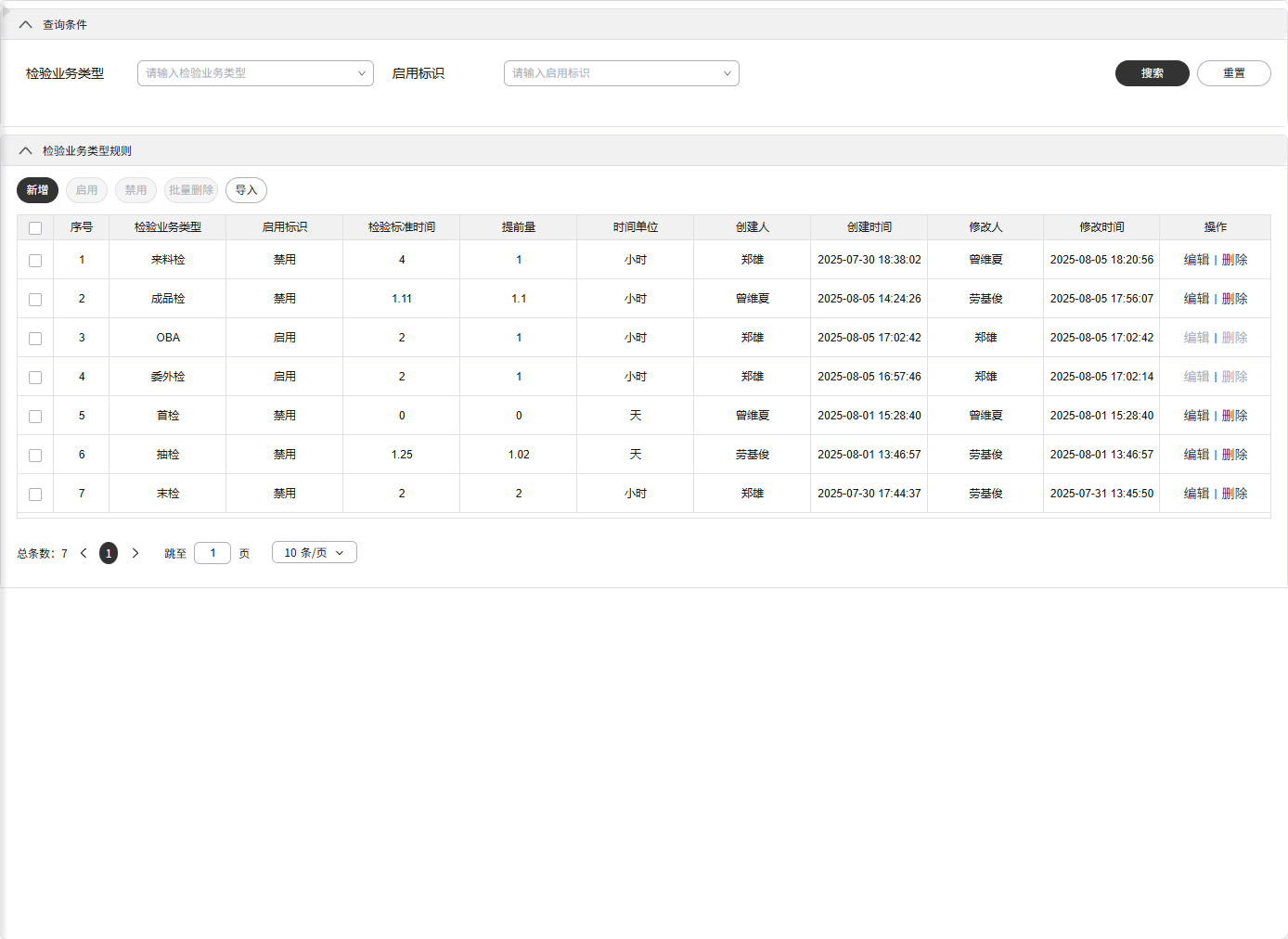
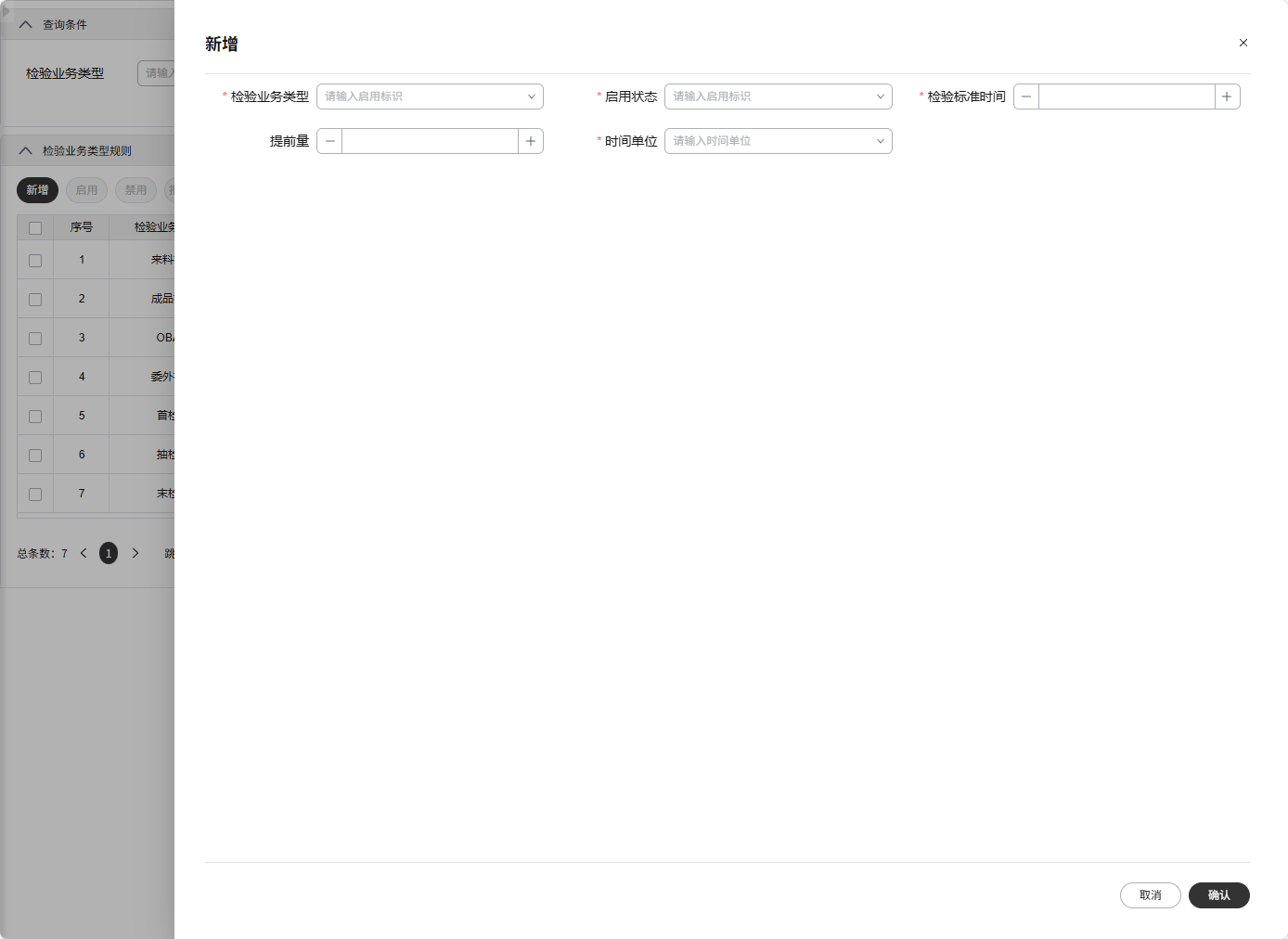
# 效果展示
需要将新的二开工程,
# 自定义扩展
介绍如何基于框架进行自定义组件的开发。 说明如何扩展框架的功能以满足特定业务需求。
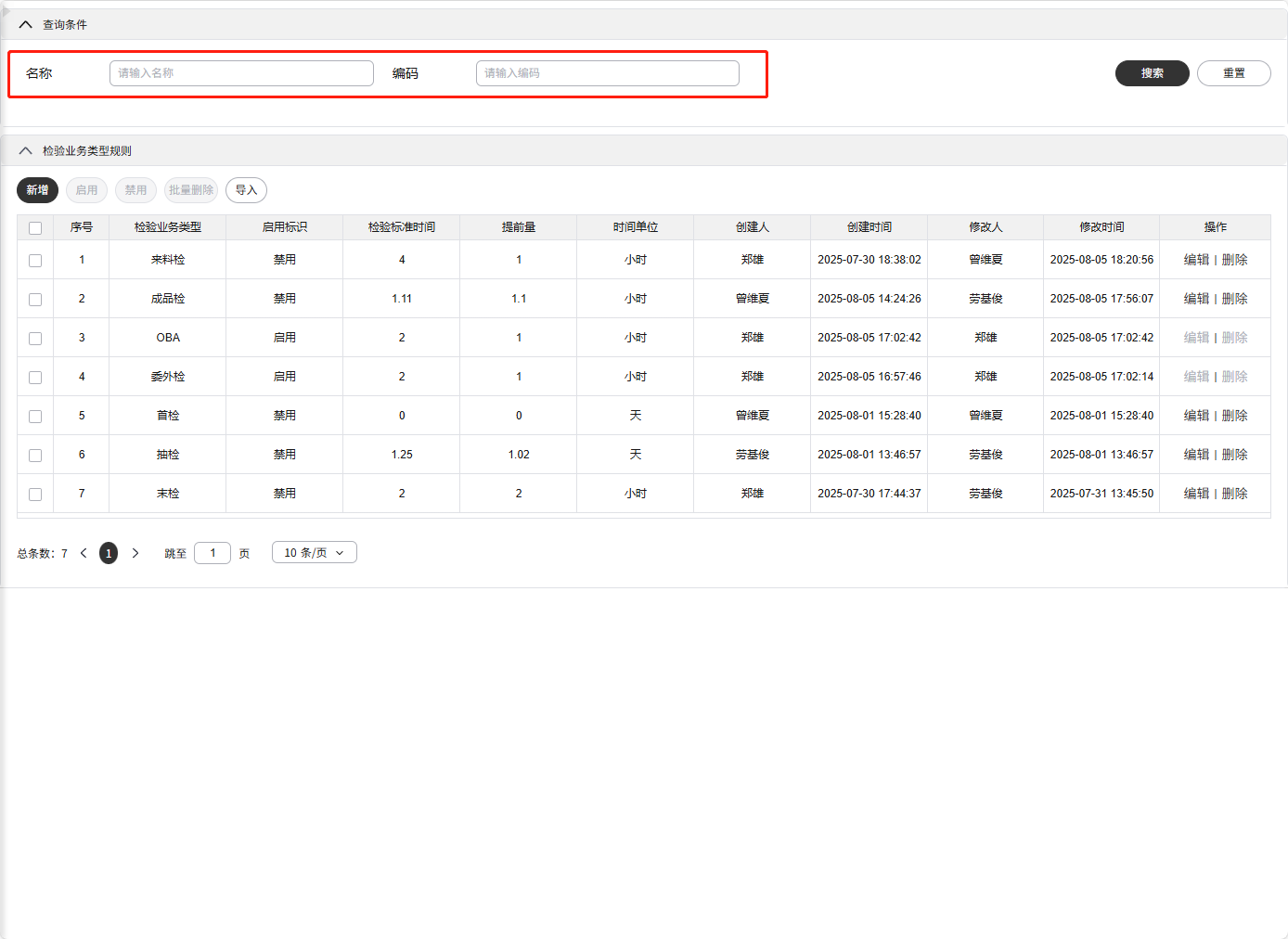
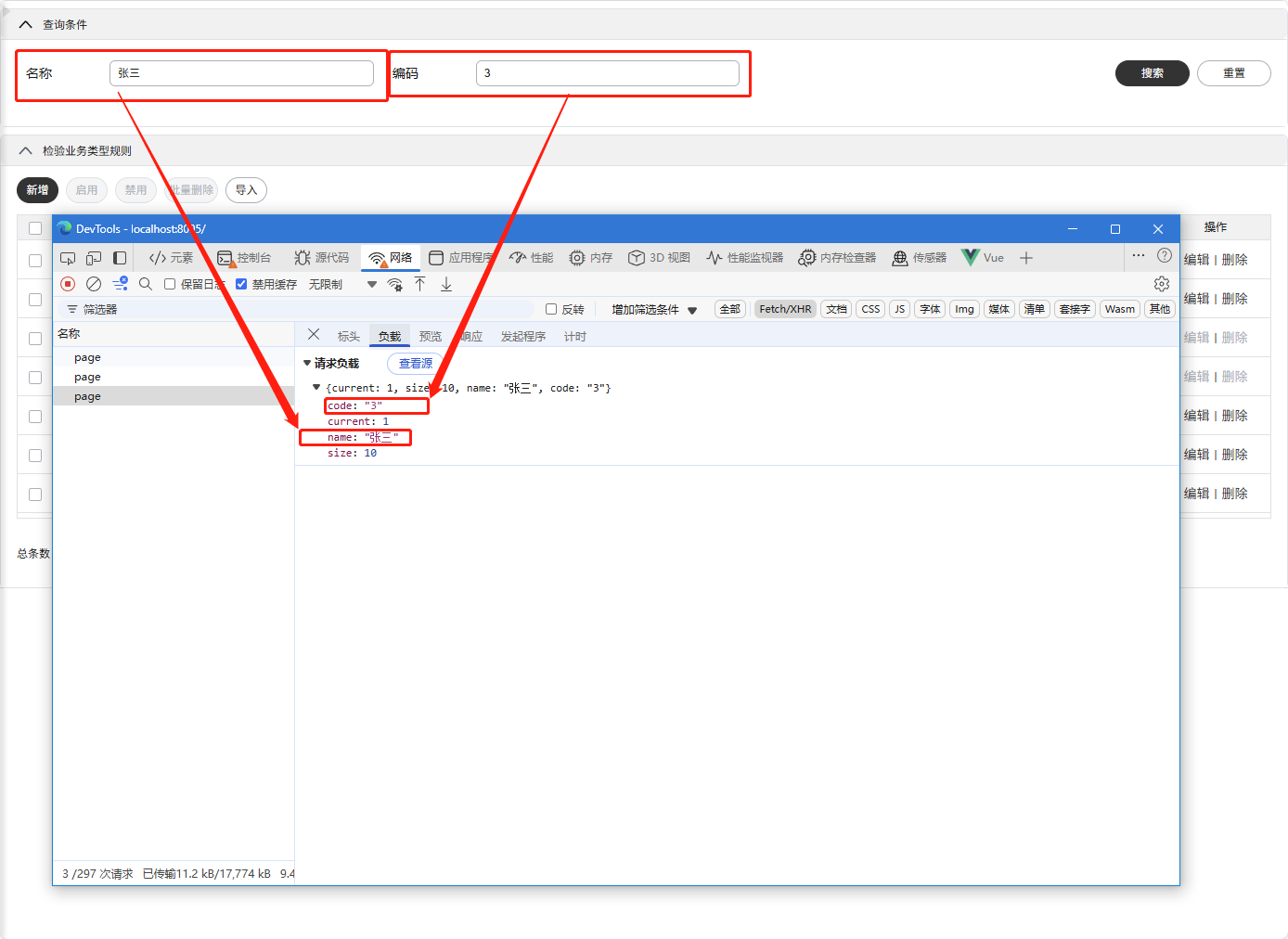
# 1. 查询表单二开(删除、添加、替换)
- 替换整个查询表单
<template>
  <div class="custom-checkrule">
    <CheckRule ref="checkRuleRef">
      <template #searchForm>
        <SieSearchForm v-bind="pageConfig.searchForm" @search="handleSearch"></SieSearchForm>
      </template>
    </CheckRule>
  </div>
</template>

<script setup>
import { ref } from "vue";
import CheckRule from "@imom-qms/processcontrol-checkrule";

defineOptions({ name: "CustomCheckrule" });

const pageConfig = {
  searchForm: {
    formItemList: [
      { label: "名称", prop: "name" },
      { label: "编码", prop: "code" }
    ]
  }
};

const checkRuleRef = ref(null);

const handleSearch = (params) => {
  checkRuleRef.value.$methods.searchForm.handleSearch(params);
};
</script>
1
2
3
4
5
6
7
8
9
10
11
12
13
14
15
16
17
18
19
20
21
22
23
24
25
26
27
28
29
30
31
2
3
4
5
6
7
8
9
10
11
12
13
14
15
16
17
18
19
20
21
22
23
24
25
26
27
28
29
30
31
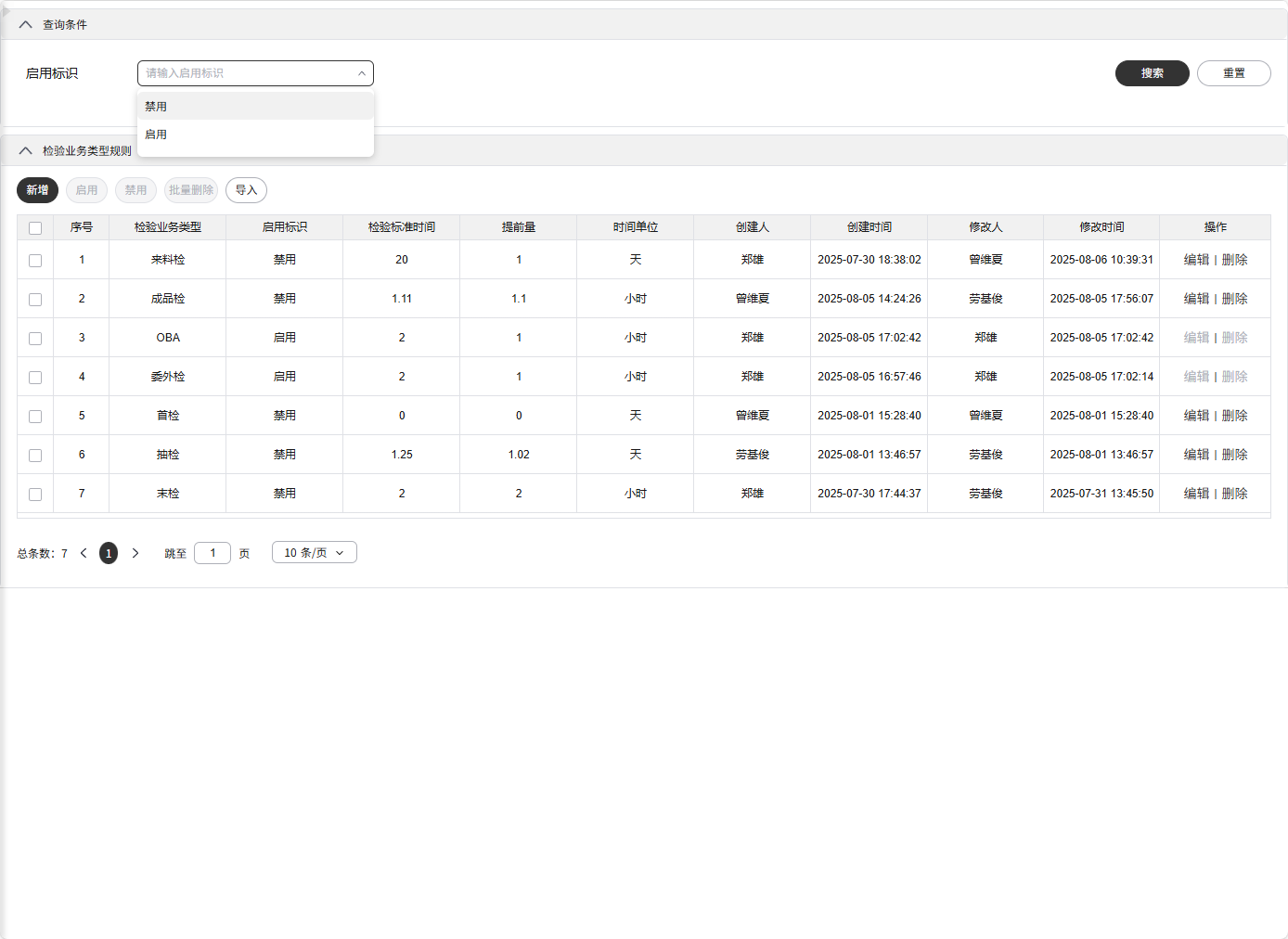
- 删除表单项
<template>
  <div class="custom-checkrule">
    <CheckRule v-bind="checkRuleOpts"></CheckRule>
  </div>
</template>

<script setup>
import CheckRule from "@imom-qms/processcontrol-checkrule";
import { setFormItemListOp } from "@imom/vue-2nd-kit";

defineOptions({ name: "CustomCheckrule" });

const checkRuleOpts = {
  customSetup({ state, config }) {
    config.searchForm.formItemList = setFormItemListOp.delete(config.searchForm.formItemList, [
      "inspectionBusinessType"
    ]);
    return { state, config };
  }
};
</script>
1
2
3
4
5
6
7
8
9
10
11
12
13
14
15
16
17
18
19
20
21
2
3
4
5
6
7
8
9
10
11
12
13
14
15
16
17
18
19
20
21
- 添加表单项
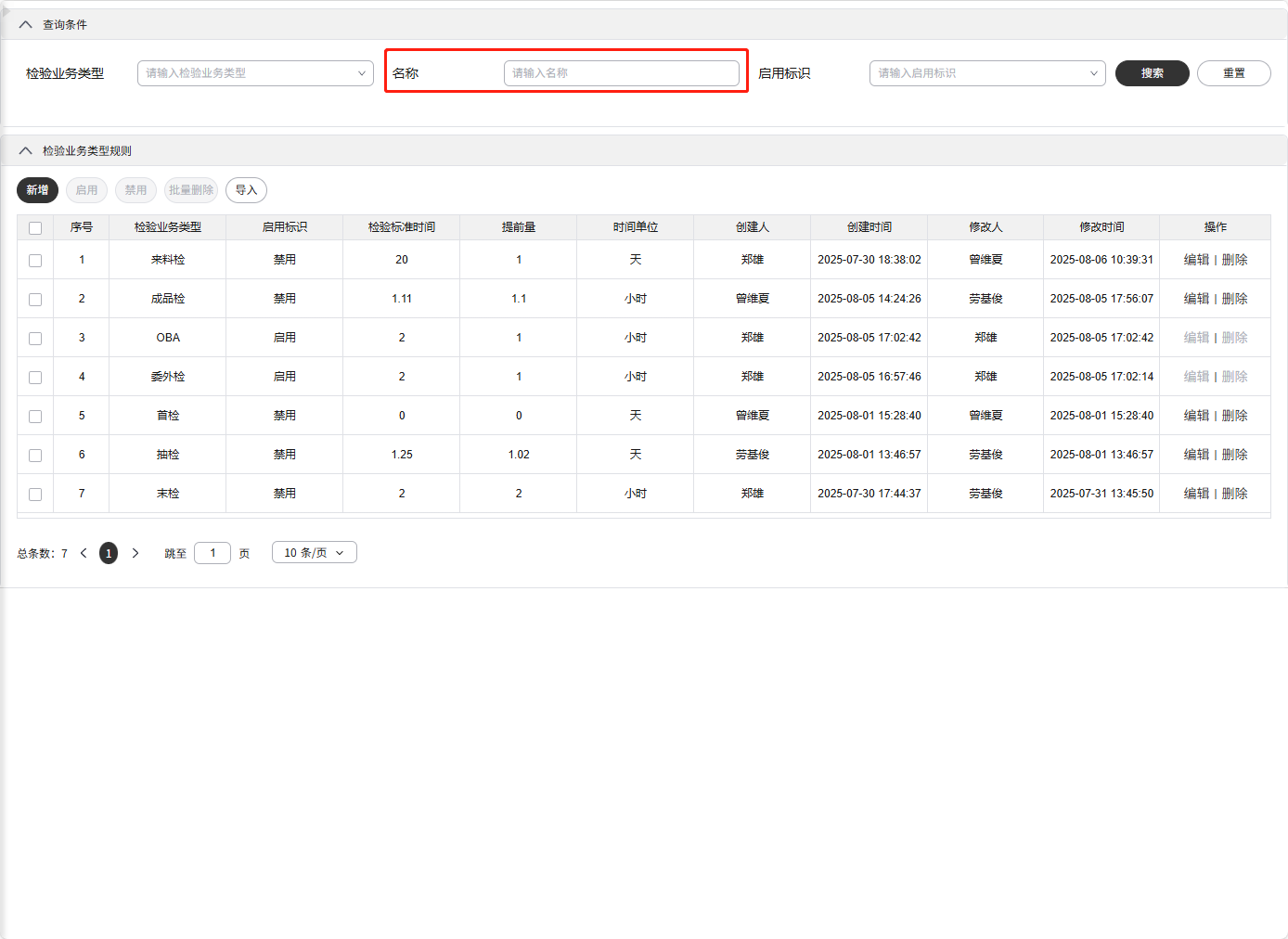
<template>
  <div class="custom-checkrule">
    <CheckRule v-bind="checkRuleOpts"></CheckRule>
  </div>
</template>

<script setup>
import CheckRule from "@imom-qms/processcontrol-checkrule";
import { setFormItemListOp } from "@imom/vue-2nd-kit";

defineOptions({ name: "CustomCheckrule" });

const checkRuleOpts = {
  customSetup({ state, config }) {
    config.searchForm.formItemList = setFormItemListOp.insert(
      config.searchForm.formItemList,
      [{ label: "名称", prop: "name" }],
      1
    );
    return { state, config };
  }
};
</script>
1
2
3
4
5
6
7
8
9
10
11
12
13
14
15
16
17
18
19
20
21
22
23
2
3
4
5
6
7
8
9
10
11
12
13
14
15
16
17
18
19
20
21
22
23
- 替换表单项
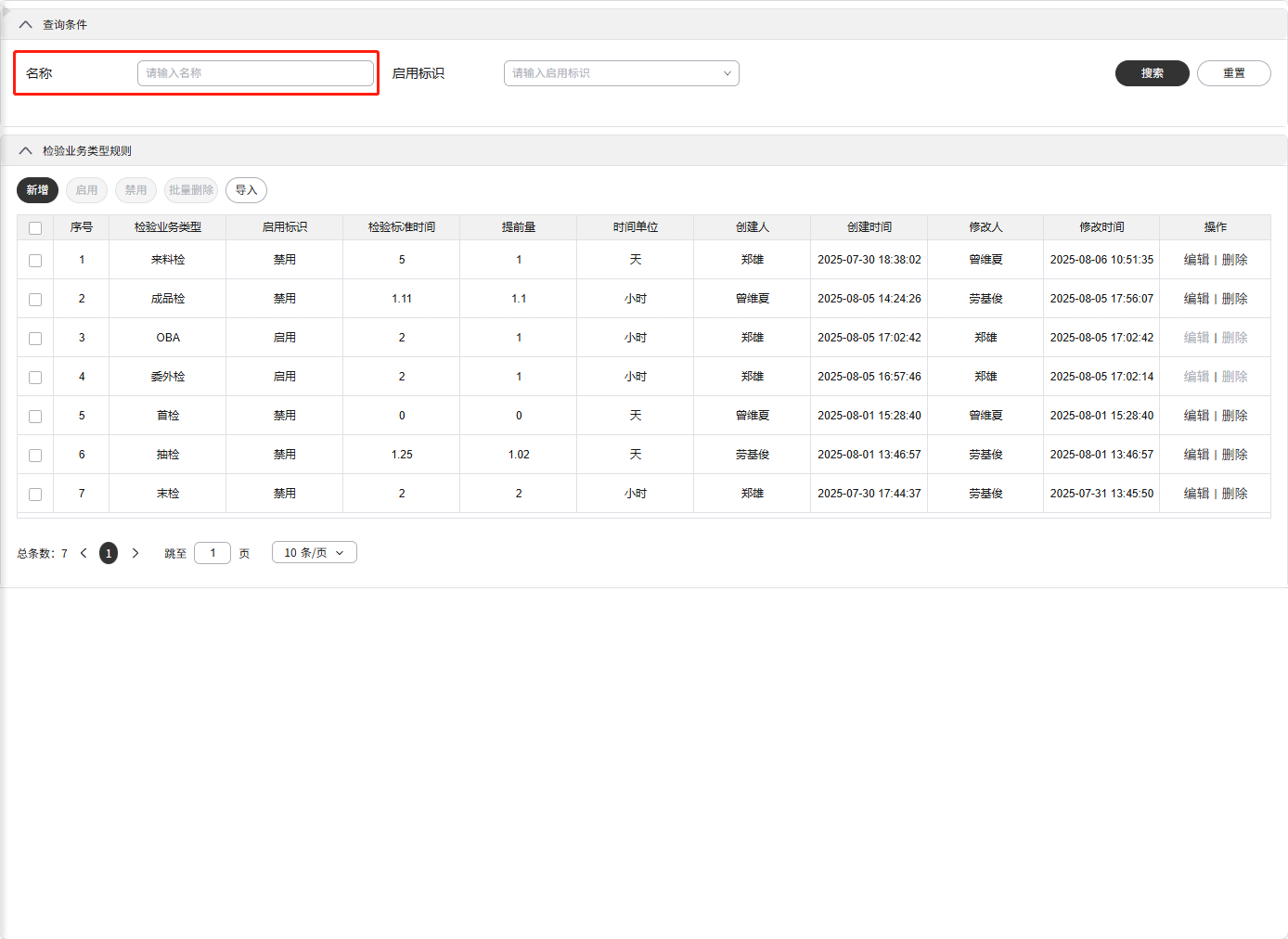
<template>
  <div class="custom-checkrule">
    <CheckRule v-bind="checkRuleOpts"></CheckRule>
  </div>
</template>

<script setup>
import CheckRule from "@imom-qms/processcontrol-checkrule";
import { setFormItemListOp } from "@imom/vue-2nd-kit";

defineOptions({ name: "CustomCheckrule" });

const checkRuleOpts = {
  customSetup({ state, config }) {
    config.searchForm.formItemList = setFormItemListOp.replace(config.searchForm.formItemList, {
      inspectionBusinessType: { label: "名称", prop: "name" }
    });
    return { state, config };
  }
};
</script>
1
2
3
4
5
6
7
8
9
10
11
12
13
14
15
16
17
18
19
20
21
2
3
4
5
6
7
8
9
10
11
12
13
14
15
16
17
18
19
20
21
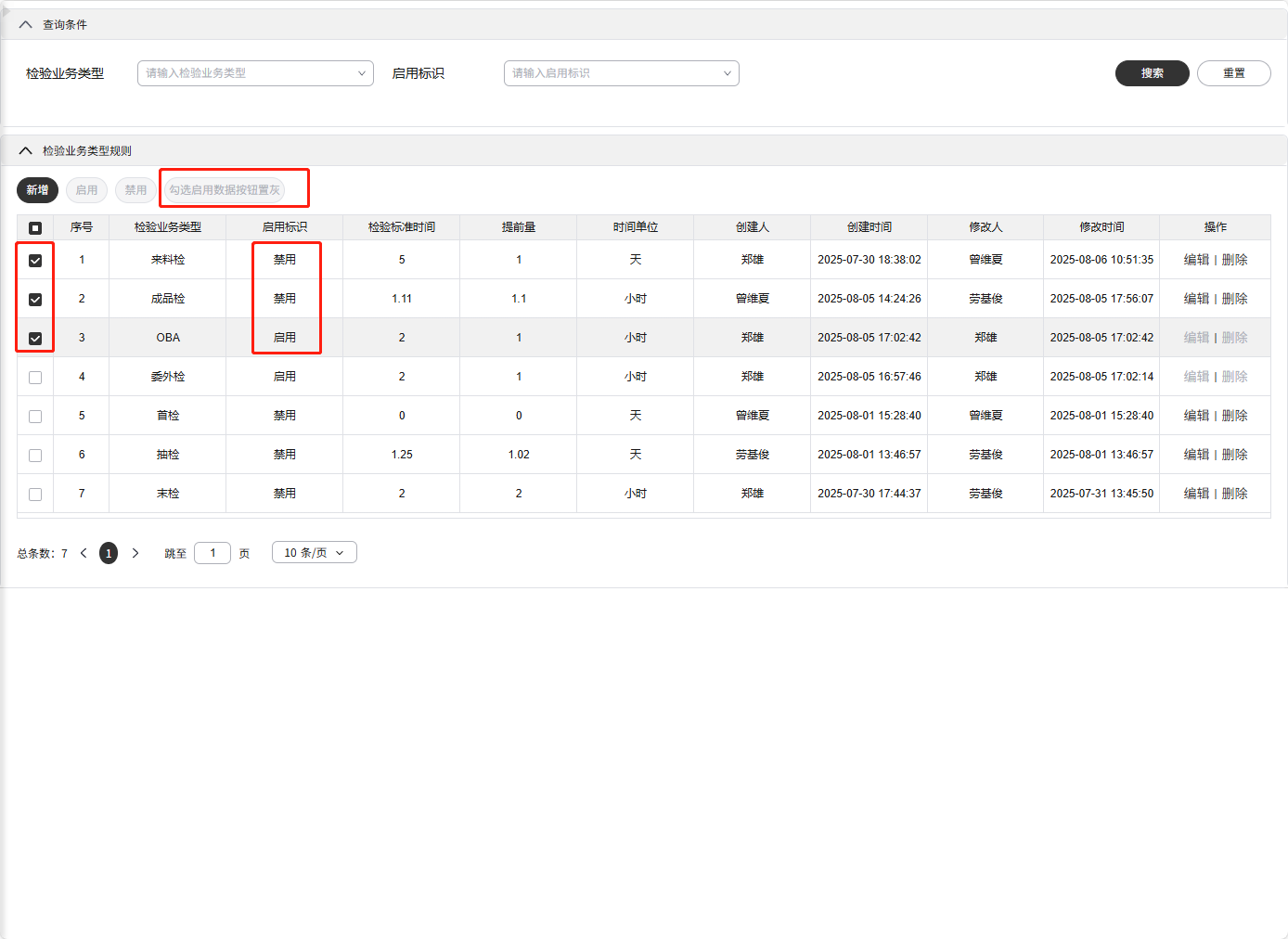
# 2. 按钮组二开
<template>
  <div class="custom-checkrule">
    <CheckRule v-bind="checkRuleOpts"></CheckRule>
  </div>
</template>

<script setup>
import CheckRule from "@imom-qms/processcontrol-checkrule";
import { setButtonListOp } from "@imom/vue-2nd-kit";

defineOptions({ name: "CustomCheckrule" });

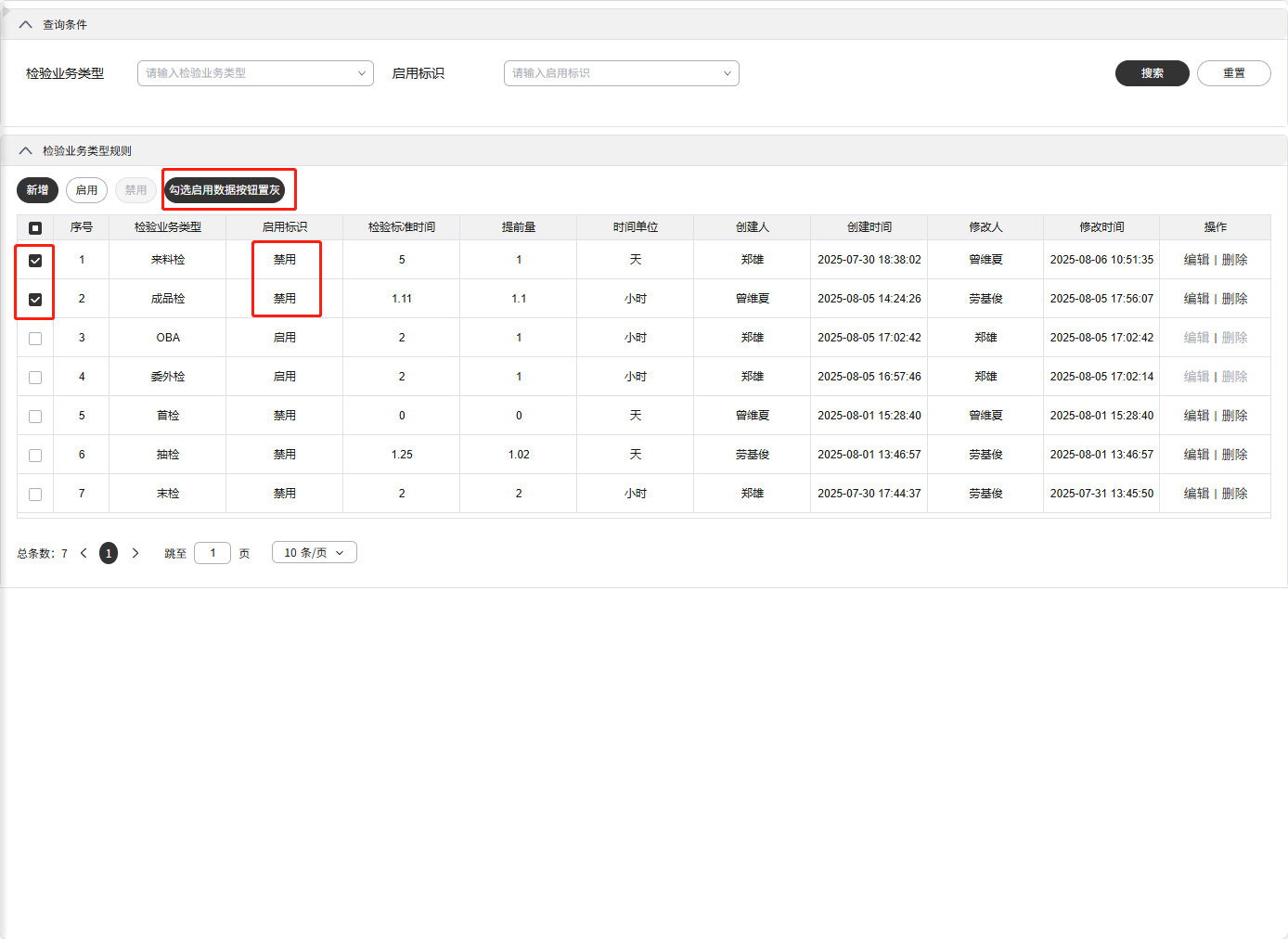
const checkRuleOpts = {
  setButtonGroupAttrs({ state, config }) {
    let customButtonList = setButtonListOp.delete(config.buttonList, ["deleteBatch", "import"]); // 删除按钮
    customButtonList = setButtonListOp.insert(customButtonList, [
      {
        text: "勾选启用数据按钮置灰",
        key: "grey",
        disabled: state.selectedData.some((item) => item.enabledStatus === "1")
      }
    ]); // 插入按钮
    config.buttonList = customButtonList;
    return config;
  }
};
</script>
1
2
3
4
5
6
7
8
9
10
11
12
13
14
15
16
17
18
19
20
21
22
23
24
25
26
27
2
3
4
5
6
7
8
9
10
11
12
13
14
15
16
17
18
19
20
21
22
23
24
25
26
27
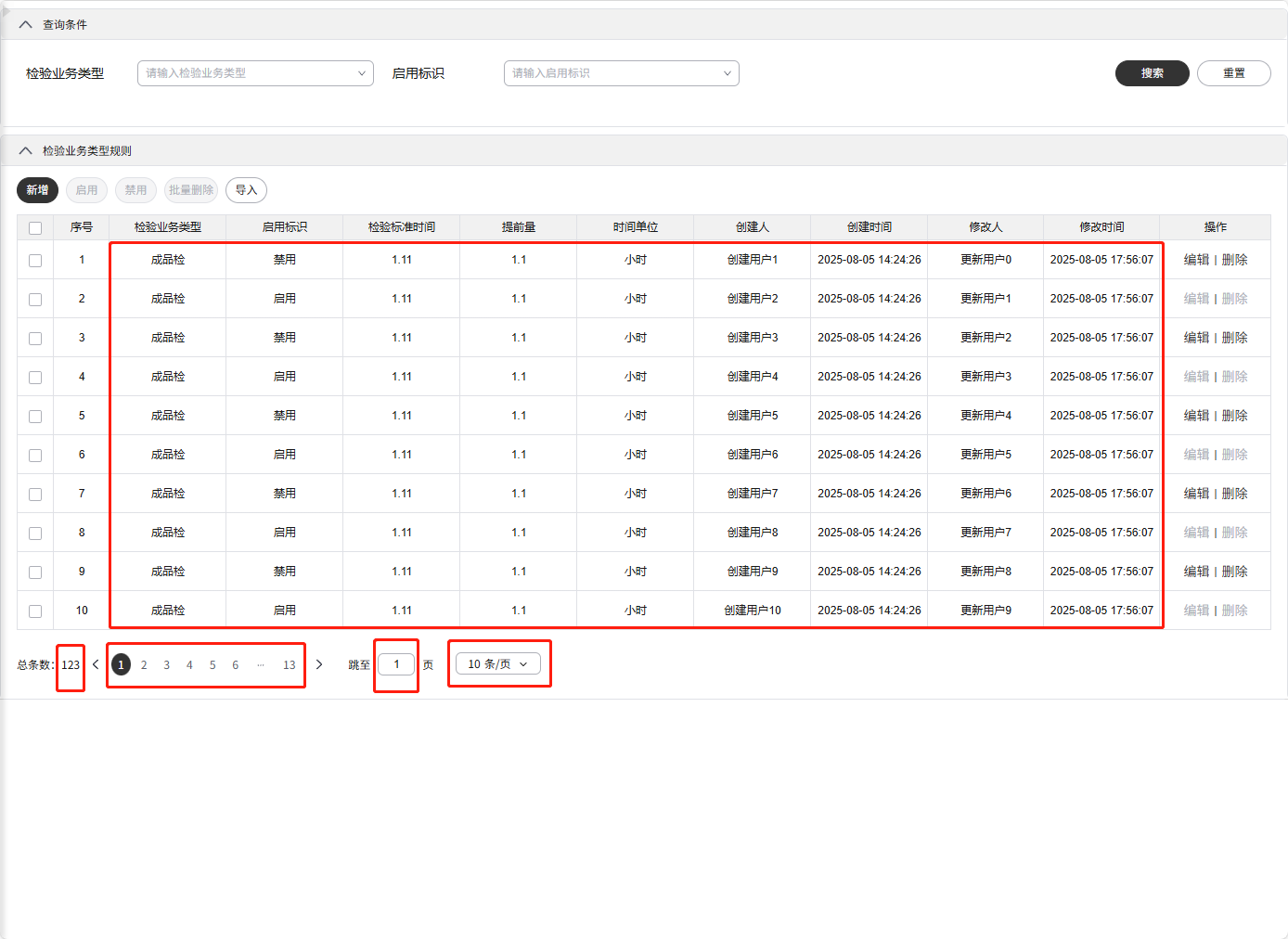
# 3. 修改(表格)查询接口
<template>
  <div class="custom-checkrule">
    <CheckRule v-bind="checkRuleOpts"></CheckRule>
  </div>
</template>

<script setup>
import CheckRule from "@imom-qms/processcontrol-checkrule";

defineOptions({ name: "CustomCheckrule" });

const api = {
  // mock的page接口
  async page(_params) {
    return {
      code: 0,
      data: {
        total: 123,
        current: 1,
        size: 10,
        pages: 13,
        records: Array.from({ length: 10 }, (_, index) => ({
          createUser: `${index}`,
          updateUser: `666243387392069`,
          createDate: `2025-08-05T06:24:26Z`,
          updateDate: `2025-08-05T09:56:07Z`,
          extAttrs: null,
          warningMethod: null,
          warningObject: null,
          inspectionBusinessType: `FQC`,
          inspectionStandardTime: 1.11,
          unit: `HOUR`,
          isWarning: `1`,
          enabledStatus: `${index % 2}`,
          delFlag: null,
          warningThreshold: 1.1,
          id: `${index + 1000}`,
          updateUserName: `更新用户${index}`,
          createUserName: `创建用户${index + 1}`
        }))
      },
      msg: ""
    };
  }
};

const checkRuleOpts = {
  customApi(type) {
    let custApi;
    switch (type) {
      case "page":
      case "table.page":
        custApi = api.page;
        break;

      default:
        break;
    }
    return custApi;
  }
};
</script>
1
2
3
4
5
6
7
8
9
10
11
12
13
14
15
16
17
18
19
20
21
22
23
24
25
26
27
28
29
30
31
32
33
34
35
36
37
38
39
40
41
42
43
44
45
46
47
48
49
50
51
52
53
54
55
56
57
58
59
60
61
62
2
3
4
5
6
7
8
9
10
11
12
13
14
15
16
17
18
19
20
21
22
23
24
25
26
27
28
29
30
31
32
33
34
35
36
37
38
39
40
41
42
43
44
45
46
47
48
49
50
51
52
53
54
55
56
57
58
59
60
61
62
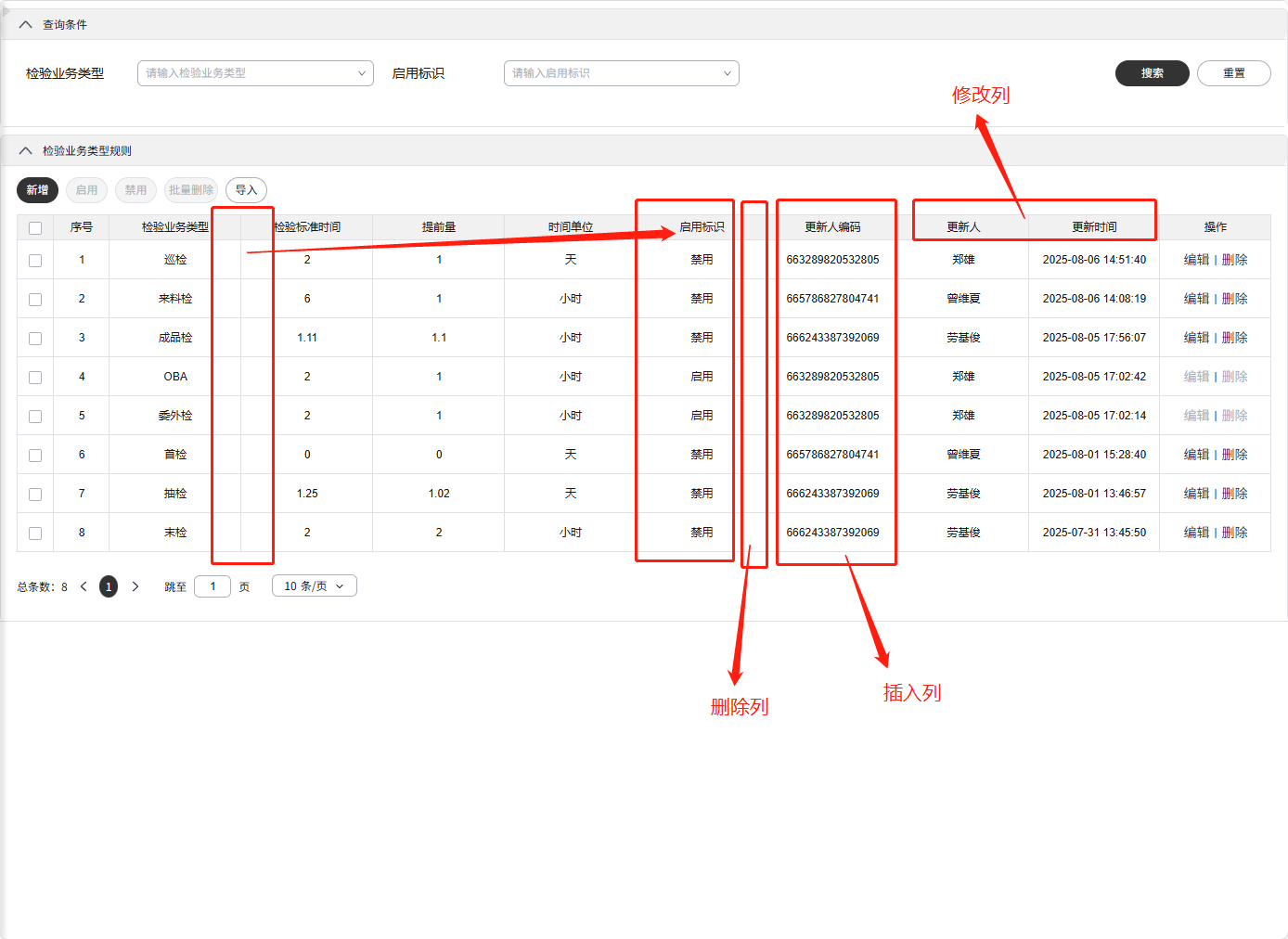
# 4. 表格列二开
<template>
  <div class="custom-checkrule">
    <CheckRule v-bind="checkRuleOpts"></CheckRule>
  </div>
</template>

<script setup>
import CheckRule from "@imom-qms/processcontrol-checkrule";
import { setColumnConfigOp } from "@imom/vue-2nd-kit";

defineOptions({ name: "CustomCheckrule" });

const checkRuleOpts = {
  customSetup({ state, config }) {
    console.log("config.table.columnConfig :>> ", config.table.columnConfig);
    let columnConfig = config.table.columnConfig;
    // 删除列:创建人、创建时间
    columnConfig = setColumnConfigOp.delete(columnConfig, ["createUserName", "createDate"]);
    // 修改列:修改人、修改时间
    columnConfig = setColumnConfigOp.update(columnConfig, [
      { field: "updateUserName", title: "更新人" },
      { field: "updateDate", title: "更新时间" }
    ]);
    // 插入列:updateUser
    columnConfig = setColumnConfigOp.insert(
      columnConfig,
      [
        {
          title: "更新人编码",
          field: "updateUser"
        }
      ],
      6
    );
    // 将启用标识列移动到时间单位后
    const enabledStatusColumn = columnConfig.find((column) => column.field === "enabledStatus");
    columnConfig = setColumnConfigOp.delete(columnConfig, ["enabledStatus"]);
    columnConfig = setColumnConfigOp.insert(columnConfig, [enabledStatusColumn], 5);

    config.table.columnConfig = columnConfig;
    return { state, config };
  }
};
</script>
1
2
3
4
5
6
7
8
9
10
11
12
13
14
15
16
17
18
19
20
21
22
23
24
25
26
27
28
29
30
31
32
33
34
35
36
37
38
39
40
41
42
43
44
2
3
4
5
6
7
8
9
10
11
12
13
14
15
16
17
18
19
20
21
22
23
24
25
26
27
28
29
30
31
32
33
34
35
36
37
38
39
40
41
42
43
44
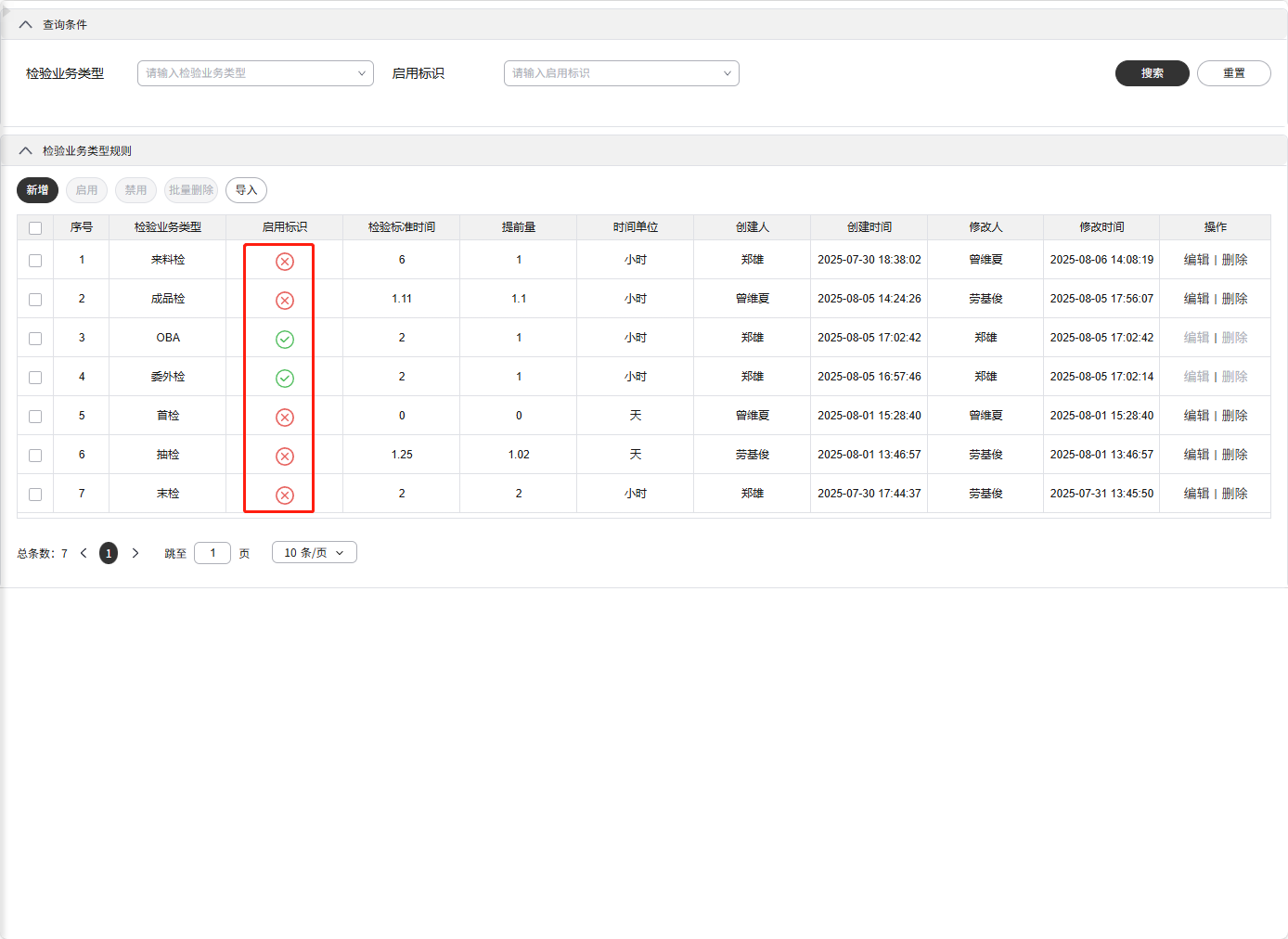
# 5. 表格列使用插槽
<template>
  <div class="custom-checkrule">
    <CheckRule>
      <template #table_enabledStatus="s">
        <div class="custom-enabledStatus">
          <template v-if="s.cellValue === '1'">
            <TinyIconSuccessful fill="#3fc05d"></TinyIconSuccessful>
          </template>
          <template v-else>
            <TinyIconOperationfaildL fill="#f05d5d"></TinyIconOperationfaildL>
          </template>
        </div>
      </template>
    </CheckRule>
  </div>
</template>

<script setup>
import CheckRule from "@imom-qms/processcontrol-checkrule";
import { IconSuccessful, IconOperationfaildL } from "@opentiny/vue-icon";

defineOptions({ name: "CustomCheckrule" });

const TinyIconSuccessful = IconSuccessful();
const TinyIconOperationfaildL = IconOperationfaildL();
</script>

<style lang="less" scoped>
.custom-checkrule {
  .custom-enabledStatus {
    font-size: 20px;
  }
}
</style>
1
2
3
4
5
6
7
8
9
10
11
12
13
14
15
16
17
18
19
20
21
22
23
24
25
26
27
28
29
30
31
32
33
34
2
3
4
5
6
7
8
9
10
11
12
13
14
15
16
17
18
19
20
21
22
23
24
25
26
27
28
29
30
31
32
33
34
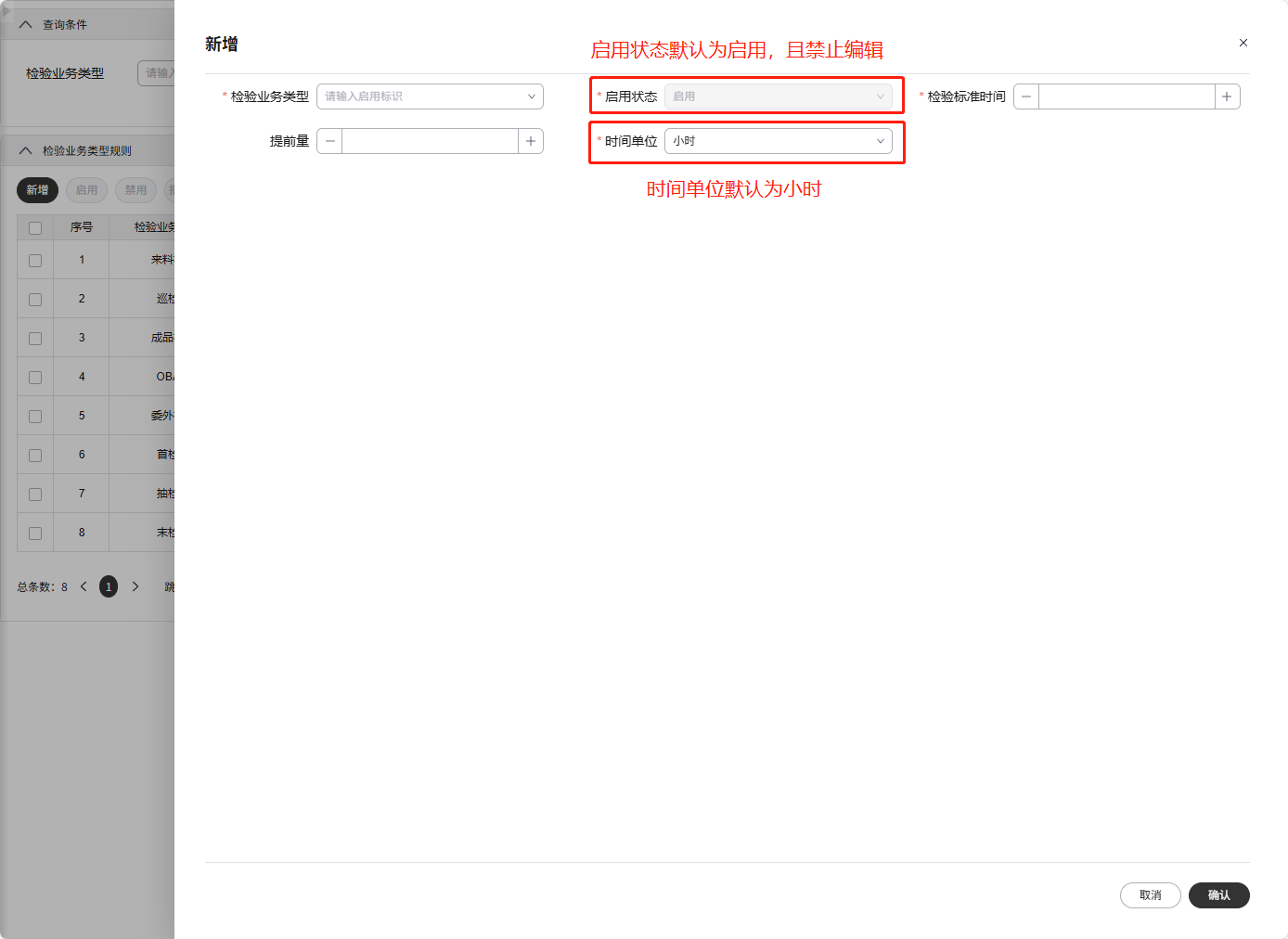
# 6. 表单项二开
<template>
  <div class="custom-checkrule">
    <CheckRule v-bind="checkRuleOpts"></CheckRule>
  </div>
</template>

<script setup>
import { $notify } from "@dme/snack-ui";
import CheckRule from "@imom-qms/processcontrol-checkrule";
import { setFormItemListOp } from "@imom/vue-2nd-kit";

defineOptions({ name: "CustomCheckrule" });

const checkRuleOpts = {
  customSetup({ state, config }) {
    let formFormItemList = setFormItemListOp.update(config.form.formItemList, [
      {
        // 启用状态默认为启用,且禁止修改
        prop: "enabledStatus",
        defaultValue: "1",
        attrs: { disabled: true }
      },
      {
        // 时间单位默认值为小时
        prop: "unit",
        defaultValue: "HOUR"
      }
    ]);
    config.form.formItemList = formFormItemList;
    return { state, config };
  },
  // 表单提交前钩子
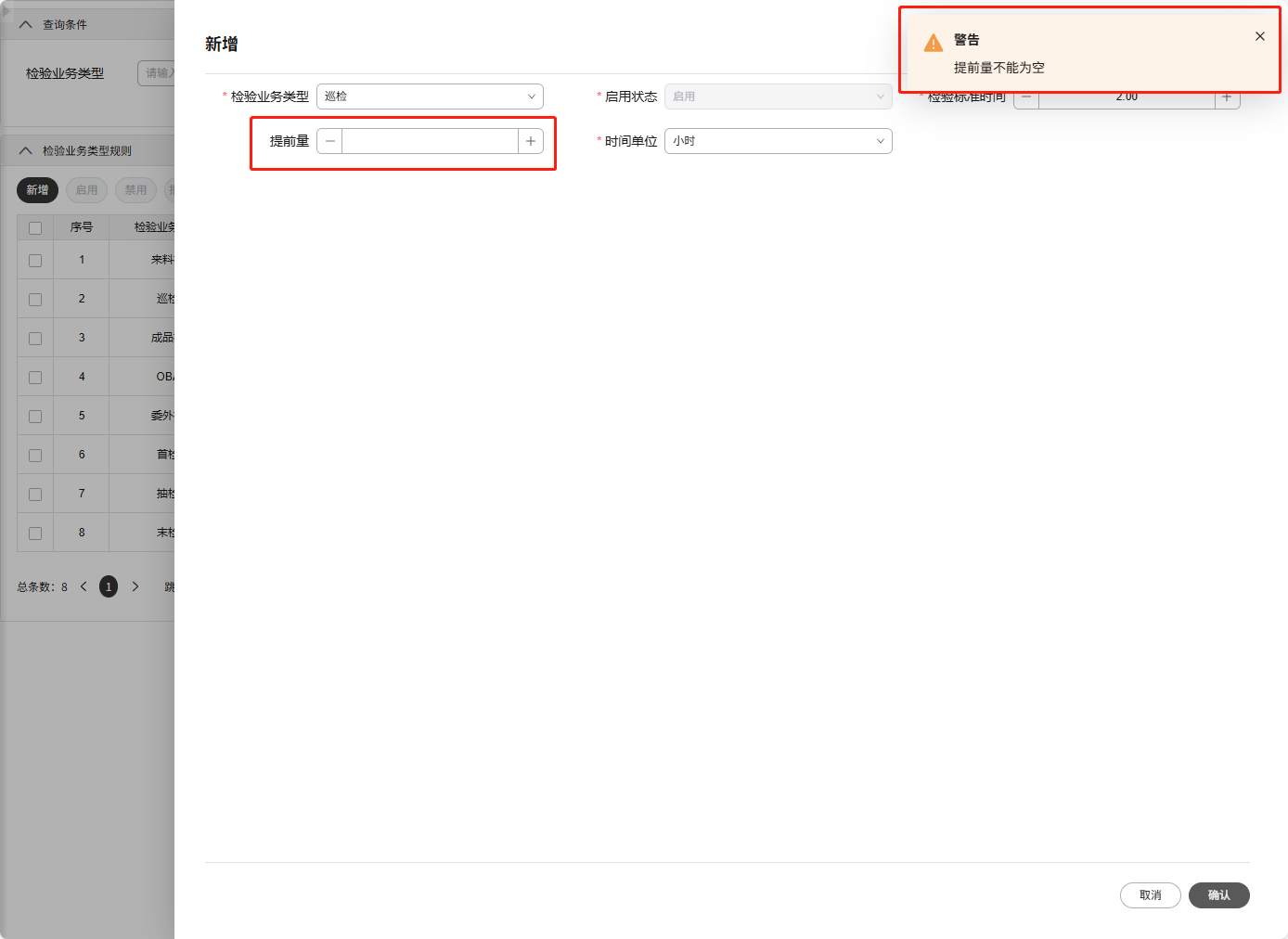
  beforeFormSubmit({ state, config }) {
    // 提前量为空时,做出提示,并阻止提交
    if (!state.formData.warningThreshold) {
      $notify.warning("提前量不能为空");
      return false;
    }

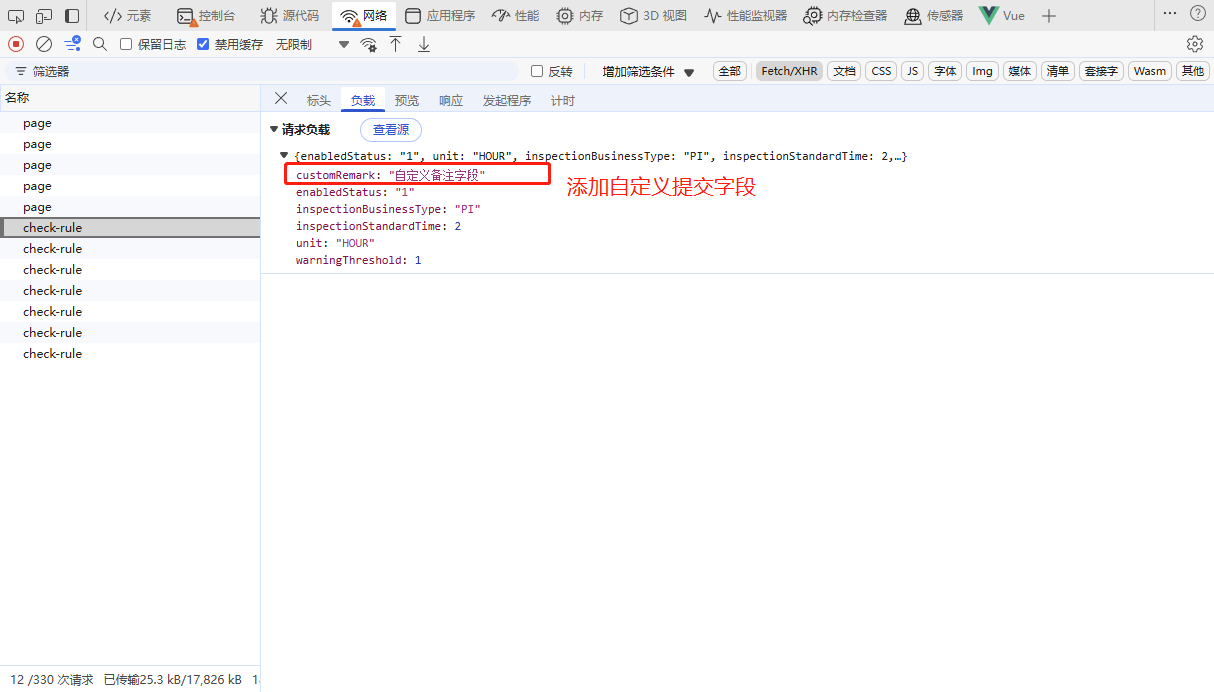
    // 添加自定义提交表单字段
    state.formData.customRemark = "自定义备注字段";
  }
};
</script>
1
2
3
4
5
6
7
8
9
10
11
12
13
14
15
16
17
18
19
20
21
22
23
24
25
26
27
28
29
30
31
32
33
34
35
36
37
38
39
40
41
42
43
44
2
3
4
5
6
7
8
9
10
11
12
13
14
15
16
17
18
19
20
21
22
23
24
25
26
27
28
29
30
31
32
33
34
35
36
37
38
39
40
41
42
43
44
在线编辑 (opens new window)